Run and benchmark vLLM mixture of experts models on Arm CPUs
Introduction
Set up vLLM for MoE inference
Understand MoE models and precision choices
Run MoE inference with vLLM
Benchmark MoE serving performance
Review benchmark results
Next Steps
Run and benchmark vLLM mixture of experts models on Arm CPUs
What vLLM is
vLLM is an open-source, high-throughput inference and serving engine for large language models (LLMs). vLLM provides an OpenAI-compatible API server and benchmarking tools for measuring online serving performance.
Understand MoE models
You’ll serve mixture of experts (MoE) models on Arm CPUs, validate responses, and measure serving throughput and latency.
MoE layers contain multiple expert networks. For each token, a router selects a subset of those experts.
The following diagram shows the high-level routing flow for an MoE layer:
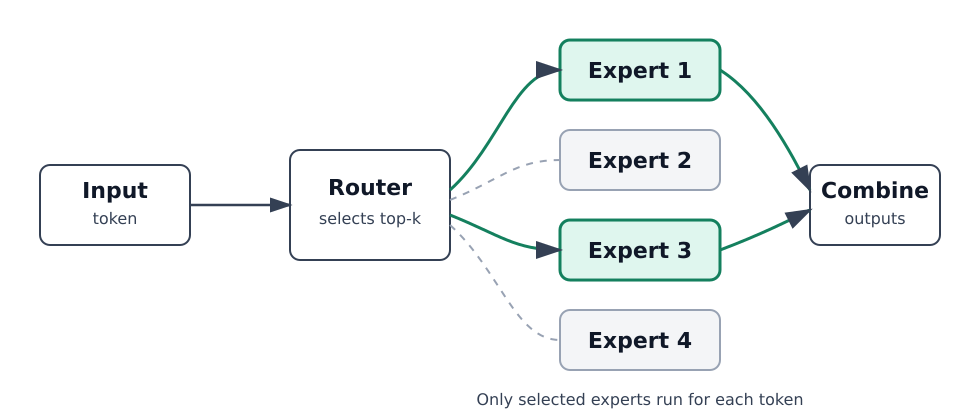
This can reduce compute compared with activating the full model. However, it also makes inference performance depend heavily on routing, batching, and optimized expert kernels.
You’ll focus on two MoE paths:
- BF16 (16-bit floating-point) MoE inference and benchmarking
- INT8/W8A8 (8-bit weights and activations) MoE inference and benchmarking
Understand the models you’ll use
You’ll run and benchmark MoE models with vLLM 0.31.0 on your Arm server. You’ll see the historical before-and-after measurements for the optimized AArch64 MoE path. The optimized path enables the CPU FusedMoE kernel on Arm CPUs and accelerates the BF16 expert GEMMs used inside MoE layers.
Gemma 4 26B-A4B is a multimodal MoE model. You’ll use its text-generation capability in BF16.
GPT-OSS 20B BF16 provides a second MoE model family for the BF16 comparison.
Qwen3-30B-A3B-Thinking-2507 provides the BF16 reference for the quantization comparison.
Red Hat AI’s W8A8 Qwen3 checkpoint provides the pre-quantized model for INT8 inference.
Set up your environment
The benchmark results in this Learning Path were collected on a 96-core Arm Neoverse-V2 system with 185 GiB RAM and a 484 GB root volume.
Allow RAM for all model weights, the key-value (KV) cache, and runtime buffers. MoE routing reduces the number of experts used per token, but all expert weights still need to be loaded. Allow disk space for the model downloads retained in the Hugging Face cache. The benchmark hardware is a reference configuration. It’s not a verified minimum.
Check CPU instruction support
On your Arm Linux server, check the architecture and CPU features before installing vLLM:
uname -m
lscpu
The architecture should be aarch64. In the Flags line from lscpu, look for bf16 and i8mm. You can also check these flags directly:
for feature in bf16 i8mm; do
  if grep -qw "$feature" /proc/cpuinfo; then
    echo "$feature: available"
  else
    echo "$feature: not exposed by this system"
  fi
done
The expected output on a system that exposes both features is:
        bf16: available
i8mm: available
The flags identify the instructions used by the optimized paths:
bf16indicates support for the Arm BF16 instructions used by the optimized BF16 MoE path, including BFMMLA.i8mmindicates support for INT8 matrix-multiply instructions, including SMMLA, used by the optimized INT8/W8A8 MoE path.
W8A8 is a quantization format, so there’s no CPU flag named w8a8. These checks confirm instruction availability. When you run the models later, you’ll verify that your vLLM build and model configuration work together.
Install dependencies
Install the following packages required for running vLLM on Arm:
sudo apt-get update -y
sudo apt install -y python3.12-venv python3.12-dev g++ curl wget
The PyTorch Inductor backend needs g++ to compile CPU code during model warmup, even when you install vLLM from a prebuilt wheel. The curl and wget tools are used for API requests and downloads.
Create and activate a Python virtual environment
Install vLLM inside an isolated environment to prevent conflicts between system and project dependencies:
python3.12 -m venv vllm_env_new
source vllm_env_new/bin/activate
python -m pip install --upgrade pip
Install vLLM for CPU
Use vLLM 0.31.0 for this Learning Path. This version was validated with Gemma 4, GPT-OSS, Qwen3 BF16, and Qwen3 W8A8 on Arm CPUs. The command installs the CPU-specific vLLM wheel used for the benchmark validation. For other versions, see the vLLM releases page .
Install a CPU-specific build of vLLM:
export VLLM_VERSION=0.31.0
python -m pip install "https://github.com/vllm-project/vllm/releases/download/v${VLLM_VERSION}/vllm-${VLLM_VERSION}%2Bcpu-cp38-abi3-manylinux_2_39_aarch64.whl" --extra-index-url https://download.pytorch.org/whl/cpu
If you want to build vLLM from source, follow the instructions in the Build and run vLLM on Arm servers Learning Path.
Verify package versions
With your virtual environment active, check the installed package versions:
python -c "from importlib.metadata import version; print('vLLM:', version('vllm'))"
python -c "from importlib.metadata import version; print('torch:', version('torch'))"
python -c "from importlib.metadata import version; print('transformers:', version('transformers'))"
The expected output for the package versions used in the public-wheel validation is:
        vLLM: 0.31.0+cpu
torch: 2.13.0+cpu
transformers: 5.17.0
Configure vLLM KV cache space
The KV cache stores attention state for tokens already processed.
In the terminal where you’ll start the server, set the cache budget used for the reported benchmarks:
export VLLM_CPU_KVCACHE_SPACE=64
The value is in GiB. This 64 GiB budget is additional to model weights and runtime memory. You can adjust this value based on available RAM, model size, context length, and expected concurrency.
What you’ve accomplished and what’s next
You’ve now set up your environment to run BF16 and INT8/W8A8 MoE inference with vLLM.
Next, you’ll review the MoE precision choices and then use vLLM to run inference.