Overview
In this section, you’ll set up a Google Axion C4A Arm virtual machine on Google Cloud Platform (GCP) using the c4a-standard-4 machine type. This instance gives you four virtual CPUs and 16 GB of memory. You’ll use the Google Cloud Console to complete each step.
For support on GCP setup, see the Learning Path Getting started with Google Cloud Platform .
Create the virtual machine
To create the virtual machine, follow these steps:
Navigate to the Google Cloud Console .
Go to Compute Engine > VM Instances and select Create Instance.
Under Machine configuration:
- Populate fields such as Instance name, Region, and Zone.
- Set Series to
C4A. - Select
c4a-standard-4for machine type.
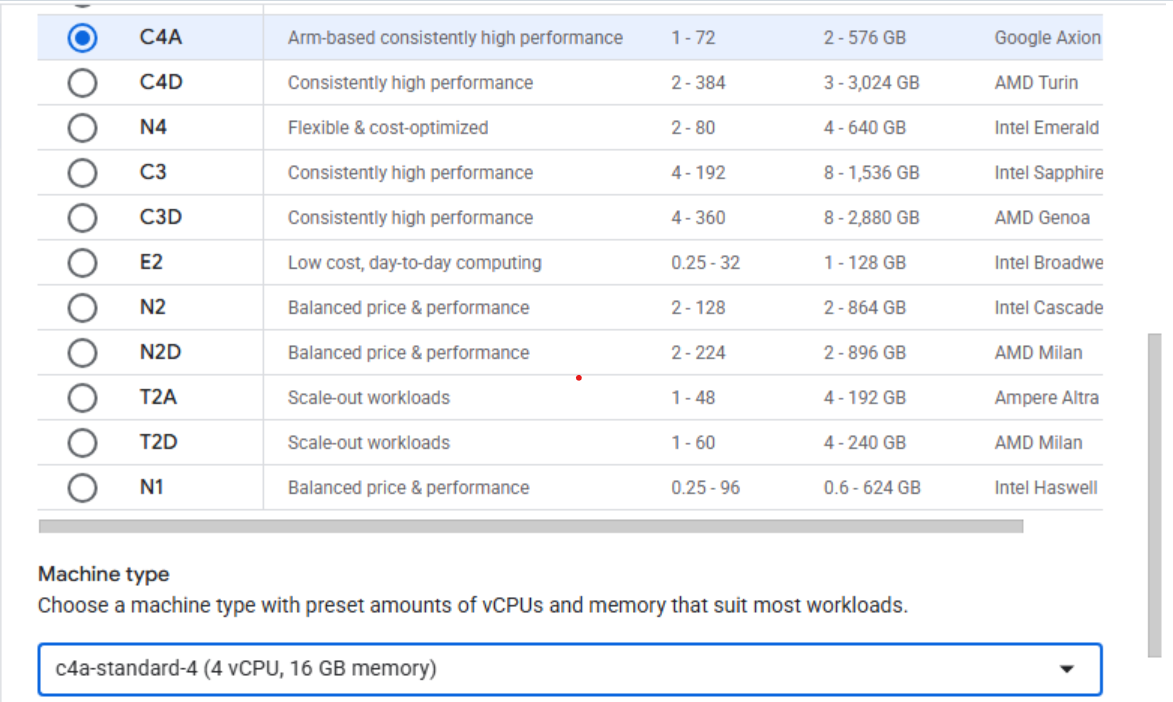 Creating a Google Axion C4A Arm virtual machine in Google Cloud Console
Under OS and Storage, select Change, then choose an Arm64-based OS image. For this Learning Path, use SUSE Linux Enterprise Server. Pick the preferred version for your operating system. Ensure you select the Arm image variant. Click Select.
Under Networking, enable Allow HTTP traffic.
Click Create to launch the instance.