Tune LLM CPU inference performance with multithreading
Introduction
Set up the environment
Understand PyTorch threading for CPU inference
Tune thread count for LLM inference
Next Steps
Tune LLM CPU inference performance with multithreading
Run inference experiments with different thread counts
Now that you understand how PyTorch threading works and have your environment configured, you’re ready to tune thread settings for actual LLM inference workloads. This section shows you how to measure inference performance across different thread counts using Google’s Gemma-3 models on Arm CPUs. You’ll run experiments with both the 270M and 1B parameter variants to understand how model size affects optimal thread configuration.
This section runs inference on Google’s
Gemma-3
model and measures how inference performance varies with thread count for both the 270 million parameter and 1 billion parameter models. The transformers_llm_text_gen.py script applies groupwise, layout-aware INT4 quantization by default.
Create a file named comparison-1b.sh with the following script:
#!/usr/bin/env bash
set -euo pipefail

# Loop over OMP_NUM_THREADS: powers of 2 plus 96
for t in 2 4 8 16 32 64 96; do
  echo "==============================="
  echo "Running with OMP_NUM_THREADS=$t"
  echo "==============================="

  TORCHINDUCTOR_CPP_WRAPPER=1 \
  TORCHINDUCTOR_FREEZING=1 \
  OMP_NUM_THREADS="$t" \
  python transformers_llm_text_gen.py --model google/gemma-3-1b-it 2>&1 | \
  grep -E \
    "^(Prefill Tokens|Prefill time|E2E Generation time|Decoded Tokens|Decode time|Prefill Tokens per second|Decode Tokens per second):"

  echo    # blank line between runs
done
Create a second script named comparison-270m.sh for the 270M model:
#!/usr/bin/env bash
set -euo pipefail

# Loop over OMP_NUM_THREADS: powers of 2 plus 96
for t in 2 4 8 16 32 64 96; do
  echo "==============================="
  echo "Running with OMP_NUM_THREADS=$t"
  echo "==============================="

  TORCHINDUCTOR_CPP_WRAPPER=1 \
  TORCHINDUCTOR_FREEZING=1 \
  OMP_NUM_THREADS="$t" \
  python transformers_llm_text_gen.py --model google/gemma-3-270m-it 2>&1 | \
  grep -E \
    "^(Prefill Tokens|Prefill time|E2E Generation time|Decoded Tokens|Decode time|Prefill Tokens per second|Decode Tokens per second):"

  echo    # blank line between runs
done
Run both scripts from the directory containing the transformers_llm_text_gen.py file. The output shows only the final statistics for clarity:
./comparison-1b.sh
./comparison-270m.sh
To observe real-time CPU utilization and thread spawning, run the following command in a separate terminal session:
watch -n 0.1 'pid=$(pgrep -n python); [ -n "$pid" ] && ps -L -p "$pid" -o pid,tid,psr,pcpu,stat,comm'
The expected output is similar to:
         PID     TID PSR %CPU STAT COMMAND
  10600   10600  31 85.3 Rl+  python
  10600   10606  32  2.4 Sl+  python
  10600   10607  33  2.4 Sl+  python
  10600   10608  34  2.4 Sl+  python
This output shows the CPU utilization of each thread, demonstrating how new threads (both inter-op and intra-op) are created and used over time.
Results
The output summarizes the statistics for each run as the script sweeps through different thread counts:
===============================
Running with OMP_NUM_THREADS=2
===============================
Prefill Tokens: 55
Prefill time: 0.07 seconds
E2E Generation time: 1.50 seconds
Decoded Tokens: 65
Decode time: 1.44 seconds
Prefill Tokens per second: 834.48
Decode Tokens per second: 45.23

...
The graph below shows how prefill tokens per second change with the number of OpenMP threads for the 270M and 1B variants of Gemma-3:
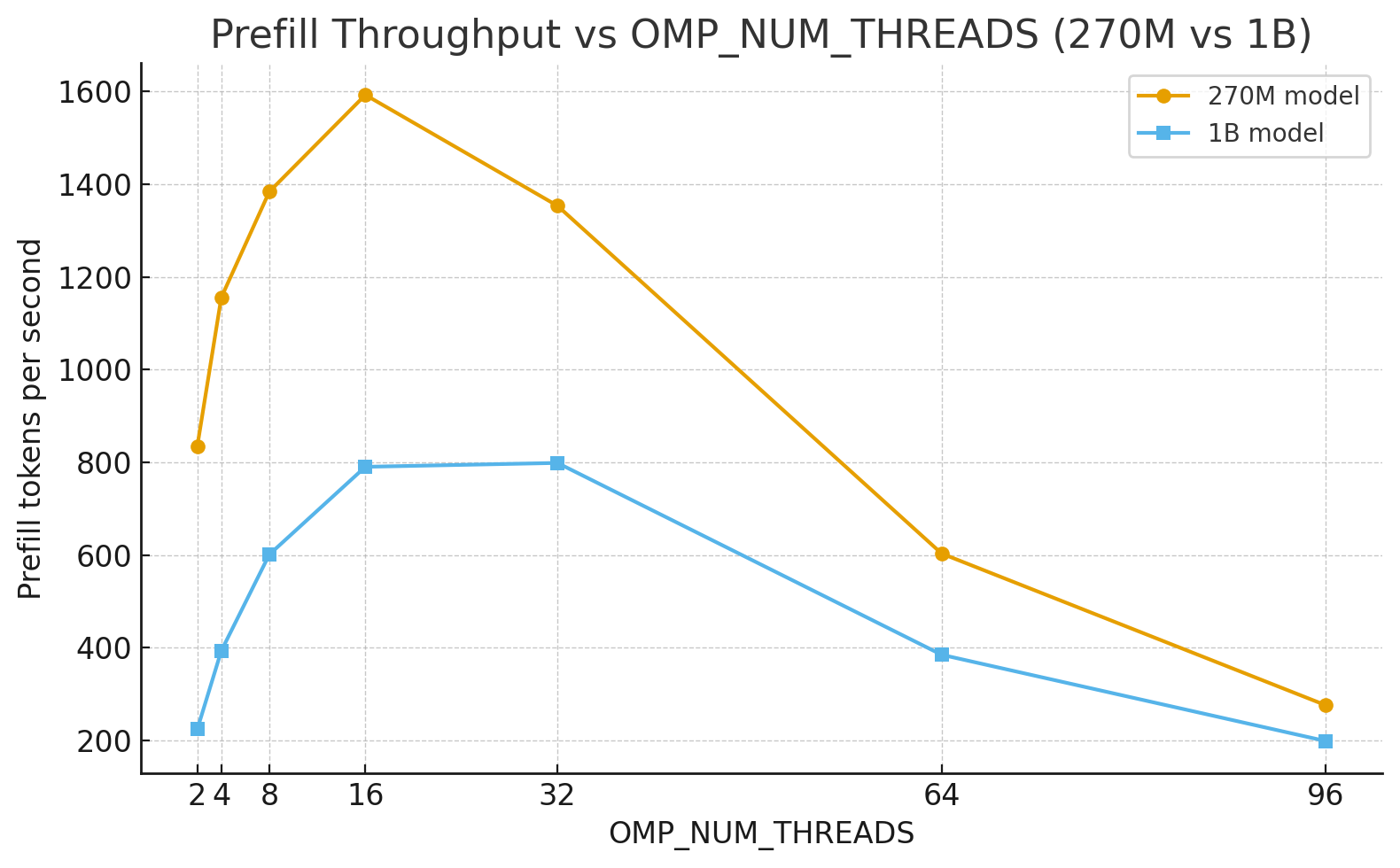 Prefill throughput versus thread count for Gemma-3 models
As expected, the smaller 270M model runs faster. Both models reach their optimal token generation rate at around 16 to 32 threads, though the 270M model exhibits a sharper performance drop-off beyond this range compared with the 1B variant.
Use PyTorch compilation mode
The examples so far have used PyTorch’s eager execution mode. PyTorch’s compile mode can provide additional performance improvements.
Before testing compile mode, install a C++ compiler and dependencies:
sudo apt update && sudo apt install g++ python3.10-dev build-essential -y
Run the gemma-3-270m model with the --compile flag using the default number of OpenMP threads:
TORCHINDUCTOR_CPP_WRAPPER=1 TORCHINDUCTOR_FREEZING=1 python transformers_llm_text_gen.py --compile --model google/gemma-3-270m-it
The output is similar to:
        E2E Generation time: 6.15 seconds
Decoded Tokens: 65
Decode time: 5.74 seconds
Prefill Tokens per second: 133.52
Decode Tokens per second: 11.33
Run the same command with OMP_NUM_THREADS set to 16:
TORCHINDUCTOR_CPP_WRAPPER=1 TORCHINDUCTOR_FREEZING=1 OMP_NUM_THREADS=16 python transformers_llm_text_gen.py --compile --model google/gemma-3-270m-it
The output is similar to:
        E2E Generation time: 0.63 seconds
Decoded Tokens: 65
Decode time: 0.61 seconds
Prefill Tokens per second: 2728.34
Decode Tokens per second: 107.37
Reducing the thread count from 96 (default) to 16 provides a significant reduction in end-to-end generation time.
What you’ve accomplished and what’s next
You’ve explored how the number of OpenMP threads impacts LLM inference performance on Arm CPUs and learned that:
- Default thread settings on many-core systems don’t always provide optimal performance
- Smaller models typically benefit from fewer threads because of lower synchronization overhead
- The optimal thread count depends on both model size and system architecture
- PyTorch’s compile mode provides additional performance improvements when combined with thread tuning
For your specific workloads, experiment with different thread counts to find the optimal setting. Start with powers of 2 (8, 16, 32) and measure the actual throughput and latency for your use case. The performance characteristics you observed in this Learning Path apply to other LLM inference workloads on Arm CPUs.