Tune LLM CPU inference performance with multithreading
Introduction
Set up the environment
Understand PyTorch threading for CPU inference
Tune thread count for LLM inference
Next Steps
Tune LLM CPU inference performance with multithreading
Understanding threading trade-offs in CPU inference
A well-known challenge in parallel programming is choosing the right number of threads for a given amount of work. When multiple threads are created to perform a task, the actual computation must be large enough to justify the overhead of coordinating those threads.
If a computation is split across many threads, the costs of creating the threads and synchronizing their results through shared memory can easily outweigh any performance gains from parallel execution. The same principle applies to generative AI workloads running on CPU.
When work is distributed across multiple threads, communication and synchronization overhead increases the total amount of work the system must perform. This creates a trade-off between latency (the time to process a single request) and throughput (the number of requests processed per unit time).
PyTorch attempts to automatically choose an appropriate number of threads. However, as you will learn, in some cases you can manually tune this configuration to improve performance.
Multithreading with PyTorch on CPU
When running inference, PyTorch uses an Application Thread Pool. PyTorch supports two types of parallelism: inter-op parallelism spawns threads to run separate operations in a graph in parallel (for example, one thread for a matrix multiplication and another thread for a softmax), while intra-op parallelism spawns multiple threads to work on the same operation.
The diagram below shows PyTorch’s threading model from the PyTorch documentation .
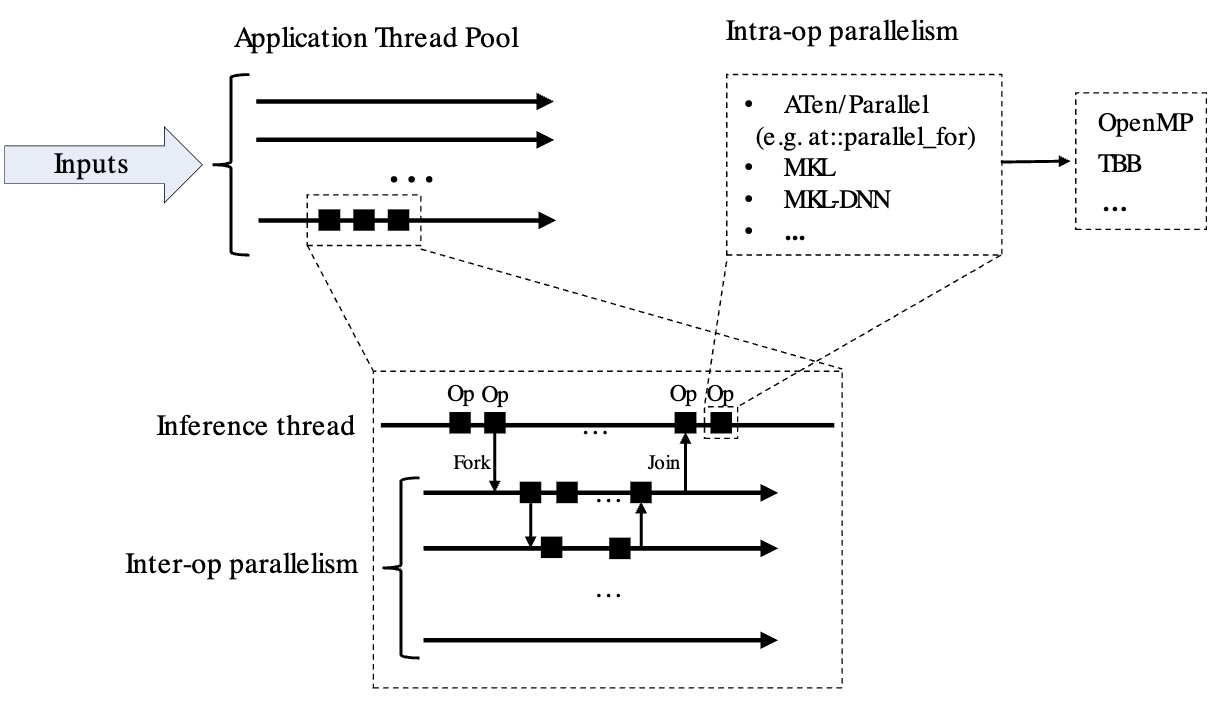 PyTorch threading model
The torch.set_num_threads()
API
sets the maximum number of threads to spawn in the Application Thread Pool.
As of PyTorch 2.8.0, the default number of threads equals the number of CPU cores (see the PyTorch CPU Threading Documentation for more detail). PyTorch determines the ideal number of threads based on the workload size, as shown in this code snippet from ParallelOpenMP.h :
int64_t num_threads = omp_get_num_threads();
    if (grain_size > 0) {
      num_threads = std::min(num_threads, divup((end - begin), grain_size));
    }

...
inline int64_t divup(int64_t x, int64_t y) {
  return (x + y - 1) / y;
}
In PyTorch builds that use OpenMP, the maximum size of the application’s thread pool can be configured at runtime using the OMP_NUM_THREADS environment variable. The actual number of threads used scales up to this limit depending on the workload and the grain_size.
The example below demonstrates that the default settings on many-core systems might not provide optimal performance for all workloads.
Basic PyTorch example
Create a new file named pytorch_omp_example.py with the following Python script. The script performs a matrix multiplication in eager mode on two 256×256 random matrices, showing the default performance of PyTorch’s parallelism and printing the parallel configuration:
import os
import time
import torch


def main():
    print(f"PyTorch version: {torch.__version__}")

    # Read OMP_NUM_THREADS from the environment
    omp_threads = os.environ.get("OMP_NUM_THREADS")
    print(f"OMP_NUM_THREADS in environment: {omp_threads}")

    # If it's set and looks like a number, use it to set PyTorch's intra-op threads
    if omp_threads and omp_threads.isdigit():
        torch.set_num_threads(int(omp_threads))

    # Show how many threads PyTorch will actually use for intra-op parallelism
    print(f"torch.get_num_threads(): {torch.get_num_threads()}\n")

    # A simple operation to illustrate parallelism:
    size = 256
    a = torch.randn(size, size)
    b = torch.randn(size, size)

    start = time.time()
    c = a @ b  # matrix multiplication (runs in a parallel region on CPU)
    end = time.time()

    print(f"Result shape: {c.shape}")
    print(f"Matrix multiply time: {end - start:.5f} seconds")
    print(f"\nThreading Information = {torch.__config__.parallel_info()}")

if __name__ == "__main__":
    main()
Run the Python script:
python pytorch_omp_example.py
The output is similar to:
        PyTorch version: 2.10.0.dev20251124
OMP_NUM_THREADS in environment: None
torch.get_num_threads(): 96

Result shape: torch.Size([256, 256])
Matrix multiply time: 0.00224 seconds

Threading Information = ATen/Parallel:
        at::get_num_threads() : 96
        at::get_num_interop_threads() : 96
OpenMP 201511 (a.k.a. OpenMP 4.5)
        omp_get_max_threads() : 96
Intel(R) MKL-DNN v3.11.0 (Git Hash 0b8a866c009b03f322e6526d7c33cfec84a4a97a)
std::thread::hardware_concurrency() : 96
Environment variables:
        OMP_NUM_THREADS : [not set]
ATen parallel backend: OpenMP
PyTorch uses all 96 cores, and the execution time is 2.24 ms.
Now reduce the number of OpenMP threads using the OMP_NUM_THREADS environment variable:
OMP_NUM_THREADS=16 python pytorch_omp_example.py
The output shows a different Matrix multiply time of of 0.64 ms.
        PyTorch version: 2.10.0.dev20251124
OMP_NUM_THREADS in environment: 16
torch.get_num_threads(): 16

Result shape: torch.Size([256, 256])
Matrix multiply time: 0.00064 seconds

Threading Information = ATen/Parallel:
        at::get_num_threads() : 16
        at::get_num_interop_threads() : 96
OpenMP 201511 (a.k.a. OpenMP 4.5)
        omp_get_max_threads() : 16
Intel(R) MKL-DNN v3.11.0 (Git Hash 0b8a866c009b03f322e6526d7c33cfec84a4a97a)
std::thread::hardware_concurrency() : 96
Environment variables:
        OMP_NUM_THREADS : 16
ATen parallel backend: OpenMP
The execution time varies with the number of threads and the processor type in your system.
What you’ve accomplished and what’s next
You’ve learned how PyTorch manages threads for CPU inference and seen how thread count affects performance in a simple example. The optimal thread count depends on both the workload size and system architecture.
Next, you’ll apply these concepts to a more realistic workload by tuning thread settings for large language model inference.