Deploy a mixed-placement AI shopping assistant on Google Kubernetes Engine with Axion-based compute
Introduction
Understand mixed placement for a storefront AI assistant
Set up the source tree and cluster access
Deploy and validate the storefront baseline on the Google N4A node pool
Review the shopping assistant implementation
Build and push the assistant image to Artifact Registry
Deploy the assistant on the Google N4A node pool
Observe and benchmark the assistant on the Google N4A node pool
Move the assistant to the Google C4A node pool and compare results
Next Steps
Deploy a mixed-placement AI shopping assistant on Google Kubernetes Engine with Axion-based compute
Introduction
Understand mixed placement for a storefront AI assistant
Set up the source tree and cluster access
Deploy and validate the storefront baseline on the Google N4A node pool
Review the shopping assistant implementation
Build and push the assistant image to Artifact Registry
Deploy the assistant on the Google N4A node pool
Observe and benchmark the assistant on the Google N4A node pool
Move the assistant to the Google C4A node pool and compare results
Next Steps
Check the starting architecture
Before you add the assistant tier, create and confirm the starting state of the application:
- The cluster contains N4A and C4A node pools.
- The storefront baseline runs on N4A after you apply the baseline overlay.
shoppingassistantserviceisn’t running yet.
If you’re running these steps in a cluster that already has the assistant from an earlier run, remove the old assistant resources before you create the baseline:
kubectl delete deployment shoppingassistantservice --ignore-not-found
kubectl delete service shoppingassistantservice --ignore-not-found
kubectl delete serviceaccount shoppingassistantservice --ignore-not-found
Deploy the storefront baseline
Create a Kustomize overlay that runs the baseline storefront on the N4A node pool:
mkdir -p kustomize/overlays/storefront-n4a

cat <<EOF > kustomize/overlays/storefront-n4a/kustomization.yaml
apiVersion: kustomize.config.k8s.io/v1beta1
kind: Kustomization
resources:
- ../../base
patches:
- path: node-selector.yaml
  target:
    kind: Deployment
EOF

cat <<EOF > kustomize/overlays/storefront-n4a/node-selector.yaml
- op: add
  path: /spec/template/spec/nodeSelector
  value:
    cloud.google.com/gke-nodepool: ${N4A_NODE_POOL_NAME}
- op: add
  path: /spec/template/spec/tolerations
  value:
  - key: kubernetes.io/arch
    operator: Equal
    value: arm64
    effect: NoSchedule
EOF
Render the overlay and confirm that the N4A node pool value is present:
sed -n '1,120p' kustomize/overlays/storefront-n4a/kustomization.yaml
sed -n '1,120p' kustomize/overlays/storefront-n4a/node-selector.yaml
kubectl kustomize kustomize/overlays/storefront-n4a | sed -n '1,240p'
Don’t apply the overlay if the rendered node-pool value is blank.
Apply the baseline and wait for the storefront deployments:
kubectl apply -k kustomize/overlays/storefront-n4a
kubectl rollout status deployment/frontend --timeout=600s
kubectl rollout status deployment/cartservice --timeout=600s
kubectl rollout status deployment/checkoutservice --timeout=600s
kubectl rollout status deployment/productcatalogservice --timeout=600s
kubectl rollout status deployment/recommendationservice --timeout=600s
kubectl rollout status deployment/shippingservice --timeout=600s
kubectl rollout status deployment/paymentservice --timeout=600s
kubectl rollout status deployment/currencyservice --timeout=600s
kubectl rollout status deployment/emailservice --timeout=600s
kubectl rollout status deployment/adservice --timeout=600s
List the cluster nodes
Show the node pool, instance type, and CPU architecture for each node:
kubectl get nodes \
  -L cloud.google.com/gke-nodepool,node.kubernetes.io/instance-type,kubernetes.io/arch
The output includes the N4A node pool, the C4A node pool, and arm64 nodes in both pools.
List the running application pods
Check the running storefront pods:
kubectl get pods -o wide
Filter the output to the most relevant services:
kubectl get pods -o wide | \
  grep -E 'frontend|cartservice|checkoutservice|productcatalogservice|shoppingassistantservice'
At this point, frontend, cartservice, checkoutservice, and productcatalogservice should be running. shoppingassistantservice shouldn’t appear yet.
Resolve the storefront endpoint
Capture the external storefront URL:
export FRONTEND_IP="$(kubectl get service frontend-external \
  -o jsonpath='{.status.loadBalancer.ingress[0].ip}')"
export APP_URL="http://${FRONTEND_IP}"

echo "${APP_URL}"
The output is similar to:
http://34.x.x.x
If the external IP is empty, wait a minute and run the commands again.
Verify that the storefront responds
Send a header request to the storefront:
curl --max-time 30 -I "${APP_URL}"
The output includes an HTTP response header. A 200 OK or 302 Found response confirms that the baseline storefront is reachable.
Open the printed URL in your browser to load the Online Boutique storefront.
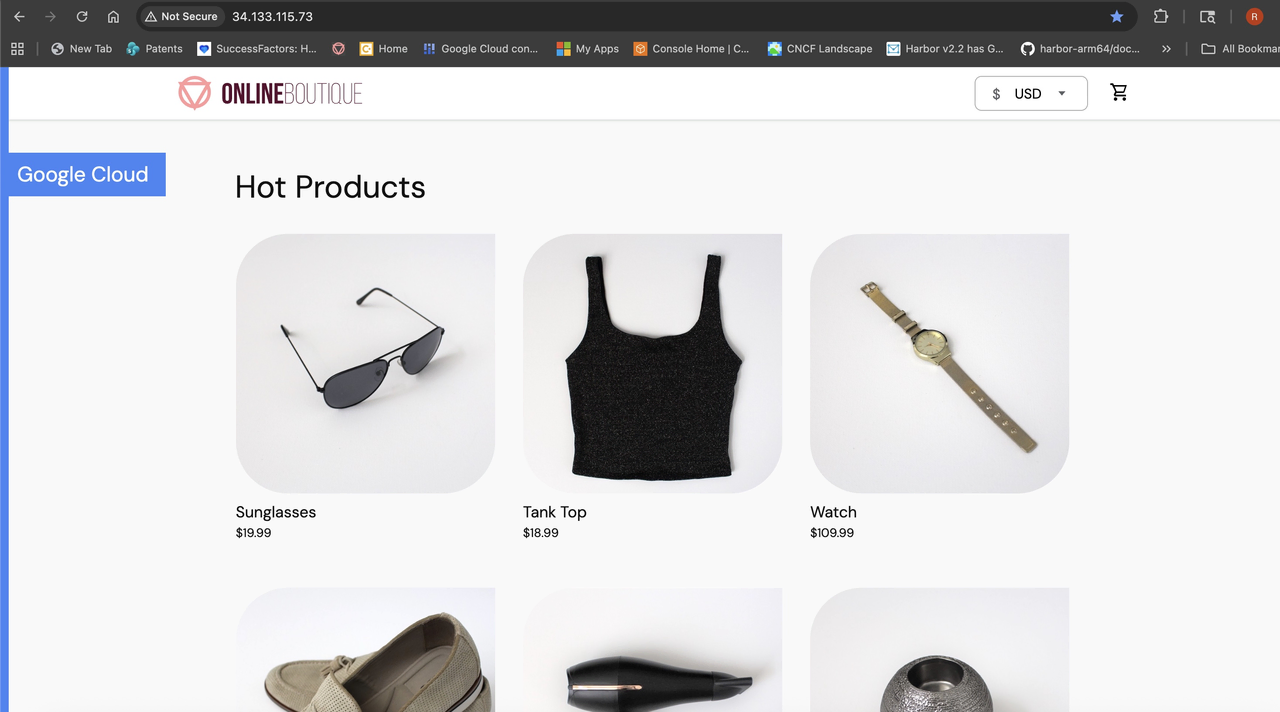 Online Boutique storefront running on Google Axion
What you’ve accomplished and what’s next
You’ve now confirmed that the storefront runs on N4A and that the assistant tier is still absent. This gives you a clean baseline before you add the AI service.
Next, you’ll inspect the assistant implementation and confirm that its source files are ready to build.