Deploy Ruby on Rails on Arm-based Google Cloud C4A virtual machines
Introduction
Get started with Ruby on Rails on Google Axion C4A
Create a Google Axion C4A Arm virtual machine on GCP
Install Ruby on Rails on SUSE Linux
Set up Ruby on Rails baseline testing
Benchmark Ruby on Rails
Next Steps
Deploy Ruby on Rails on Arm-based Google Cloud C4A virtual machines
Overview
In this section, you will learn how to provision a Google Axion C4A Arm virtual machine on Google Cloud Platform (GCP) using the c4a-standard-4 (4 vCPUs, 16 GB memory) machine type in Google Cloud Console.
For support on GCP setup, see the Learning Path Getting started with Google Cloud Platform .
Provision a Google Axion C4A Arm VM in Google Cloud Console
To create a virtual machine based on the C4A instance type:
Navigate to Google Cloud Console .
Go to Compute Engine > VM Instances and select Create Instance.
Under Machine configuration:
Populate fields such as Instance name, Region, and Zone.
- Set Series to
C4A. - Select
c4a-standard-4for machine type, as shown below:
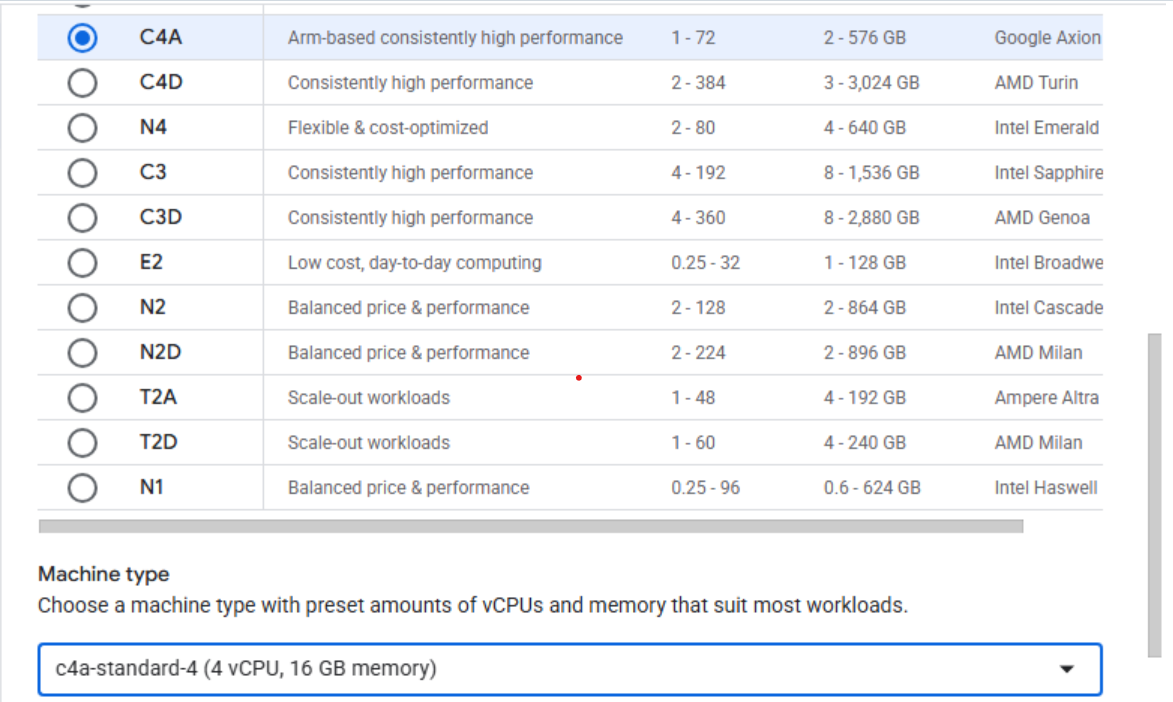 Creating a Google Axion C4A Arm virtual machine in Google Cloud Console
- Set Series to
Under OS and Storage, select Change, then select an Arm64-based OS image. For this Learning Path, use SUSE Linux Enterprise Server. Pick the preferred version for your operating system. Ensure you select the Arm image variant. Select Select.
Under Networking, enable Allow HTTP traffic.
Select Create to launch the instance.
What you’ve accomplished
You’ve successfully created a Google Axion C4A Arm virtual machine on GCP. Your Arm-based cloud environment is ready for Ruby on Rails development.