Scale AI workloads with Ray on Google Cloud C4A Axion VM
Introduction
Get started with Ray on Google Axion C4A
Create a firewall rule for Ray Dashboard and Serve
Create a Google Axion C4A Arm virtual machine on GCP
Deploy Ray on GCP SUSE Arm64
Run Distributed Workloads with Ray
Ray Tune, Serve, and Benchmarking
Next Steps
Scale AI workloads with Ray on Google Cloud C4A Axion VM
Hyperparameter tuning, serving, and benchmarking
This section demonstrates hyperparameter tuning, model serving, and performance benchmarking using Ray.
Hyperparameter tuning with Ray Tune
Create the tuning script:
vi ray_tune.py
from ray import tune
from ray.air import session
import random

def trainable(config):
    score = 0
    for _ in range(10):
        score += random.random() * config["lr"]

    session.report({"score": score})

tuner = tune.Tuner(
    trainable,
    param_space={
        "lr": tune.grid_search([0.001, 0.01, 0.1])
    },
)

results = tuner.fit()

print("Best result:", results.get_best_result(metric="score", mode="max"))
Code explanation
tune.grid_search()→ tries multiple hyperparameter values- Each value runs as a separate parallel trial
session.report()→ sends metrics back to RayTuner.fit()→ executes all trials
Run hyperparameter tuning
python3 ray_tune.py
The output is similar to:
        Configuration for experiment trainable...

Number of trials: 3

Trial status: 3 TERMINATED
Current time: 2026-04-13 13:21:47. Total running time: 1s
Logical resource usage: 1.0/4 CPUs, 0/0 GPUs
╭────────────────────────────────────────────────────────────────────────────────────╮
│ Trial name              status          lr     iter     total time (s)       score │
├────────────────────────────────────────────────────────────────────────────────────┤
│ trainable_b83d8_00000   TERMINATED   0.001        1        0.000396013   0.0053353 │
│ trainable_b83d8_00001   TERMINATED   0.01         1        0.000548363   0.0366355 │
│ trainable_b83d8_00002   TERMINATED   0.1          1        0.000375986   0.363394  │
╰────────────────────────────────────────────────────────────────────────────────────╯

Best result: Result(
  metrics={'score': 0.36339389194042176},
  path='/home/pareena_verma_arm_com/ray_results/trainable_2026-04-13_13-21-45/trainable_b83d8_00002_2_lr=0.1000_2026-04-13_13-21-46',
  filesystem='local',
  checkpoint=None
)
Understanding the output
- Ray created 3 parallel trials using different learning rates
- Each trial executed independently on available CPU cores
- Scores represent the performance of each configuration
| Learning Rate | Score |
|---|---|
| 0.001 | 0.005 |
| 0.01 | 0.036 |
| 0.1 | 0.363 |
Best configuration = learning rate 0.1
- Total runtime ≈ 1 second (parallel execution)
- Results stored in:
$HOME/ray_results/
Deploy model using Ray Serve
Create the serving script:
vi ray_serve.py
import ray
from ray import serve

ray.init()
serve.start(detached=True)

@serve.deployment
class Model:
    def __call__(self, request):
        return {"message": "Hello from Ray Serve on ARM VM!"}

app = Model.bind()
serve.run(app)
Code explanation
serve.start()→ initializes serving system@serve.deployment→ defines deployable serviceserve.run()→ launches API
Run the service
python3 ray_serve.py
Test the API:
curl http://127.0.0.1:8000/
The output is similar to:
{"message":"Hello from Ray Serve on Arm VM!"}
Ray Tune execution in Ray Dashboard
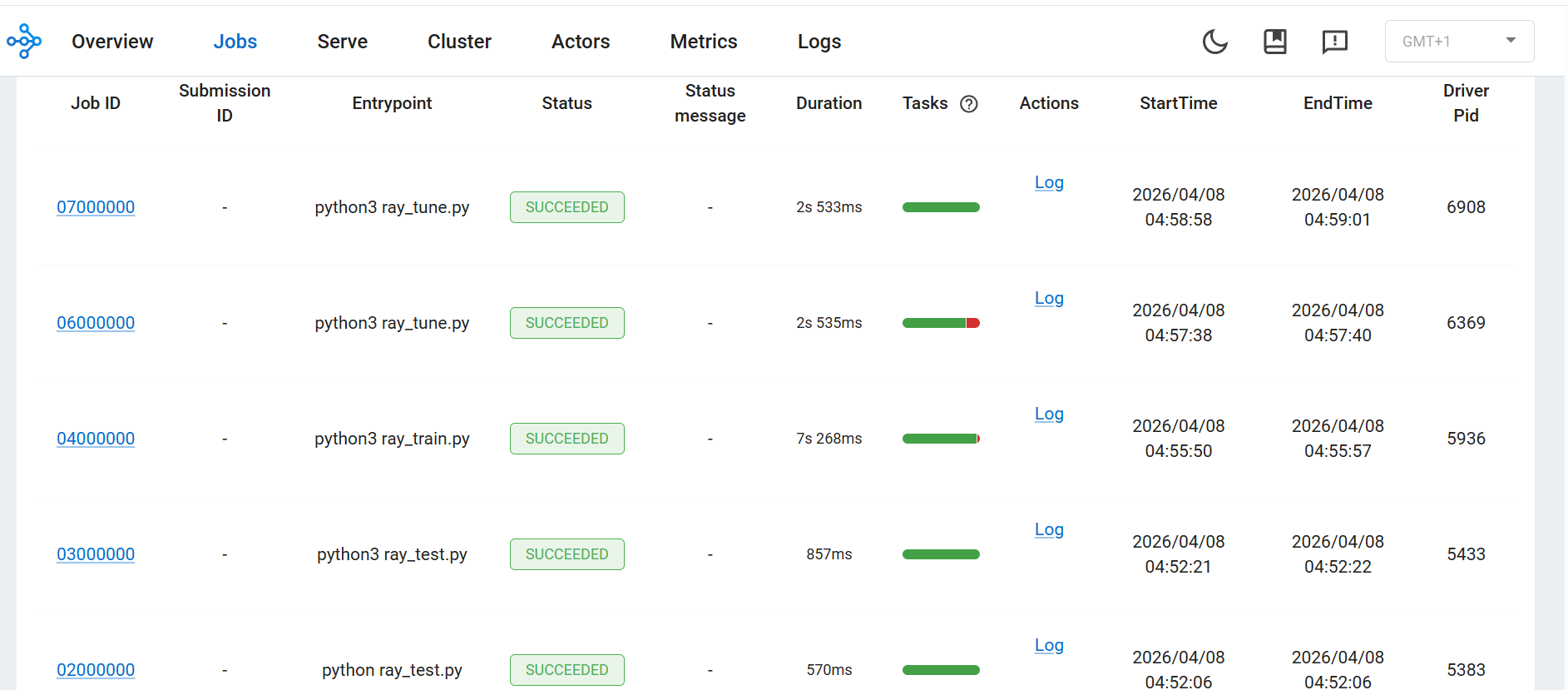 Ray Tune trials executed successfully with different configurations
The Ray Dashboard shows all jobs executed successfully, confirming correct Ray cluster operation.
Benchmark distributed execution
Create benchmark script:
vi ray_benchmark.py
import ray
import time

ray.init()

@ray.remote
def work(x):
    time.sleep(1)
    return x

start = time.time()
ray.get([work.remote(i) for i in range(20)])
end = time.time()

print("Execution Time:", end - start)
Run the benchmark
ray stop
ray start --head --num-cpus=4

python3 ray_benchmark.py
The output is similar to:
Execution Time: 5.171869277954102
Understanding the benchmark
- 20 tasks executed in parallel
- Each task takes approximately 1 second
- With 4 CPUs → total time ≈ 5 seconds
Sequential execution would take approximately 20 seconds
- Confirms Ray parallel execution
What you’ve learned
You have successfully:
- Performed hyperparameter tuning
- Identified the best configuration automatically
- Deployed a model using Ray Serve
- Validated parallel performance with benchmarking
You can now extend this setup to multi-node clusters, real ML pipelines, and production deployments.