Deploy an Amazon EKS cluster with AWS Graviton-based nodes using Rafay
Introduction
Set up Rafay and AWS access
Create an Amazon EKS cluster using a Rafay cluster manifest
Deploy NGINX to the Amazon EKS cluster and clean up
Next Steps
Deploy an Amazon EKS cluster with AWS Graviton-based nodes using Rafay
Before you begin
Rafay is a Kubernetes operations platform that provisions, secures, and manages the full cluster lifecycle across public cloud, private, and hybrid environments. It provides a single control plane for fleet-wide operations including automated provisioning, upgrades, and governance.
In this Learning Path, you’ll use Rafay to provision an Amazon EKS cluster with an AWS Graviton-based node group and deploy a workload to verify the setup.
You need the following accounts and tools before starting this Learning Path:
- An AWS account with sufficient IAM permissions to create roles, EKS clusters, EC2 instances, CloudFormation stacks, and related resources.
- A Rafay account . You can sign up if you don’t have an account.
- The AWS CLI installed and configured with credentials that have the required permissions. For setup instructions, see the AWS CLI and the AWS Credentials install guides.
Confirm your AWS CLI is working by running the following command, which prints your account and user information:
aws sts get-caller-identity
Install kubectl
Install the Kubernetes command-line tool by following the kubectl install guide .
Confirm the installation:
kubectl version --client
The output is similar to:
        Client Version: v1.32.1
Kustomize Version: v5.5.0
Install RCTL
RCTL is the Rafay CLI. You’ll use it to submit cluster manifests, check cluster status, download kubeconfig files, and delete clusters.
To download RCTL, log in to the Rafay console, navigate to My Tools > Download CLI, and download the binary for your operating system.
The downloads are .tar.bz2 files.
On macOS with Apple Silicon, extract the file with:
tar xvf rctl-darwin-arm64.tar.bz2
On Arm Linux, use the filename:
tar xvf rctl-linux-arm64.tar.bz2
RCTL is also available for x86_64 Linux and Windows. Modify the filename to match your platform as needed.
Move the binary to a directory in your search path:
sudo mv rctl /usr/local/bin/
Configure RCTL
Download the RCTL configuration file from the Rafay console. Navigate to My Tools > Download CLI Config and save the file.
The file name is formatted for your user information.
Copy the downloaded file to a known location and initialize rctl with it:
cp ~/Downloads/<filename>.json ~/rafay-config.json
rctl config init ~/rafay-config.json
The config command doesn’t have any output.
Verify the installation:
rctl version
The output is similar to:
        VERSION: r4.2.0
BUILD: r4.2.0-1
BUILD-TIME: Thu 04 Jun 2026 07:17:05 AM UTC
ARCH: darwin/arm64
Confirm that rctl can reach the Rafay platform:
rctl config show
The output lists your account information, including the endpoints, keys, project, and organization information.
Create an AWS IAM role for Rafay
Rafay provisions EKS resources in your AWS account using a cross-account IAM role. You need two values from the Rafay console before running the script:
- Log in to the Rafay console.
- Select defaultproject (or another project) from the project selector in the navigation bar.
- Navigate to Infrastructure > Cloud Credentials > New Credential.
- Select AWS as the provider, then select ROLE. Copy the Rafay Account ID and External ID displayed on the screen. You’ll pass these values to the script that follows.
Save the following script as create-rafay-role.sh:
#!/bin/bash
set -euo pipefail

read -rp "Enter Rafay Account ID: " RAFAY_ACCOUNT_ID
read -rp "Enter External ID:       " EXTERNAL_ID

ROLE_NAME="RafayEKSProvisioner"
REGION="us-east-1"

TRUST_POLICY=$(cat <<EOF
{
  "Version": "2012-10-17",
  "Statement": [
    {
      "Effect": "Allow",
      "Principal": {
        "AWS": "arn:aws:iam::${RAFAY_ACCOUNT_ID}:root"
      },
      "Action": "sts:AssumeRole",
      "Condition": {
        "StringEquals": {
          "sts:ExternalId": "${EXTERNAL_ID}"
        }
      }
    }
  ]
}
EOF
)

echo "Creating IAM role: ${ROLE_NAME}"
aws iam create-role \
  --role-name "${ROLE_NAME}" \
  --assume-role-policy-document "${TRUST_POLICY}" \
  --region "${REGION}"

INLINE_POLICY=$(cat <<'POLICY'
{
    "Version": "2012-10-17",
    "Statement": [
        {
            "Effect": "Allow",
            "Action": [
                "iam:CreateInstanceProfile",
                "iam:CreateOpenIDConnectProvider",
                "iam:DeleteOpenIDConnectProvider",
                "iam:GetOpenIDConnectProvider",
                "iam:ListOpenIDConnectProviderTags",
                "iam:TagOpenIDConnectProvider",
                "iam:DeleteInstanceProfile",
                "iam:GetRole",
                "iam:GetInstanceProfile",
                "iam:RemoveRoleFromInstanceProfile",
                "iam:CreateRole",
                "iam:DeleteRole",
                "iam:AttachRolePolicy",
                "iam:PutRolePolicy",
                "iam:ListInstanceProfiles",
                "iam:AddRoleToInstanceProfile",
                "iam:ListInstanceProfilesForRole",
                "iam:PassRole",
                "iam:DetachRolePolicy",
                "iam:UpdateAssumeRolePolicy",
                "iam:DeleteRolePolicy",
                "iam:GetRolePolicy",
                "iam:DeleteServiceLinkedRole",
                "iam:CreateServiceLinkedRole",
                "iam:TagRole",
                "iam:ListRoleTags",
                "iam:ListAttachedRolePolicies",
                "iam:ListPolicyVersions",
                "iam:GetPolicy",
                "iam:GetPolicyVersion"
            ],
            "Resource": "*"
        },
        {
            "Effect": "Allow",
            "Action": [
                "cloudformation:GetTemplate",
                "cloudformation:ListStacks",
                "cloudformation:ListStackResources",
                "cloudformation:ListStackSets",
                "cloudformation:ListChangeSets",
                "cloudformation:DescribeStacks",
                "cloudformation:DescribeStackResources",
                "cloudformation:DescribeStackResource",
                "cloudformation:DescribeStackEvents",
                "cloudformation:DescribeChangeSet",
                "cloudformation:DescribeStackSet",
                "cloudformation:DeleteStack",
                "cloudformation:DeleteChangeSet",
                "cloudformation:DeleteStackSet",
                "cloudformation:CreateStackSet",
                "cloudformation:UpdateStackSet",
                "cloudformation:CreateChangeSet",
                "cloudformation:ExecuteChangeSet",
                "cloudformation:CreateStack",
                "cloudformation:UpdateStack"
            ],
            "Resource": "*"
        },
        {
            "Effect": "Allow",
            "Action": [
                "eks:AssociateEncryptionConfig",
                "eks:CreatePodIdentityAssociation",
                "eks:DescribePodIdentityAssociation",
                "eks:DescribeClusterVersions",
                "eks:DeletePodIdentityAssociation",
                "eks:UpdatePodIdentityAssociation",
                "eks:ListPodIdentityAssociations",
                "eks:CreateAccessEntry",
                "eks:CreateAddon",
                "eks:CreateCluster",
                "eks:CreateFargateProfile",
                "eks:DescribeNodegroup",
                "eks:DescribeCluster",
                "eks:DescribeAddon",
                "eks:DescribeAddonConfiguration",
                "eks:DescribeAddonVersions",
                "eks:DescribeFargateProfile",
                "eks:DescribeUpdate",
                "eks:ListUpdates",
                "eks:UpdateClusterVersion",
                "eks:UpdateClusterConfig",
                "eks:ListAccessPolicies",
                "eks:ListAccessEntries",
                "eks:ListAssociatedAccessPolicies",
                "eks:AssociateAccessPolicy",
                "eks:ListClusters",
                "eks:ListNodegroups",
                "eks:ListAddons",
                "eks:ListFargateProfiles",
                "eks:ListTagsForResource",
                "eks:CreateNodegroup",
                "eks:TagResource",
                "eks:AccessKubernetesApi",
                "eks:DeleteCluster",
                "eks:DeleteAccessEntry",
                "eks:UntagResource",
                "eks:UpdateAddon",
                "eks:UpdateNodegroupConfig",
                "eks:UpdateNodegroupVersion",
                "eks:DeleteAddon",
                "eks:DeleteFargateProfile",
                "eks:DeleteNodegroup",
                "eks:ListInsights",
                "eks:DescribeInsight",
                "eks:DescribeAccessEntry",
                "eks:DisassociateAccessPolicy",
                "eks:UpdateAccessEntry"
            ],
            "Resource": "*"
        },
        {
            "Effect": "Allow",
            "Action": [
                "autoscaling:DescribeAutoScalingGroups",
                "autoscaling:DescribeLaunchConfigurations",
                "autoscaling:DescribeScalingActivities",
                "autoscaling:DescribeScheduledActions",
                "autoscaling:CreateLaunchConfiguration",
                "autoscaling:DeleteLaunchConfiguration",
                "autoscaling:TerminateInstanceInAutoScalingGroup",
                "autoscaling:SetDesiredCapacity",
                "autoscaling:UpdateAutoScalingGroup",
                "autoscaling:DeleteAutoScalingGroup",
                "autoscaling:CreateAutoScalingGroup",
                "autoscaling:SuspendProcesses",
                "autoscaling:CreateOrUpdateTags",
                "autoscaling:DeleteTags"
            ],
            "Resource": "*"
        },
        {
            "Effect": "Allow",
            "Action": "ec2:DeleteInternetGateway",
            "Resource": "arn:aws:ec2:*:*:internet-gateway/*"
        },
        {
            "Effect": "Allow",
            "Action": [
                "ec2:AuthorizeSecurityGroupIngress",
                "ec2:GetConsoleOutput",
                "ec2:DeleteSubnet",
                "ec2:DeleteTags",
                "ec2:CreateNatGateway",
                "ec2:CreateVpc",
                "ec2:AttachInternetGateway",
                "ec2:DescribeVpcAttribute",
                "ec2:DeleteRouteTable",
                "ec2:AssociateRouteTable",
                "ec2:DescribeInternetGateways",
                "ec2:CreateRoute",
                "ec2:CreateInternetGateway",
                "ec2:RevokeSecurityGroupEgress",
                "ec2:CreateSecurityGroup",
                "ec2:ModifyVpcAttribute",
                "ec2:DeleteInternetGateway",
                "ec2:DescribeRouteTables",
                "ec2:ReleaseAddress",
                "ec2:AuthorizeSecurityGroupEgress",
                "ec2:DescribeTags",
                "ec2:CreateTags",
                "ec2:DeleteRoute",
                "ec2:CreateRouteTable",
                "ec2:DetachInternetGateway",
                "ec2:DescribeNatGateways",
                "ec2:DisassociateRouteTable",
                "ec2:AllocateAddress",
                "ec2:DescribeSecurityGroups",
                "ec2:DescribeSecurityGroupRules",
                "ec2:RevokeSecurityGroupIngress",
                "ec2:DeleteSecurityGroup",
                "ec2:DeleteNatGateway",
                "ec2:DeleteVpc",
                "ec2:CreateSubnet",
                "ec2:DescribeSubnets",
                "ec2:DescribeAvailabilityZones",
                "ec2:DescribeImages",
                "ec2:describeAddresses",
                "ec2:DescribeVpcs",
                "ec2:CreateLaunchTemplate",
                "ec2:CreateLaunchTemplateVersion",
                "ec2:DescribeLaunchTemplates",
                "ec2:RunInstances",
                "ec2:DeleteLaunchTemplate",
                "ec2:DescribeLaunchTemplateVersions",
                "ec2:DescribeImageAttribute",
                "ec2:DescribeKeyPairs",
                "ec2:ImportKeyPair",
                "ec2:DescribeInstances",
                "ec2:ModifySubnetAttribute",
                "ec2:ModifySecurityGroupRules",
                "ec2:DescribeInstanceTypeOfferings",
                "ec2:AssociateVpcCidrBlock",
                "ec2:DescribeVolumes",
                "ec2:CreateCarrierGateway",
                "ec2:DeleteCarrierGateway",
                "ec2:DescribeCarrierGateways",
                "ec2:UpdateSecurityGroupRuleDescriptionsIngress",
                "ec2:UpdateSecurityGroupRuleDescriptionsEgress"
            ],
            "Resource": "*"
        },
        {
            "Effect": "Allow",
            "Action": "ssm:GetParameter",
            "Resource": "arn:aws:ssm:*:*:parameter/*"
        },
        {
            "Effect": "Allow",
            "Action": [
                "kms:DescribeKey",
                "kms:CreateGrant"
            ],
            "Resource": "*"
        },
        {
            "Sid": "VisualEditor0",
            "Effect": "Allow",
            "Action": [
                "logs:DeleteRetentionPolicy",
                "logs:PutRetentionPolicy"
            ],
            "Resource": "*"
        }
    ]
}
POLICY
)

echo "Attaching inline policy to role"
aws iam put-role-policy \
  --role-name "${ROLE_NAME}" \
  --policy-name "RafayEKSProvisionerPolicy" \
  --policy-document "${INLINE_POLICY}"

ROLE_ARN=$(aws iam get-role --role-name "${ROLE_NAME}" --query "Role.Arn" --output text)
echo ""
echo "Role ARN (copy this value into the Rafay console):"
echo "${ROLE_ARN}"
Make the script executable and run it:
chmod +x create-rafay-role.sh
./create-rafay-role.sh
You’ll be prompted for the Account ID and External ID. Enter these values from the previous step.
The output is similar to:
        Enter Rafay Account ID: 123456789012
Enter External ID:       abc123xyz
Creating IAM role: Proj-RafayEKSProvisioner
Attaching inline policy to role

Role ARN (copy this value into the Rafay console):
arn:aws:iam::111122223333:role/Proj-RafayEKSProvisioner
The Account ID, External ID, and Role ARN in this output are sample values.
Copy the Role ARN from the output.
Register the cloud credential in Rafay
With the Role ARN copied, complete the credential registration in the Rafay console:
- Return to Infrastructure > Cloud Credentials > New Credential in the Rafay console.
- Paste the
Role ARNinto the Role ARN field. - Enter
aws-cloud-credentialas the credential name. - Select Save.
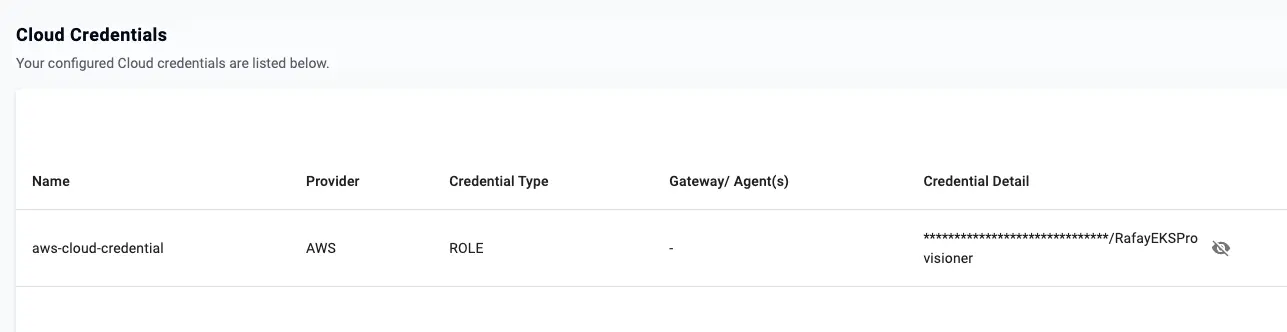 Registered AWS cloud credential in the Rafay console
What you’ve accomplished and what’s next
You’ve now installed kubectl and rctl, authenticated rctl to Rafay, and registered an AWS cloud credential.
Next, you’ll create the EKS cluster.