Build Semantic Search and Chatbot Retrieval Systems with Qdrant on Google Cloud C4A Axion processors
Introduction
Understand vector search with Qdrant on Google Axion
Create a Google Axion C4A Arm virtual machine
Install and run Qdrant on Axion
Generate and index vector embeddings
Query vector embeddings with semantic search
Build a chatbot with Qdrant on Axion
Understand the vector search architecture
Next Steps
Build Semantic Search and Chatbot Retrieval Systems with Qdrant on Google Cloud C4A Axion processors
Introduction
Understand vector search with Qdrant on Google Axion
Create a Google Axion C4A Arm virtual machine
Install and run Qdrant on Axion
Generate and index vector embeddings
Query vector embeddings with semantic search
Build a chatbot with Qdrant on Axion
Understand the vector search architecture
Next Steps
Create a knowledge retrieval chatbot
In this section, you build a simple chatbot-style knowledge retrieval system using the Qdrant vector database running on Google Axion Arm-based infrastructure.
The chatbot retrieves relevant knowledge by performing semantic similarity search against stored vector embeddings.
The architecture represents the retrieval component of Retrieval-Augmented Generation (RAG) systems, commonly used in modern AI assistants and enterprise knowledge platforms.
The chatbot uses:
- Sentence Transformers to generate embeddings
- Qdrant to store and retrieve vector data
- Python to implement an interactive chatbot interface
Architecture overview
The chatbot workflow retrieves relevant information using vector similarity search.
User Question
      |
      v
Sentence Transformer Model
      |
      v
Query Embedding Vector
      |
      v
Qdrant Vector Database
      |
      v
Similarity Search
      |
      v
Top Matching Knowledge
      |
      v
Chatbot Response
Navigate to project directory
Move to the project directory created earlier.
cd ~/qdrant-rag-demo
Verify files:
ls
The output is similar to:
        ingest.py
search.py
These scripts were created in earlier sections to generate embeddings and perform vector searches.
Load knowledge into Qdrant
The ingestion script converts documents into embeddings and stores them in Qdrant.
Run the ingestion script:
python ingest.py
The output is similar to:
Documents indexed successfully in Qdrant!
Verify the collection:
curl http://localhost:6333/collections
The output is similar to:
 "result": {
  "collections":[{"name":"axion_demo"}]
 }
}
The output confirms the vector collection has been created successfully.
Create chatbot script
Create a Python file that allows users to interactively query the vector database.
vi chatbot.py
Add the following code.
from qdrant_client import QdrantClient
from sentence_transformers import SentenceTransformer

client = QdrantClient(url="http://localhost:6333")

model = SentenceTransformer("sentence-transformers/all-MiniLM-L6-v2")

print("Chatbot ready! Ask a question (type 'exit' to quit).")

while True:

    query = input("\nUser: ")

    if query.lower() == "exit":
        break

    query_vector = model.encode(query).tolist()

    results = client.query_points(
        collection_name="axion_demo",
        query=query_vector,
        limit=2
    )

    print("\nChatbot Response:\n")

    for point in results.points:
        print("-", point.payload["text"])
Run the chatbot
Start the chatbot application.
python chatbot.py
The output is similar to:
        Chatbot ready! Ask a question (type 'exit' to quit)

User:
Test the chatbot
Example interaction:
User: What is Qdrant?
The output is similar to:
        Chatbot Response:

- Qdrant is optimized for vector similarity search.
- Vector databases enable semantic search.
Another example:
User: what are rag pipelines?
The output is similar to:
        Chatbot Response:

- RAG pipelines combine retrieval with LLMs.
- Axion processors provide Arm based cloud compute.
Exit the chatbot:
exit
Example chatbot interaction
The following image shows the chatbot running on the Axion VM and retrieving relevant results from the Qdrant vector database.
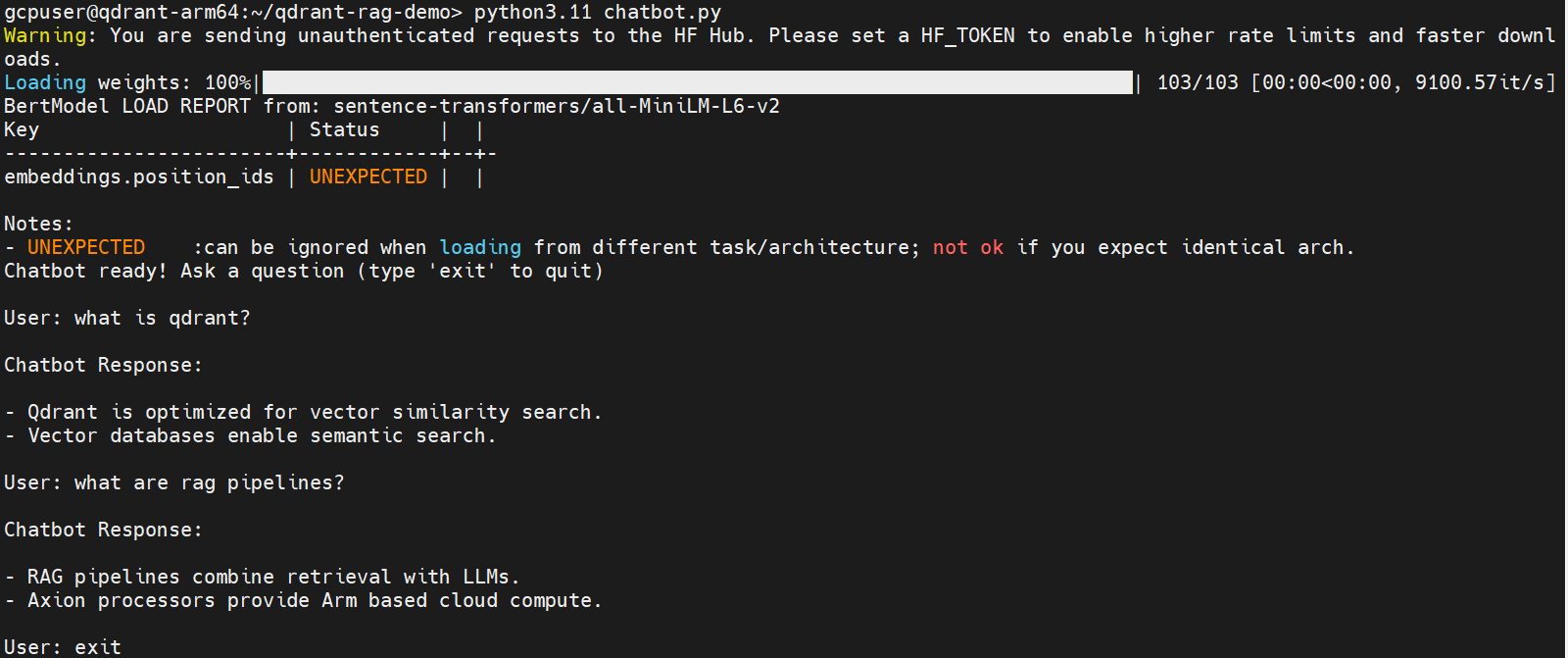 Qdrant chatbot semantic search demo on Axion
How the chatbot works
- The user asks a question.
- The system converts the question into a vector embedding.
- Qdrant performs a similarity search.
- The chatbot returns the most relevant knowledge documents.
- This enables semantic search instead of simple keyword matching.
Retrieval-Augmented Generation (RAG)
In modern AI systems, this retrieval step is typically combined with a large language model.
The full RAG workflow looks like:
User Question
      |
      v
Embedding Model
      |
      v
Qdrant Vector Database
      |
      v
Relevant Context Retrieved
      |
      v
Large Language Model (LLM)
      |
      v
Generated Answer
Qdrant provides the high-performance retrieval layer for this architecture.
Real-world applications
This architecture is widely used in:
- Customer support chatbots
- Enterprise knowledge assistants
- AI documentation search tools
- Technical support bots
- RAG-based AI assistants
What you’ve learned and what’s next
In this section, you learned how to:
- Build a chatbot-style knowledge retrieval system
- Convert user queries into vector embeddings
- Perform semantic similarity search with Qdrant
- Retrieve relevant information using vector search
In the next section, you will explore the system architecture behind vector search workloads on Axion infrastructure, including how Qdrant enables scalable AI retrieval pipelines.