Optimize application performance with CPU affinity
Introduction
Understand thread pinning and CPU affinity
Create a CPU-intensive program
Pin threads to cores with taskset
Set CPU affinity in source code
Next Steps
Optimize application performance with CPU affinity
Create a single-threaded Python benchmark
Create a single-threaded program that’s sensitive to execution variations. This simulates scenarios like a log ingesting process or a single-threaded consumer that needs to maintain a steady pace.
Check that you have Python installed:
python --version
The output is similar to:
Python 3.12.3
If Python isn’t installed, use your Linux package manager to install it or see the Python downloads page .
Next, create a virtual environment to install packages without interfering with system packages:
python -m venv venv
source venv/bin/activate
pip install matplotlib
Create a file named single_threaded_python_script.py with the following code. This script measures the execution time of a computational function, writes results to data.txt, and generates time-series graphs to illustrate the effects of thread pinning:
#!/usr/bin/env python3
import time
import matplotlib.pyplot as plt
import matplotlib
import sys

def timer(func):
    def foo(*args,**kwargs):
        with open("data.txt", "a") as f:
            start = time.perf_counter()
            ans = func(*args,**kwargs)
            end = time.perf_counter()
            duration = end - start
            # print(f"Function {func.__name__} took {(duration*1000):4f} milliseconds")
            f.write((str(duration*1000)) + ", ")
        return ans
    return foo

@timer
def bar(x:int)->float:
    """Random function that is time sensitive"""
    res = 0.0
    for i in range(0,x*100):
        res += (float(i) / 9.0) + (42.0 + float(i))

    return res

def plot_csv_values_from_txt(path: str, *, title: str | None = None, show_markers: bool = False) -> None:
    """
    Reads a .txt file containing comma-separated numeric values (with optional whitespace/newlines)
    and plots them as a simple chart.
    """
    with open(path, "r", encoding="utf-8") as f:
        text = f.read()

    # Split on commas, trim whitespace, ignore empty tokens (handles trailing comma)
    tokens = [t.strip() for t in text.replace("\n", " ").split(",")]
    values = [float(t) for t in tokens if t]

    plt.figure()
    x = range(len(values))
    if show_markers:
        plt.plot(x, values, marker="o", linestyle="-")
    else:
        plt.plot(x, values)

    plt.xlabel("Sample Number")
    plt.ylabel("Time / milliseconds")
    if title:
        plt.title(title)
    plt.tight_layout()
    plt.grid()
    plt.show()
    if (sys.argv[1] == "exclusive"):
        plt.savefig("Exclusive.jpg")
    elif (sys.argv[1] == "shared"):
        plt.savefig("Shared.jpg")
    elif (sys.argv[1] == "free"):
        plt.savefig("Free.jpg")

def main():

    for i in range(0,10000):
        bar(50)
    if (sys.argv[1] == "exclusive"):
        plot_csv_values_from_txt(path="data.txt",title="Exclusively Pinned")
    elif (sys.argv[1] == "shared"):
        plot_csv_values_from_txt(path="data.txt", title="Shared")
    elif (sys.argv[1] == "free"):
        plot_csv_values_from_txt(path="data.txt", title="Free")
    return 0

if __name__ == "__main__":
    main()
Make the script executable:
chmod +x single_threaded_python_script.py
Compare thread pinning strategies
Explore three different scenarios to understand the trade-offs of thread pinning:
- Free: The operating system allocates both programs to any of four cores
- Shared-pinned: The Python script is pinned to core 0, but
progcan run on any core - Exclusive: The Python script has exclusive access to core 0, and
progruns on cores 1-3
Create test scripts
Create three bash scripts to automate the testing.
Free script
The first script allows both programs to run on any of the first four cores.
Use an editor to create a file named free-script.sh with the following code:
#!/bin/bash

set -euo pipefail

rm -f ./data.txt
taskset --cpu-list 0-3 ./single_threaded_python_script.py free & # time-critical python script
taskset --cpu-list 0-3 ./prog

wait
Shared script
The next script pins the Python script to core 0, while prog can use any of the first four cores.
Create a file named shared-pinned.sh with the following code:
#!/bin/bash

set -euo pipefail

rm -f ./data.txt
taskset --cpu-list 0 ./single_threaded_python_script.py shared & # time-critical python script
taskset --cpu-list 0-3 ./prog

wait
Exclusive script
The last one gives the Python script exclusive access to core 0, and prog uses cores 1-3.
Create a file named exclusive.sh with the following code:
#!/bin/bash

set -euo pipefail

rm -f ./data.txt
taskset --cpu-list 0 ./single_threaded_python_script.py exclusive & # time-critical python script
taskset --cpu-list 1-3 ./prog

wait
Run the tests
Execute all three scenarios:
chmod +x free-script.sh shared-pinned.sh exclusive.sh
./free-script.sh
./shared-pinned.sh
./exclusive.sh
Analyze the results
The terminal output shows the execution time for prog under the three scenarios. The Python script also generates three files: Free.jpg, Exclusive.jpg, and Shared.jpg.
The terminal output shows the free-script.sh scenario (where the Linux scheduler assigns threads to cores without restriction) completes prog the fastest at 5.8 seconds. The slowest execution occurs when the Python script has exclusive access to CPU 0, which is expected because prog is constrained to fewer cores:
        Answer = 3.14159        5 iterations took 5838 milliseconds
Answer = 3.14159        5 iterations took 5946 milliseconds
Answer = 3.14159        5 iterations took 5971 milliseconds
However, this represents a trade-off with the Python script’s performance.
Free scenario results
The Free.jpg graph shows periodic zones of high latency (3.5 ms) that likely occur when there’s contention between prog and the Python script:
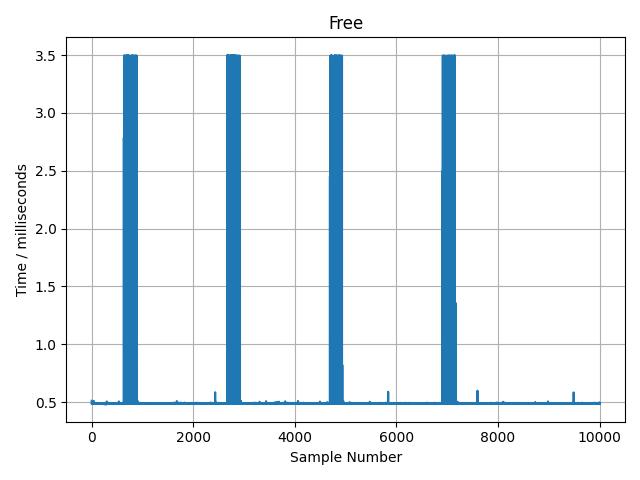 Free scenario: both programs can run on any of four cores
Shared-pinned scenario results
When pinning the Python script to core 0 while prog remains free to use any cores, the behavior is similar:
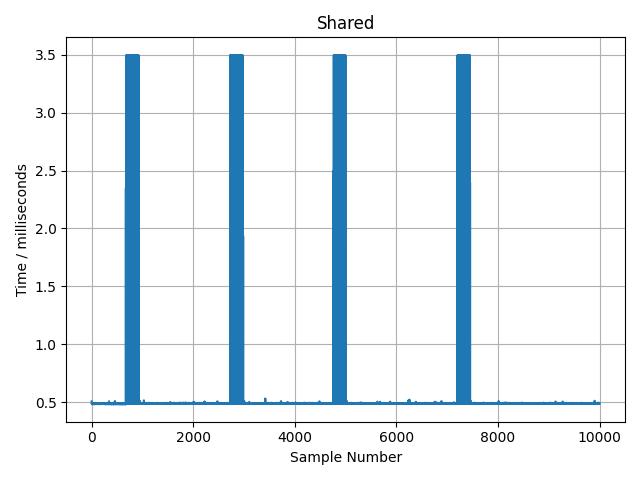 Shared-pinned scenario: Python script pinned to core 0, prog free to run on any core
Exclusive scenario results
When the Python script has exclusive access to core 0, the execution time is more consistent around 0.49 ms because the script doesn’t contend with any other demanding processes:
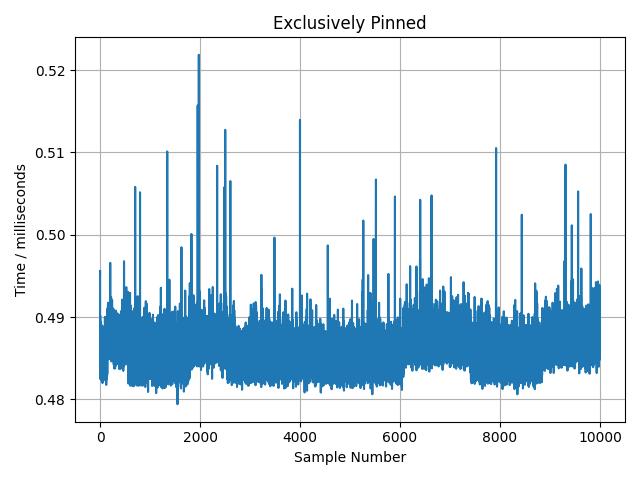 Exclusive scenario: Python script has exclusive access to core 0, prog runs on cores 1-3
Understanding the trade-offs
The results demonstrate key trade-offs in thread pinning:
- Free allocation: Fastest overall throughput but inconsistent latency for time-sensitive tasks
- Shared pinning: Provides some isolation but doesn’t eliminate contention
- Exclusive pinning: Most consistent latency for the pinned process but reduces available cores for other work
Multiple factors influence this behavior, including the Linux scheduler algorithm, associated parameters, and process priority. These topics are beyond the scope of this Learning Path. If you’d like to learn more, see the nice utility documentation for information about process priority settings.
What you’ve accomplished and what’s next
In this section:
- Created a single-threaded Python benchmark that measures execution time variations
- Used
tasksetto pin processes to specific CPU cores - Compared three thread pinning strategies: free, shared-pinned, and exclusive
- Analyzed the trade-offs between throughput and latency consistency
Next, you learn how to control thread affinity programmatically using source code modifications.