Overview
In this section, you’ll provision a Google Cloud Axion C4A Arm virtual machine (VM) using the c4a-standard-4 (four vCPUs, 16 GB memory) machine type in the Google Cloud Console. This process sets up a high-performance Arm server for PHP workloads, leveraging the scalability and efficiency of Axion C4A and SUSE Linux on Google Cloud.
For support on GCP setup, see the Learning Path Getting started with Google Cloud Platform .
Provision your Google Axion C4A instance
Follow these steps to create a c4a-standard-4 instance configured for PHP on Arm. This walkthrough covers machine selection, OS image choice, and basic networking. Ensure your Google Cloud project has billing enabled and you have permission to create Compute Engine instances.
Follow these steps to get started:
Go to the Google Cloud Console
In the left menu, select Compute Engine > VM Instances
Select Create Instance
Under Machine configuration
- Enter your Instance name, Region, and Zone
- Set Series to
C4A - Set Machine type to
c4a-standard-4(four vCPUs, 16 GB memory) as shown below:
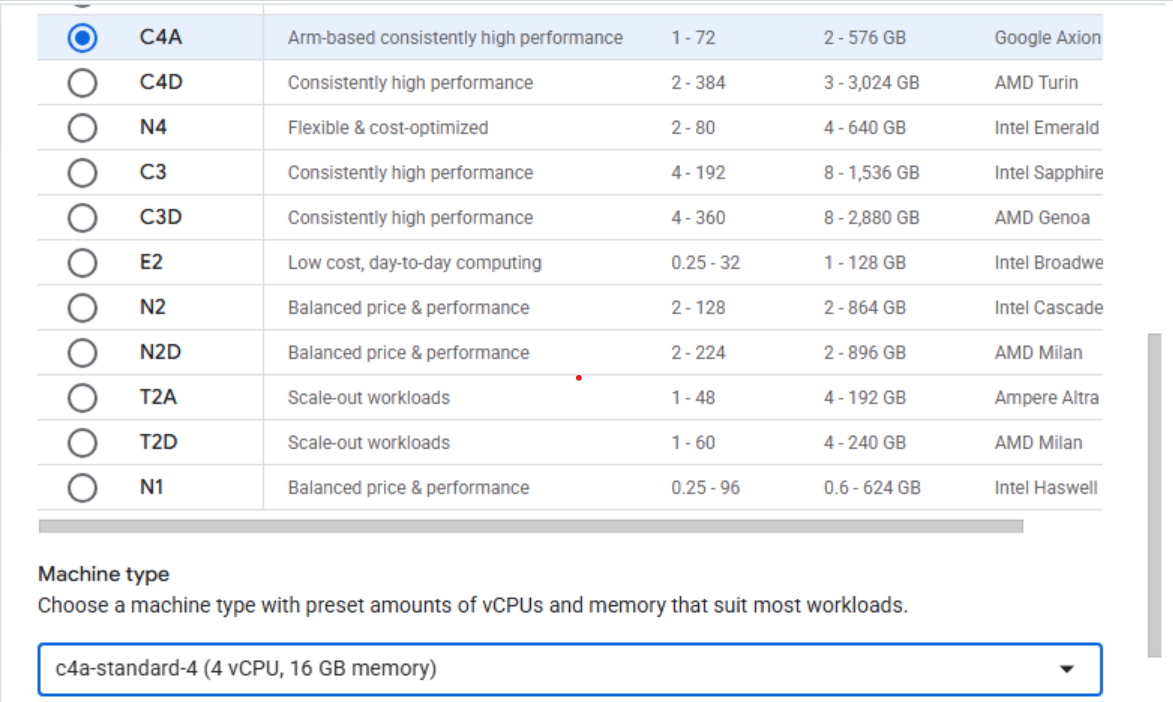 Creating a Google Axion C4A Arm virtual machine in Google Cloud Console
Under OS and Storage, select Change:
- Choose an Arm64-based OS image; for this Learning Path, select SUSE Linux Enterprise Server
- Select your preferred version and ensure you choose the Arm image variant
- Select OK
Under Networking, enable Allow HTTP traffic
Select Create to launch the instance
What’s next?
You’ve successfully provisioned an Arm-based Axion C4A VM on Google Cloud. Your server is ready for PHP installation and cloud-native development on Arm. Next, you’ll install PHP and configure your environment to run dynamic web applications on your new Arm server.