Optimize a sample C++ application on an Arm-based server with Arm Performix
Introduction
Set up Arm Performix
Build a sample C++ dot-product application
Find code hotspots in the scalar dot-product application
Identify CPU pipeline bottlenecks in the scalar dot-product application
Examine instruction patterns in the scalar dot-product application
Optimize the dot-product application with Arm Neon intrinsics
Validate the optimized dot-product application
Next Steps
Optimize a sample C++ application on an Arm-based server with Arm Performix
Introduction
Set up Arm Performix
Build a sample C++ dot-product application
Find code hotspots in the scalar dot-product application
Identify CPU pipeline bottlenecks in the scalar dot-product application
Examine instruction patterns in the scalar dot-product application
Optimize the dot-product application with Arm Neon intrinsics
Validate the optimized dot-product application
Next Steps
Run the Instruction Mix recipe
The Instruction Mix recipe in Arm Performix shows how your code uses different instruction types and Arm architectural features.
In Performix, select the Instruction Mix recipe.
Specify the path to your compiled binary and run it with the same parameters as before:
performix-analysis/dot_scalar 16777216 2000Leaving all other fields as defaults, select Run Recipe to start the analysis. Performix collects data and presents the results.
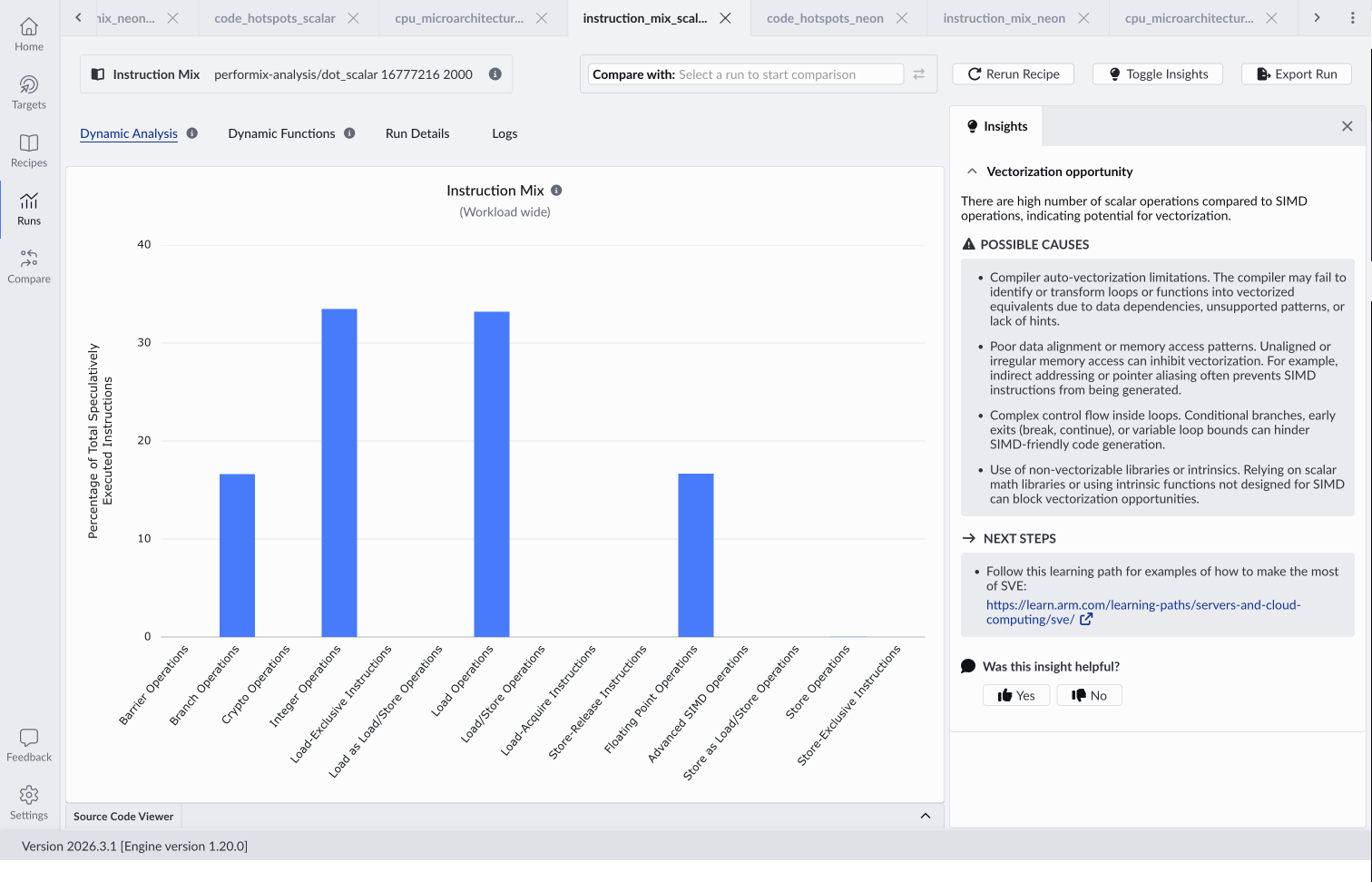 Instruction Mix results for the scalar application
Interpret the results
The Instruction Mix analysis shows the distribution of instruction types used by your application. The exact results depend on your hardware but confirm that the code is dominated by scalar operations with no SIMD usage.
Each loop iteration performs only a small amount of work but still consumes instruction bandwidth. This creates sustained pressure on the frontend because too many instructions are required per unit of useful computation.
The Insights panel identifies the root cause: the application isn’t using SIMD and is missing vectorization opportunities. Vectorization reduces the number of instructions required per element by performing multiple operations per instruction, directly relieving frontend pressure.
The scalar application is frontend bound because it performs too many instructions per unit of useful work. Instruction Mix confirms that it misses SIMD opportunities.
What you’ve accomplished and what’s next
You’ve run the Instruction Mix recipe and interpreted how instruction types are used by the scalar version of the sample C++ application.
Next, you’ll optimize the application using Arm Neon intrinsics.