Optimize a sample C++ application on an Arm-based server with Arm Performix
Introduction
Set up Arm Performix
Build a sample C++ dot-product application
Find code hotspots in the scalar dot-product application
Identify CPU pipeline bottlenecks in the scalar dot-product application
Examine instruction patterns in the scalar dot-product application
Optimize the dot-product application with Arm Neon intrinsics
Validate the optimized dot-product application
Next Steps
Optimize a sample C++ application on an Arm-based server with Arm Performix
Introduction
Set up Arm Performix
Build a sample C++ dot-product application
Find code hotspots in the scalar dot-product application
Identify CPU pipeline bottlenecks in the scalar dot-product application
Examine instruction patterns in the scalar dot-product application
Optimize the dot-product application with Arm Neon intrinsics
Validate the optimized dot-product application
Next Steps
Run the CPU Microarchitecture recipe
The CPU Microarchitecture recipe in Arm Performix provides a Topdown analysis breakdown of how CPU execution capacity is used. You can use this analysis to identify where performance is lost due to stalls or inefficiencies. It also shows whether your application is limited by frontend, backend, memory, or other CPU pipeline effects.
To run the recipe:
In Performix, select the CPU Microarchitecture recipe.
Specify the path to your compiled binary and run it with the same parameters as before:
performix-analysis/dot_scalar 16777216 2000Leaving all other values as defaults, select Run Recipe to start the analysis. Performix collects data and presents the results using Topdown analysis.
Interpret the results
The analysis shows that the application is 0.34% frontend stalled compared to 0.042% backend stalled. The exact values depend on your hardware.
This difference between frontend and backend stalls means the CPU stalls while fetching or decoding instructions, even though backend resources are available. The CPU isn’t compute-bound. Instead, it’s waiting for instructions.
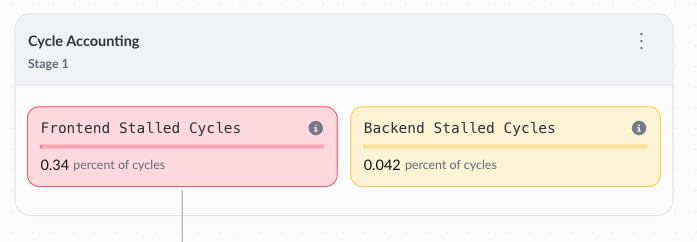 CPU Microarchitecture Topdown summary
Performix provides guidance in the Insights panel to help you understand these results.
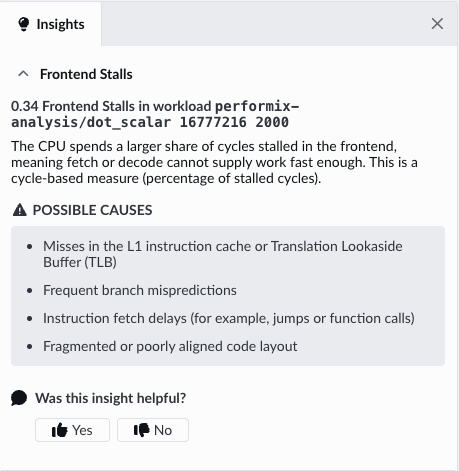 CPU Microarchitecture insights
What you’ve accomplished and what’s next
You now know the application is frontend bound, but this is a tight loop with predictable control flow. Frontend stalls in this context often indicate that the CPU is processing too many instructions per unit of work.
Next, you’ll run the Instruction Mix recipe to confirm this by seeing what types of instructions the CPU executes.