Deploy Phi-4-mini model with ONNX Runtime on Azure Cobalt 100
Introduction
Demo
Build ONNX Runtime and set up the Phi-4-mini Model
Run the Chatbot Server
Interact with the Phi-4-mini Chatbot
Next Steps
Deploy Phi-4-mini model with ONNX Runtime on Azure Cobalt 100
Try a text prompt
To begin, input the text prompt as shown in the example below:
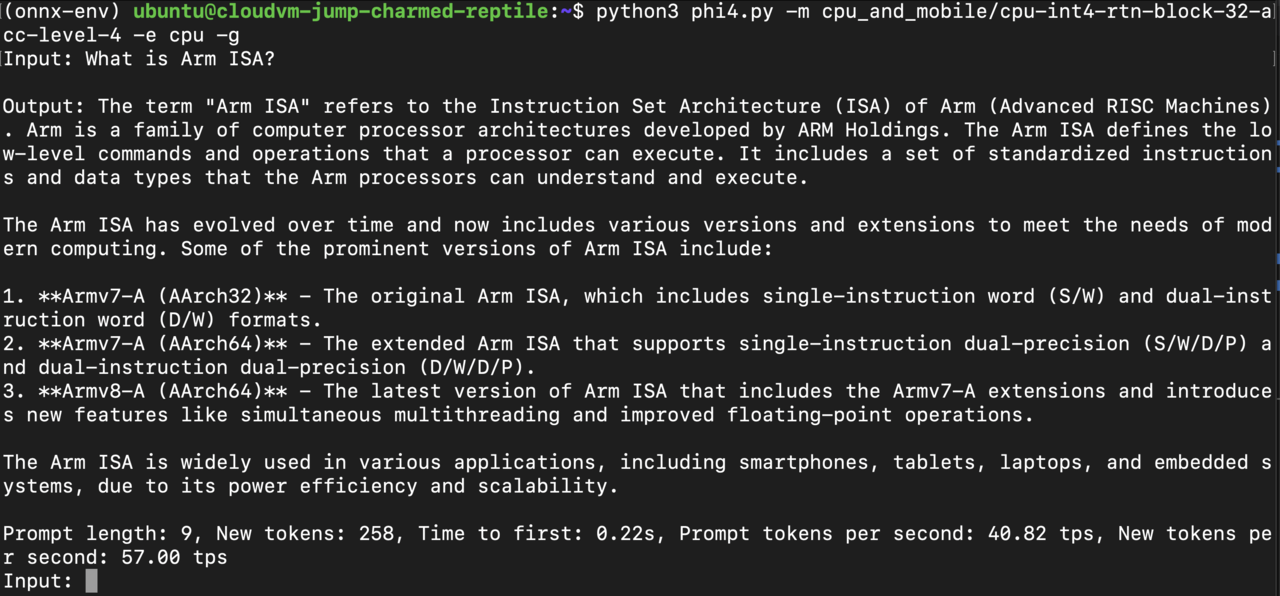
Observe performance metrics
As shown in the example above, the LLM Chatbot performs inference at a speed of ** 57 tokens/second**, with the time to first token being approximately 0.2 second. This highlights the efficiency and responsiveness of the LLM Chatbot in processing queries and generating outputs.
Further interaction and custom applications
You can continue interacting with the chatbot by asking follow-up prompts and observing the performance metrics displayed in the terminal.
This setup shows how to build applications using the Phi-4-mini model. It also highlights the performance benefits of running Phi models on Arm CPUs.