Optimize performance using Link-Time Optimization with GCC
Introduction
An LTO Primer
Deploying LTO
Potential Gains
Next Steps
Optimize performance using Link-Time Optimization with GCC
Compare performance
Link-time optimization delivers measurable improvements across a range of workloads. The SPEC CPU®2017 integer rate (SPECint2017 rate) benchmark suite provides a standardized way to measure these gains. SPEC CPU is an industry-standard benchmark widely used by CPU vendors and compiler teams to evaluate and compare performance. While these benchmarks don’t necessarily reflect the characteristics of every real-world application, they illustrate LTO’s potential impact across different optimization patterns.
In this example, we compiled the benchmarks with GCC 15.1, with and without LTO, and executed them on an Arm Neoverse V2 CPU running Ubuntu 20.04 LTS.
Common optimization flags between runs were as follows:
-mcpu=native -Ofast -fomit-frame-pointer --param ipa-cp-eval-threshold=1 --param ipa-cp-unit-growth=80
Across the benchmark suite, enabling LTO resulted in an improvement in the geometric mean score of approximately 3.4%. Some workloads benefited more noticeably:
mcf(+11%)deepsjeng(+9.9%)leela(+6.6%)
These results highlight how workloads with significant cross-module interaction—particularly those with many function calls across translation units—benefit from the additional whole-program visibility provided by LTO.
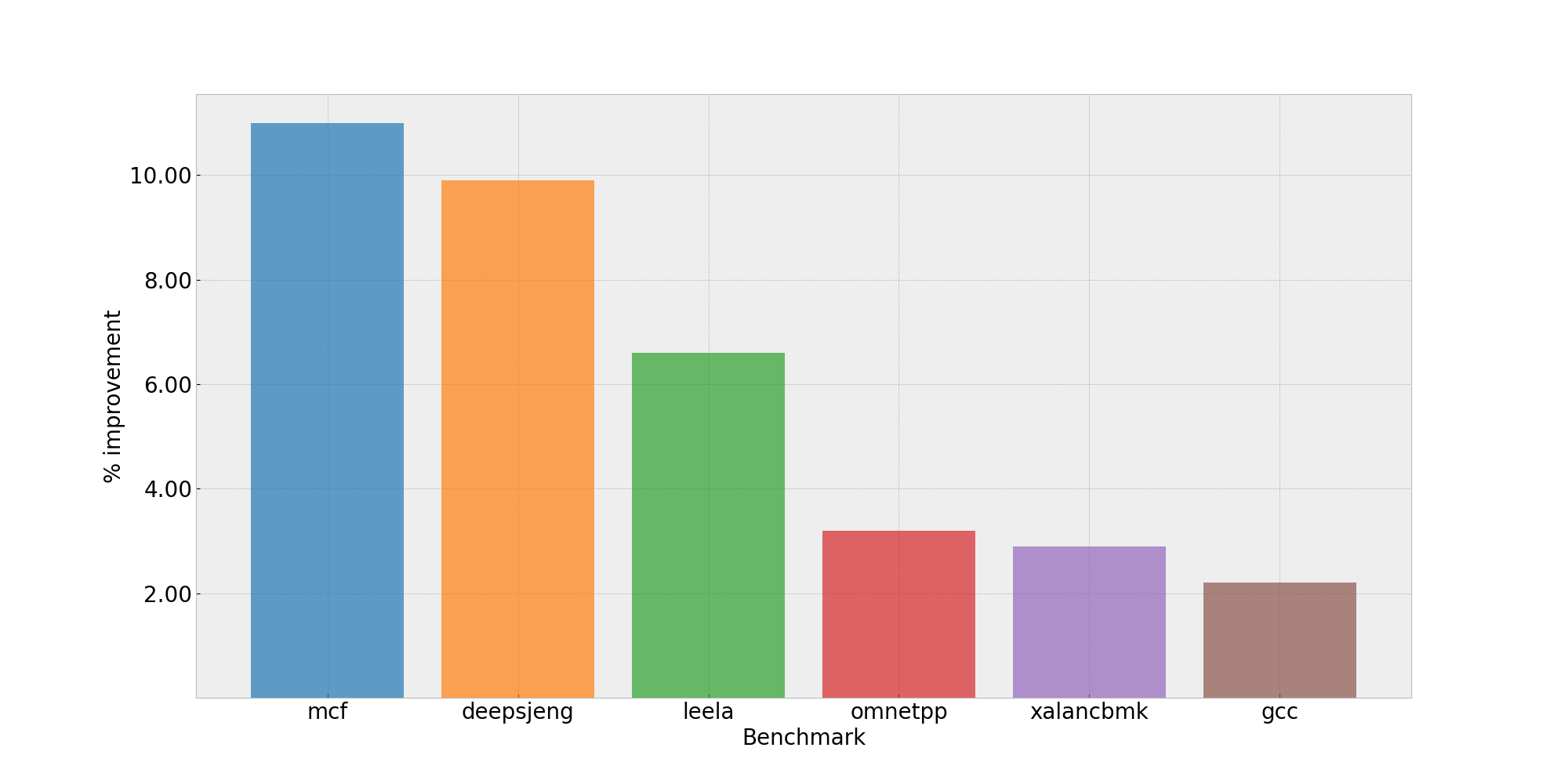 Performance uplift to Specint2017
Code size considerations
While performance improvements are often the primary motivation for enabling LTO, its impact isn’t limited to execution speed. Link-time optimization can also significantly affect the final code size of an executable, with results varying depending on the application’s structure.
As shown in the chart above, LTO’s impact on code size varies across different benchmarks. Some applications experience modest reductions (up to 10%), while others see increases of 15% or more. The variation reflects the balance between dead code elimination and aggressive optimizations like inlining and loop unrolling.
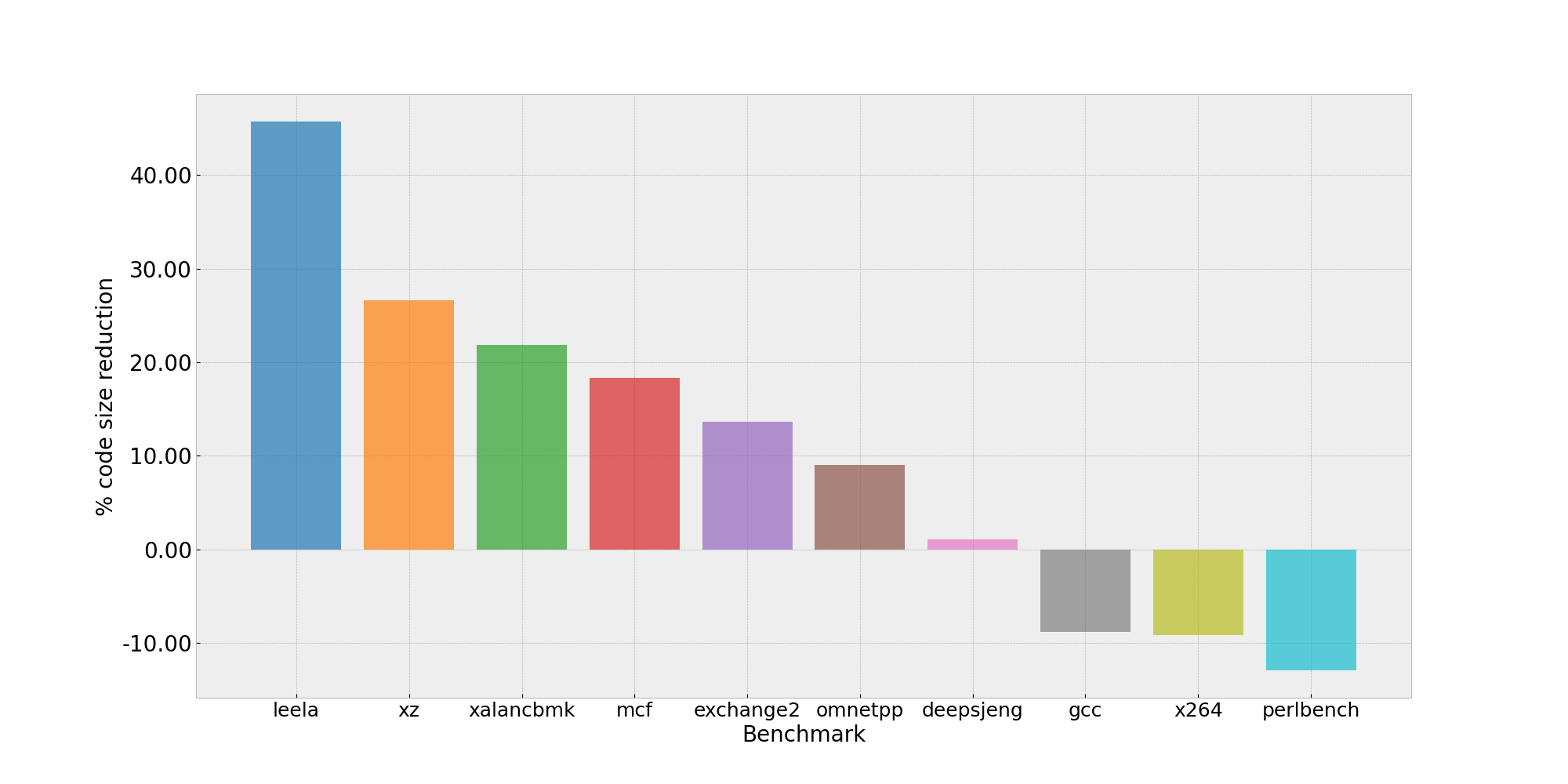 Code size reduction to Specint2017
Potential code size reduction
One common source of code size reduction with LTO is cross-translation-unit dead code elimination. With whole-program visibility, the compiler determines whether non-static functions or global variables are ever referenced anywhere in the final executable.
Without LTO, such symbols must be retained conservatively because they may be referenced by other translation units during linking. With LTO enabled, the compiler makes a definitive decision and eliminates unused functions and variables, reducing the size of the resulting binary. This approach is particularly effective for libraries where only a subset of the exported functions are actually used by the application.
Potential code size increase
While global visibility often enables code size reductions, some LTO-driven optimizations lead to larger binaries when they’re deemed profitable for performance.
Examples include:
- Aggressive loop unrolling when iteration counts are known in specific call paths
- Increased function inlining when call relationships are well understood
LTO also enables function cloning (also called function specialization). When a function exhibits multiple common usage patterns, the compiler may generate specialized versions optimized for frequent cases, while retaining a generic version for less common ones. Although this approach preserves correctness and improves performance for hot paths, it introduces code duplication and increases overall binary size.
These trade-offs reflect the compiler’s cost model, which balances performance gains against code size growth. The net effect depends heavily on the application’s structure. For performance-critical applications, the speed improvements typically outweigh the code size increase.
What you’ve accomplished and what’s next
You’ve examined concrete performance data showing LTO’s impact on SPEC CPU 2017 benchmarks, with gains ranging from modest improvements to double-digit percentage increases for workloads with significant cross-module interaction. You’ve also learned how LTO affects binary size through dead code elimination, aggressive inlining, and function specialization.
You’re now ready to apply LTO to your own applications. Start with -flto -O2 on a test build, measure the results, and adjust configuration options based on your specific performance and binary size requirements.