Benchmark Linux kernel performance on Arm servers with Fastpath
Introduction
Understand the Fastpath kernel benchmarking workflow
Set up the kernel build host
Set up the Fastpath host
Set up the System Under Test
Generate and execute the benchmark plan
Analyze the benchmark results
Next Steps
Benchmark Linux kernel performance on Arm servers with Fastpath
System Under Test prerequisites and instance requirements
Now that kernels are built and the Fastpath host is ready, you’ll set up the System Under Test (SUT)—the machine where benchmarks run on each kernel.
The SUT is a Graviton instance running Ubuntu 24.04 LTS. Fastpath installs your kernels on this machine one at a time, runs benchmarks, and then compares results. An m6g.12xlarge instance provides a good balance of CPU and memory for realistic test workloads.
In this section, you’ll provision the SUT, configure it with the Fastpath software and user account, and validate connectivity from the Fastpath host.
Provision the SUT
The System Under Test (SUT) is the target machine where Fastpath installs your kernels, runs benchmarks on each kernel (one at a time), and when complete, compares and displays the results.
Just like choosing the kernels to test, the instance type of the SUT depends on your use case. For this Learning Path, use a Graviton m6g.12xlarge instance with Ubuntu 24.04 LTS. This instance type provides a good balance of CPU and memory for test benchmarks.
You now need to create a third EC2 instance that will serve as the SUT. This is the machine where benchmark workloads run under different kernel versions.
Create the SUT with the following specifications:
- Name — fastpath-sut
- Operating system — Ubuntu
- AMI — Ubuntu 24.04 LTS (Arm)
- Architecture — 64-bit Arm
- Instance type —
m6g.12xlarge - Key pair — Select or create a key for SSH
- Security group — Allow SSH inbound from your IP and cluster peers
- Storage — 200 GB gp3
Choose whichever provisioning method is most convenient. The tabs below provide the console settings, a CLI example, and a CloudFormation template (including the optional Fastpath security-group peer parameter).
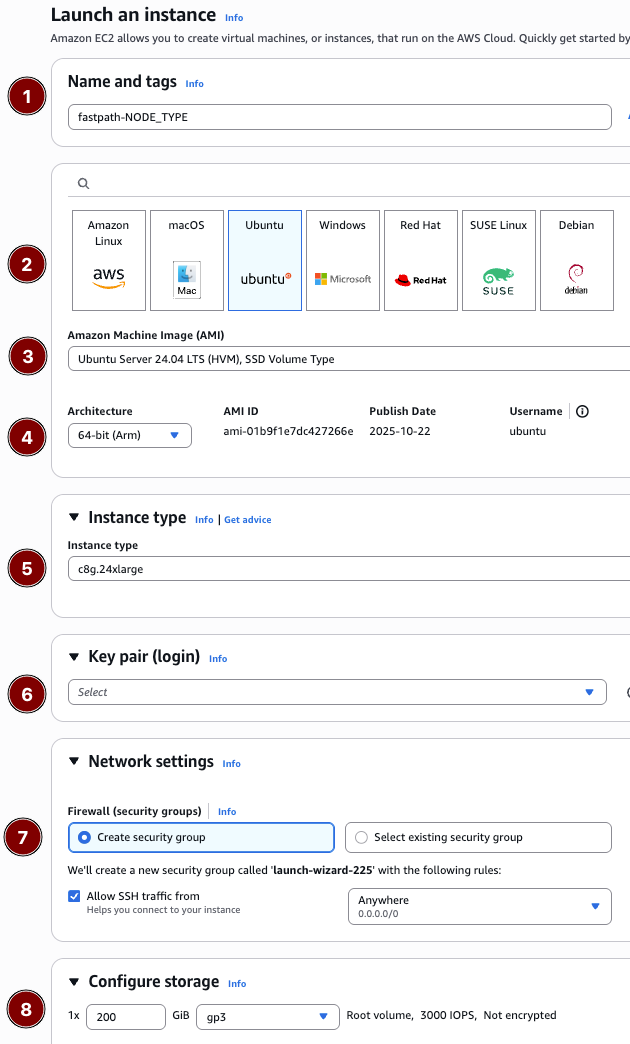 AWS Console
# Replace the placeholders with values from your account/environment
aws ec2 run-instances \
  --image-id resolve:ssm:/aws/service/canonical/ubuntu/server/24.04/stable/current/arm64/hvm/ebs-gp3/ami-id \
  --instance-type m6g.12xlarge \
  --key-name <KEY_PAIR_NAME> \
  --subnet-id <SUBNET_ID> \
  --security-group-ids <SECURITY_GROUP_ID> \
  --associate-public-ip-address \
  --block-device-mappings '[{"DeviceName":"/dev/sda1","Ebs":{"VolumeSize":200,"VolumeType":"gp3","DeleteOnTermination":true}}]' \
  --tag-specifications 'ResourceType=instance,Tags=[{Key=Name,Value=fastpath-sut},{Key=fastpath:role,Value=sut}]'
cat <<'EOF' > sut-host.yaml

# README FIRST!
#
# 1. Click the copy icon to save this file to your clipboard.
# 2. Paste it into your terminal, it will be saved as `sut-host.yaml`
# 3. Go to the CloudFormation console at https://us-east-1.console.aws.amazon.com/cloudformation/home
# 4. Click "Create stack -> With new resources (standard)"
# 5. Choose "Upload a template file" in the CloudFormation console.
# 6. Name the stack "fastpath-sut", enter remaining required values, then click "Submit" to create the stack.

AWSTemplateFormatVersion: '2010-09-09'
Description: >-
  Fastpath Learning Path - System Under Test (SUT) instance for benchmark execution.

Parameters:
  LatestUbuntuAmiId:
    Type: 'AWS::SSM::Parameter::Value<AWS::EC2::Image::Id>'
    Default: /aws/service/canonical/ubuntu/server/24.04/stable/current/arm64/hvm/ebs-gp3/ami-id
    Description: SSM parameter for the latest Ubuntu 24.04 LTS (Arm) AMI.
  InstanceType:
    Type: String
    Default: m6g.12xlarge
    AllowedValues:
      - m6g.8xlarge
      - m6g.12xlarge
      - m6g.16xlarge
    Description: Instance size for the SUT.
  KeyPairName:
    Type: AWS::EC2::KeyPair::KeyName
    Description: Existing EC2 key pair to enable SSH access.
  VpcId:
    Type: AWS::EC2::VPC::Id
    Description: VPC where the SUT will run.
  SubnetId:
    Type: AWS::EC2::Subnet::Id
    Description: Subnet for the SUT (needs network reachability from the Fastpath host).
  SSHAllowedCidr:
    Type: String
    Default: 0.0.0.0/0
    Description: CIDR block allowed to SSH into the SUT (replace with your IP/CIDR).
  SutSecurityGroupId:
    Type: String
    Default: ''
    Description: Security group ID of the Fastpath host to allow peer-to-peer SSH.
  RootVolumeSizeGiB:
    Type: Number
    Default: 200
    MinValue: 100
    MaxValue: 1024
    Description: Size (GiB) of the gp3 root volume.

Conditions:
  HasFastpathPeer: !Not [ !Equals [ !Ref SutSecurityGroupId, '' ] ]

Resources:
  SutSecurityGroup:
    Type: AWS::EC2::SecurityGroup
    Properties:
      GroupDescription: Enable SSH access for the SUT
      VpcId: !Ref VpcId
      SecurityGroupIngress:
        - IpProtocol: tcp
          FromPort: 22
          ToPort: 22
          CidrIp: !Ref SSHAllowedCidr
      SecurityGroupEgress:
        - IpProtocol: -1
          CidrIp: 0.0.0.0/0
      Tags:
        - Key: Name
          Value: fastpath-sut-sg

  SutPeerIngress:
    Type: AWS::EC2::SecurityGroupIngress
    Condition: HasFastpathPeer
    Properties:
      IpProtocol: tcp
      FromPort: 22
      ToPort: 22
      SourceSecurityGroupId: !Ref SutSecurityGroupId
      GroupId: !Ref SutSecurityGroup

  SutHost:
    Type: AWS::EC2::Instance
    Properties:
      ImageId: !Ref LatestUbuntuAmiId
      InstanceType: !Ref InstanceType
      KeyName: !Ref KeyPairName
      SubnetId: !Ref SubnetId
      SecurityGroupIds:
        - !Ref SutSecurityGroup
      BlockDeviceMappings:
        - DeviceName: /dev/sda1
          Ebs:
            VolumeSize: !Ref RootVolumeSizeGiB
            VolumeType: gp3
            Encrypted: true
            DeleteOnTermination: true
      Tags:
        - Key: Name
          Value: fastpath-sut
        - Key: fastpath:role
          Value: sut

Outputs:
  InstanceId:
    Description: ID of the SUT EC2 instance.
    Value: !Ref SutHost
  PublicIp:
    Description: Public IPv4 address for the SUT (if applicable).
    Value: !GetAtt SutHost.PublicIp
  PrivateIp:
    Description: Private IPv4 address for intra-cluster communication.
    Value: !GetAtt SutHost.PrivateIp
  SecurityGroupId:
    Description: Security group attached to the SUT.
    Value: !Ref SutSecurityGroup
EOF
When the instance reports a running state, note the public and private IP addresses as SUT_PUBLIC_IP and SUT_PRIVATE_IP. You’ll need these values later.
Configure the SUT from the Fastpath host
Run a script that remotely installs the Fastpath software and the required fpuser system account. It also sets up SSH access for the new fpuser account by copying over ubuntu@SUT’s ~/.ssh/authorized_keys file.
SSH into the Fastpath host if you aren’t already there. Use agent forwarding with the -A flag and replace the private key .pem file with your key.
In this example, 44.201.174.17 is the Fastpath host public IP, and 172.31.100.19 is the SUT’s private IP. Replace with your own values:
ssh -A -i <your-key.pem> ubuntu@44.201.174.17
Run the configuration script from within the Fastpath virtual environment:
source ~/venv/bin/activate # Activate the Fastpath virtual environment
cd ~/arm_kernel_install_guide # Enter the helper scripts repository
./scripts/configure_fastpath_sut.sh --host 172.31.100.19 # Replace with YOUR SUT private IP
The output is similar to:
        [2026-01-08 18:36:23] Configuring 172.31.100.19 as fastpath SUT (non-interactive mode)
[2026-01-08 18:36:23] Ensuring docker.io, btop, and yq are installed
Warning: Permanently added '172.31.100.19' (ED25519) to the list of known hosts.
Hit:1 http://us-east-1.ec2.ports.ubuntu.com/ubuntu-ports noble InRelease
...
[2026-01-08 18:36:47] Creating/updating fpuser
[2026-01-08 18:36:53] Testing SSH connectivity for fpuser
fpuser
[2026-01-08 18:36:54] Fastpath SUT configuration complete.
[2026-01-08 18:36:54] Note: ubuntu may need to re-login for docker group membership to take effect.
Validate Fastpath connectivity
Ensure the Fastpath host can ping the SUT with the following command:
source ~/venv/bin/activate
~/fastpath/fastpath/fastpath sut fingerprint --user fpuser 172.31.100.19
The output is similar to:
        HW:
  host_name: ip-172-31-100-19
  architecture: aarch64
  cpu_count: 48
  ...
  product_name: m6g.12xlarge
SW:
  kernel_name: 6.14.0-1018-aws
  userspace_name: Ubuntu 24.04.3 LTS
A successful run prints hardware details for the SUT. If the command fails, verify security group rules and rerun the configuration script. If you can SSH into the SUT as fpuser, but the fingerprint command still fails, ensure that docker.io is installed on the SUT.
With the SUT now configured, you’re ready to move on to the next step: setting up and running a Fastpath benchmark! Remember to stop (but not terminate) the build host so that kernel artifacts remain available, and stop any Fastpath/SUT instances when you’re finished testing to avoid unnecessary spend.
What you’ve accomplished and what’s next
In this section, you:
- Provisioned the System Under Test (SUT) instance
- Configured the SUT with Docker and the Fastpath user account
- Validated connectivity between the Fastpath host and the SUT
Next, you’ll generate a benchmark plan and execute Fastpath to test the kernels you built earlier.