Benchmark Linux kernel performance on Arm servers with Fastpath
Introduction
Understand the Fastpath kernel benchmarking workflow
Set up the kernel build host
Set up the Fastpath host
Set up the System Under Test
Generate and execute the benchmark plan
Analyze the benchmark results
Next Steps
Benchmark Linux kernel performance on Arm servers with Fastpath
The kernel testing challenge
Building custom Linux kernels gives you the flexibility to experiment with new features, patches, or performance flags without waiting for official Linux distribution updates. However, building the kernel is only the first step. You also need to deploy, run, and compare results across multiple kernels and benchmarks to understand how your code changes impact real workloads on Arm systems.
This Learning Path shows you how to implement this end-to-end workflow for building, configuring, and running benchmarks using Fastpath on Arm Linux systems.
Utility scripts are provided which abstract low‑level setup work, allowing you to focus on how the systems work together, rather than how every dependency is installed.
If you want to learn more about building Linux kernels for Arm systems, see the Build the Linux kernel Learning Path.
Sequence of operations
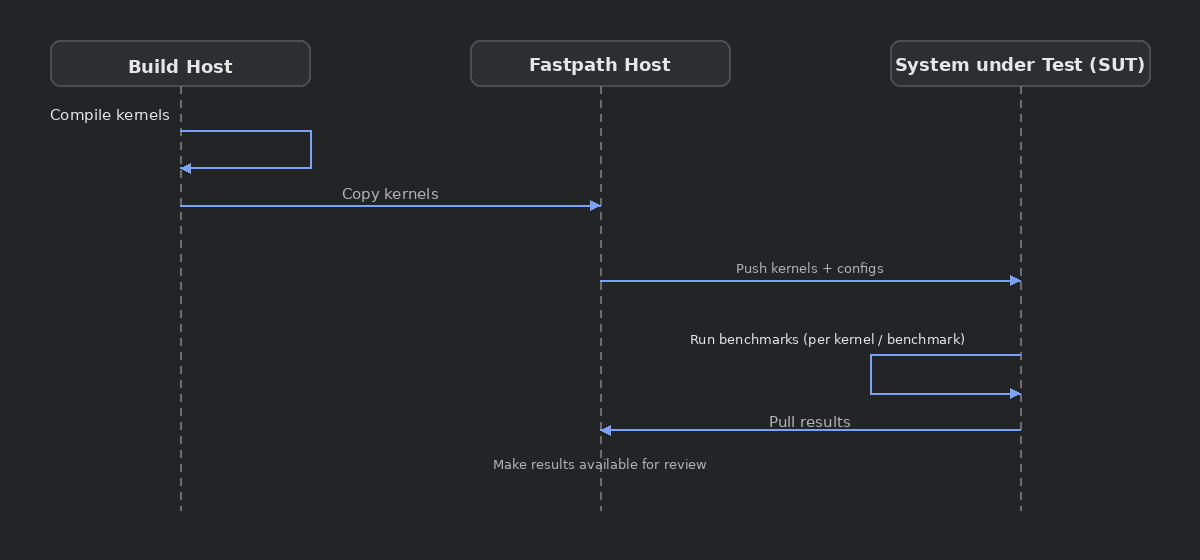
The following diagram shows how the three machines you’ll create work together:
 Fastpath benchmarking workflow: three-machine architecture diagram
Kernel build host
The kernel build host is responsible for producing kernel artifacts. Using build scripts, it installs the required development environment and calls tuxmake to build kernels in a consistent and repeatable way.
System Under Test (SUT)
The SUT host is a clean system where benchmark workloads run. It’s the system you’re doing performance testing on.
The provided utility scripts make it easy to prepare the SUT by installing prerequisites such as Docker and the Fastpath system account.
Fastpath host
The Fastpath host acts as the control plane for benchmarking tasks. Provided utility scripts help you copy kernels from the build host to the Fastpath host, enabling it to execute benchmarks on the SUT and aggregate benchmark run results.
Workflow steps
Each section in this Learning Path corresponds to a step in the flow above. For each section, the same high-level pattern applies:
- Create the required cloud instance
- Run utility script setup for that machine
- Use the machine for its intended purpose
The goal is to understand how the pieces fit together and how each machine contributes to the overall benchmarking workflow. You’ll work through the setup systematically, with each step building on the previous one.
You’re ready to begin setting up the build machine.