Benchmark Linux kernel performance on Arm servers with Fastpath
Introduction
Understand the Fastpath kernel benchmarking workflow
Set up the kernel build host
Set up the Fastpath host
Set up the System Under Test
Generate and execute the benchmark plan
Analyze the benchmark results
Next Steps
Benchmark Linux kernel performance on Arm servers with Fastpath
With newly compiled kernels ready and waiting on the build host, it’s time to set up the Fastpath host.
The Fastpath host will manage testing against the system under test (SUT) and coordinate benchmarking runs.
Provision the Fastpath host
You now need to create a second EC2 instance that will serve as the Fastpath host. This host orchestrates the benchmarking workflow by managing kernel deployment to the SUT and collecting test results.
Create the Fastpath host with the following specifications:
- Name — fastpath-host
- Operating system — Ubuntu
- AMI — Ubuntu 24.04 LTS (Arm)
- Architecture — 64-bit Arm
- Instance type —
m6g.4xlarge - Key pair — Select or create a key for SSH
- Security group — Allow SSH inbound from your IP and cluster peers
- Storage — 200 GB gp3
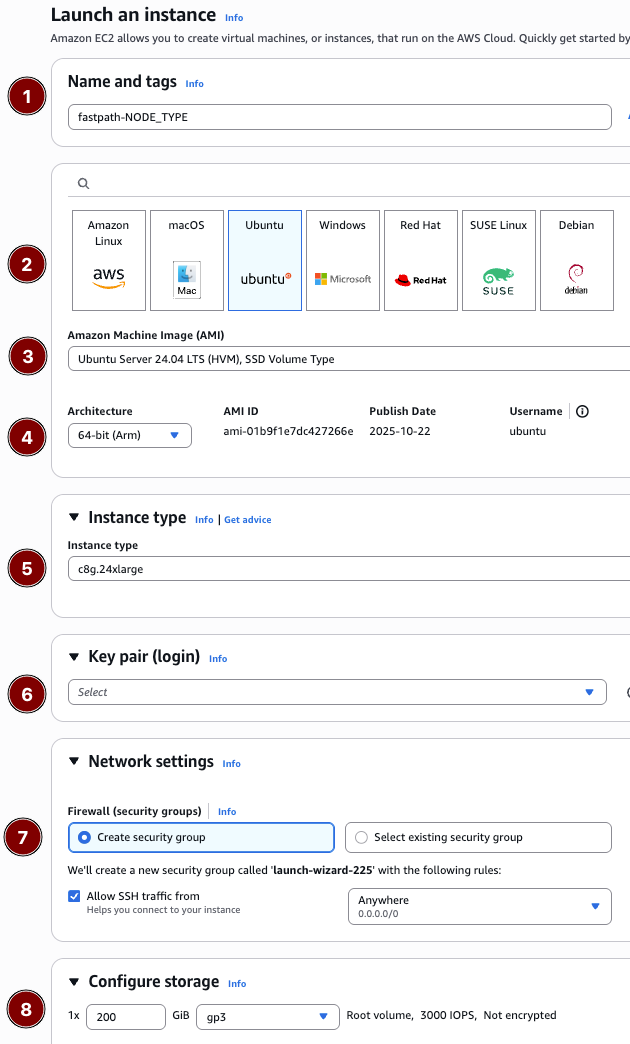 AWS Console
# Replace the placeholders with values from your account/environment
aws ec2 run-instances \
  --image-id resolve:ssm:/aws/service/canonical/ubuntu/server/24.04/stable/current/arm64/hvm/ebs-gp3/ami-id \
  --instance-type m6g.4xlarge \
  --key-name <KEY_PAIR_NAME> \
  --subnet-id <SUBNET_ID> \
  --security-group-ids <SECURITY_GROUP_ID> \
  --associate-public-ip-address \
  --block-device-mappings '[{"DeviceName":"/dev/sda1","Ebs":{"VolumeSize":200,"VolumeType":"gp3","DeleteOnTermination":true}}]' \
  --tag-specifications 'ResourceType=instance,Tags=[{Key=Name,Value=fastpath-host},{Key=fastpath:role,Value=controller}]'
cat <<'EOF' > fastpath-host.yaml

# README FIRST!
#
# 1. Click the copy icon to save this file to your clipboard.
# 2. Paste it into your terminal, it will be saved as `fastpath-host.yaml`
# 3. Go to the CloudFormation console at https://us-east-1.console.aws.amazon.com/cloudformation/home
# 4. Click "Create stack -> With new resources (standard)"
# 5. Choose "Upload a template file" in the CloudFormation console.
# 6. Name the stack "fastpath-host", enter remaining required values, then click "Submit" to create the stack.

AWSTemplateFormatVersion: '2010-09-09'
Description: >-
  Fastpath Learning Path - Fastpath host (controller) instance for benchmarking orchestration.

Parameters:
  LatestUbuntuAmiId:
    Type: 'AWS::SSM::Parameter::Value<AWS::EC2::Image::Id>'
    Default: /aws/service/canonical/ubuntu/server/24.04/stable/current/arm64/hvm/ebs-gp3/ami-id
    Description: SSM parameter for the latest Ubuntu 24.04 LTS (Arm) AMI.
  InstanceType:
    Type: String
    Default: m6g.4xlarge
    AllowedValues:
      - m6g.4xlarge
      - m6g.8xlarge
    Description: Instance size for the Fastpath host.
  KeyPairName:
    Type: AWS::EC2::KeyPair::KeyName
    Description: Existing EC2 key pair to enable SSH access.
  VpcId:
    Type: AWS::EC2::VPC::Id
    Description: VPC where the Fastpath host will run.
  SubnetId:
    Type: AWS::EC2::Subnet::Id
    Description: Subnet (public or private with outbound access) for the Fastpath host.
  SSHAllowedCidr:
    Type: String
    Default: 0.0.0.0/0
    Description: CIDR block allowed to SSH into the Fastpath host.
  FastpathSecurityGroupId:
    Type: String
    Default: ''
    Description: Security group ID of the Fastpath host to allow peer-to-peer SSH.
  RootVolumeSizeGiB:
    Type: Number
    Default: 200
    MinValue: 100
    MaxValue: 1024
    Description: Size (GiB) of the gp3 root volume.


Conditions:
  HasFastpathPeer: !Not [ !Equals [ !Ref FastpathSecurityGroupId, '' ] ]

Resources:
  FastpathSecurityGroup:
    Type: AWS::EC2::SecurityGroup
    Properties:
      GroupDescription: Enable SSH access for the Fastpath host
      VpcId: !Ref VpcId
      SecurityGroupIngress:
        - IpProtocol: tcp
          FromPort: 22
          ToPort: 22
          CidrIp: !Ref SSHAllowedCidr
      SecurityGroupEgress:
        - IpProtocol: -1
          CidrIp: 0.0.0.0/0
      Tags:
        - Key: Name
          Value: fastpath-host-sg

  FastpathHost:
    Type: AWS::EC2::Instance
    Properties:
      ImageId: !Ref LatestUbuntuAmiId
      InstanceType: !Ref InstanceType
      KeyName: !Ref KeyPairName
      SubnetId: !Ref SubnetId
      SecurityGroupIds:
        - !Ref FastpathSecurityGroup
      BlockDeviceMappings:
        - DeviceName: /dev/sda1
          Ebs:
            VolumeSize: !Ref RootVolumeSizeGiB
            VolumeType: gp3
            Encrypted: true
            DeleteOnTermination: true
      Tags:
        - Key: Name
          Value: fastpath-host
        - Key: fastpath:role
          Value: controller

Outputs:
  InstanceId:
    Description: ID of the Fastpath host EC2 instance.
    Value: !Ref FastpathHost
  PublicIp:
    Description: Public IPv4 address for the Fastpath host (if applicable).
    Value: !GetAtt FastpathHost.PublicIp
  PrivateIp:
    Description: Private IPv4 address for intra-cluster communication.
    Value: !GetAtt FastpathHost.PrivateIp
  SecurityGroupId:
    Description: Security group attached to the Fastpath host.
    Value: !Ref FastpathSecurityGroup
EOF
When the instance reports a running state, note the public and private IP addresses as FASTPATH_PUBLIC_IP and FASTPATH_PRIVATE_IP. You’ll need these values later.
Install Fastpath dependencies
Repeat the dependency installation process so the Fastpath host has the same tools and helper scripts as the build host.
SSH to the Fastpath host and run the commands:
sudo apt update
sudo apt install -y git python3 python3-pip python3-venv python-is-python3 build-essential bc rsync dwarves flex bison libssl-dev libelf-dev btop yq jq
git clone https://github.com/geremyCohen/arm_kernel_install_guide.git ~/arm_kernel_install_guide
cd ~/arm_kernel_install_guide
chmod +x scripts/*.sh
Copy kernels from build host to Fastpath host
When you begin testing, the Fastpath host will push the compiled kernels to the SUT for testing. The kernels are currently on the build host, so this step copies them to the Fastpath host.
Locate the value you recorded earlier for BUILD_PRIVATE_IP.
On the Fastpath host, navigate into the arm_kernel_install_guide folder you just cloned and run the pull_kernel_artifacts.sh script, substituting BUILD_PRIVATE_IP with the private IP of the build host:
cd ~/arm_kernel_install_guide
./scripts/pull_kernel_artifacts.sh --host 172.31.110.110
The output shows the files being copied:
        [2026-01-08 18:35:14] Pulling kernel artifacts:
[2026-01-08 18:35:14]   Host        : 172.31.110.110
[2026-01-08 18:35:14]   SSH user    : ubuntu
[2026-01-08 18:35:14]   Remote dir  : /home/ubuntu/kernels
[2026-01-08 18:35:14]   Local dir   : /home/ubuntu/kernels
[2026-01-08 18:35:14]   Versions    : auto-detected
[2026-01-08 18:35:15] Copying 6.18.1-ubuntu+/Image.gz
[2026-01-08 18:35:16] Copying 6.18.1-ubuntu+/modules.tar.xz
[2026-01-08 18:35:18] Copying optional 6.18.1-ubuntu+/config.stock
[2026-01-08 18:35:18] Copying 6.19.0-rc1-ubuntu+/Image.gz
[2026-01-08 18:35:19] Copying 6.19.0-rc1-ubuntu+/modules.tar.xz
[2026-01-08 18:35:21] Copying optional 6.19.0-rc1-ubuntu+/config.stock
[2026-01-08 18:35:21] Artifact pull complete.
When the script completes, the Fastpath host is ready with the kernels it needs for testing.
Power down the build host
After copying the artifacts from the build host, stop or terminate it to avoid incurring additional costs. If you want to keep it for future kernel builds, stopping it is sufficient.
If you decide to keep the machine around as a kernel copy host, you can modify it to a smaller instance type such as m6g.4xlarge to save on costs when it’s running. The larger 12xlarge instance is only needed during kernel compilation.
Configure the Fastpath host
With kernels copied over, the final step is to install and configure the Fastpath software.
From the arm_kernel_install_guide folder, run the host configuration script targeting localhost:
./scripts/configure_fastpath_host.sh --host localhost
The output shows the configuration confirmation:
        [2026-01-08 18:35:27] Configuring fastpath host localhost (non-interactive mode)
[2026-01-08 18:35:27] Installing prerequisites
...
[2026-01-08 18:36:10] Fastpath host setup complete.
The script creates a Python virtual environment at ~/venv and installs the Fastpath CLI alongside its dependencies.
Whenever you log back into the machine, activate the virtual environment before running any Fastpath commands:
source ~/venv/bin/activate
With the Fastpath host configured, you’re now ready to provision the system under test (SUT) and verify connectivity between them.
What you’ve accomplished and what’s next
In this section, you:
- Provisioned the Fastpath host instance
- Copied compiled kernel artifacts from the build host
- Installed and configured the Fastpath software and Python virtual environment
Next, you’ll provision and configure the System Under Test (SUT) where the benchmark workloads will run.