Deploy Django on Arm-based Google Cloud C4A
Introduction
Get started with Django on Google Axion C4A
Configure firewall rules for Django on Google Cloud
Create a Google Axion C4A Arm virtual machine on GCP
Install Django on your Arm-based VM
Verify Django installation and run the development server
Deploy Django on GKE Axion with managed data services
Build a Django REST API with PostgreSQL and Redis
Containerize and deploy Django on Axion GKE
Benchmark Django application performance on Arm
Next Steps
Deploy Django on Arm-based Google Cloud C4A
Introduction
Get started with Django on Google Axion C4A
Configure firewall rules for Django on Google Cloud
Create a Google Axion C4A Arm virtual machine on GCP
Install Django on your Arm-based VM
Verify Django installation and run the development server
Deploy Django on GKE Axion with managed data services
Build a Django REST API with PostgreSQL and Redis
Containerize and deploy Django on Axion GKE
Benchmark Django application performance on Arm
Next Steps
Containerize and deploy Django on Axion GKE
This section shows you how to package your Django REST API into a production-ready container and deploy it on GKE running Axion Arm64 processors.
Create a Docker image
This step packages your Django API and all its dependencies into a portable container image that can run on any Axion Arm64 node.
Create a file called requirements.txt and insert the following:
django
djangorestframework
psycopg2-binary
django-redis
gunicorn
Create a file called Dockerfile and insert the following:
FROM python:3.11-slim
WORKDIR /app
COPY . .
RUN pip install --no-cache-dir -r requirements.txt
CMD ["gunicorn","django_api.wsgi:application","--bind","0.0.0.0:8000","--workers","3"]
This Dockerfile defines how to build your Django container for production deployment.
Build and push the image
Build the image on an Arm machine and push it to Artifact Registry, ensuring Kubernetes pulls an Arm-native image.
Replace PROJECT_ID with your current project.
Build the docker image:
docker build -t us-central1-docker.pkg.dev/PROJECT_ID/django-arm/api:1.0 .
Push the built image:
docker push us-central1-docker.pkg.dev/PROJECT_ID/django-arm/api:1.0
The image is now stored in Artifact Registry and ready for deployment.
Deploy to GKE
Kubernetes Deployments define how many containers run and where. The nodeSelector forces pods onto Axion ARM64 nodes.
First, make a directory:
mkdir ./k8s
Next, create k8s/deployment.yaml file with the following contents (replace PROJECT_ID with your current project):
apiVersion: apps/v1
kind: Deployment
metadata:
  name: django-api
spec:
  replicas: 2
  selector:
    matchLabels:
      app: django-api
  template:
    metadata:
      labels:
        app: django-api
    spec:
      nodeSelector:
        kubernetes.io/arch: arm64
      containers:
      - name: django
        image: us-central1-docker.pkg.dev/PROJECT_ID/django-arm/api:1.0
        ports:
        - containerPort: 8000
        env:
        - name: DJANGO_SETTINGS_MODULE
          value: django_api.settings
Apply the deployment:
kubectl apply -f k8s/deployment.yaml
Verify pods are running on Axion Arm nodes:
kubectl get pods -o wide
The output is similar to:
        NAME                          READY   STATUS    RESTARTS   AGE     IP         NODE                                                NOMINATED NODE   READINESS GATES
django-api-XXXXXX   1/1     Running   0          3h52m   10.0.2.9   gke-django-axion-cluster-axion-pool-xxxxxxx   <none>           <none>
django-api-XXXXXX   1/1     Running   0          3h52m   10.0.1.9   gke-django-axion-cluster-axion-pool-xxxxxxx   <none>           <none>
The Django API is running as replicated containers on Axion Arm64 nodes.
Create a Kubernetes service (LoadBalancer)
A Service exposes your pods to the internet using Google Cloud’s managed load balancer.
Create k8s/service.yaml:
apiVersion: v1
kind: Service
metadata:
  name: django-api
spec:
  type: LoadBalancer
  selector:
    app: django-api
  ports:
  - port: 80
    targetPort: 8000
Apply the service configuration:
kubectl apply -f k8s/service.yaml
Validate the service
kubectl get svc django-api
        NAME         TYPE           CLUSTER-IP       EXTERNAL-IP   PORT(S)        AGE
django-api   LoadBalancer   34.118.226.245   34.45.23.92   80:31700/TCP   3h57m
Wait until the EXTERNAL-IP field is populated before proceeding.
Test the application
Open the following URL in browser:
http://<EXTERNAL-IP>/healthz/
The output is similar to:
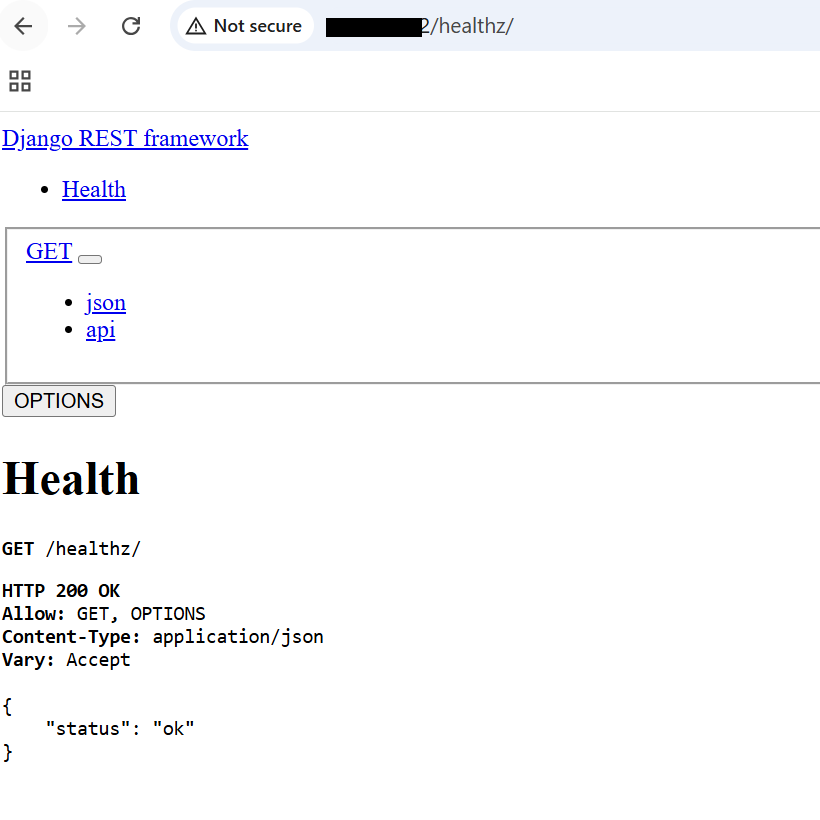 Django health check validation
The Arm-based Django API is now accessible over the internet.
What you’ve accomplished and what’s next
In this section, you:
- Containerized your Django REST API for Arm64
- Pushed the image to Artifact Registry
- Deployed the application to GKE running on Axion nodes
- Exposed the service through a Kubernetes LoadBalancer
- Validated public access to your Django API
Next, you’ll benchmark your Django application to measure performance on Arm infrastructure.