Optimize hot functions
Use the insights from Arm Performix to focus optimizations on the hottest functions. The flame graph from the previous step shows that __hypot is invoked by Mandelbrot::getIterations to calculate the absolute value of a complex number. One option worth exploring is replacing the libm implementation with an optimized alternative, but first consider the more targeted changes below.
Looking at the Mandelbrot::getIterations function, there are two clear optimization opportunities.
    while (iterations < MAX_ITERATIONS){
        z = (z*z) + c;
        if (abs(z) > THRESHOLD){
            break;
        }
        iterations++;
    }
Optimization 1: Limiting loop boundary
The iteration count is bounded by MAX_ITERATIONS, defined as 1024, a static const integer in the Mandelbrot.h header. Halving this to 512 reduces the maximum work per pixel but you will need to verify that the change in image quality is acceptable.
public:
    ...
    static const int MAX_ITERATIONS = (1<<10);
    ...
On the remote server, reduce MAX_ITERATIONS in Mandelbrot.h to (1<<9) (512), update the output image filename in main.cpp to a different name (for example: green-512.bmp)so you can compare the output with the baseline image, then rebuild:
make clean
make single_thread DEBUG=1
Select the refresh icon in the top right to rerun the recipe, then switch to comparison mode to view differences between runs. Under the Run Details tab, the run duration drops from 1m 0s to 0m 32s — almost proportional to the reduction in MAX_ITERATIONS. The trade-off to verify is whether the image quality is still acceptable.
There is negligible difference in perceived image quality when halving MAX_ITERATIONS.
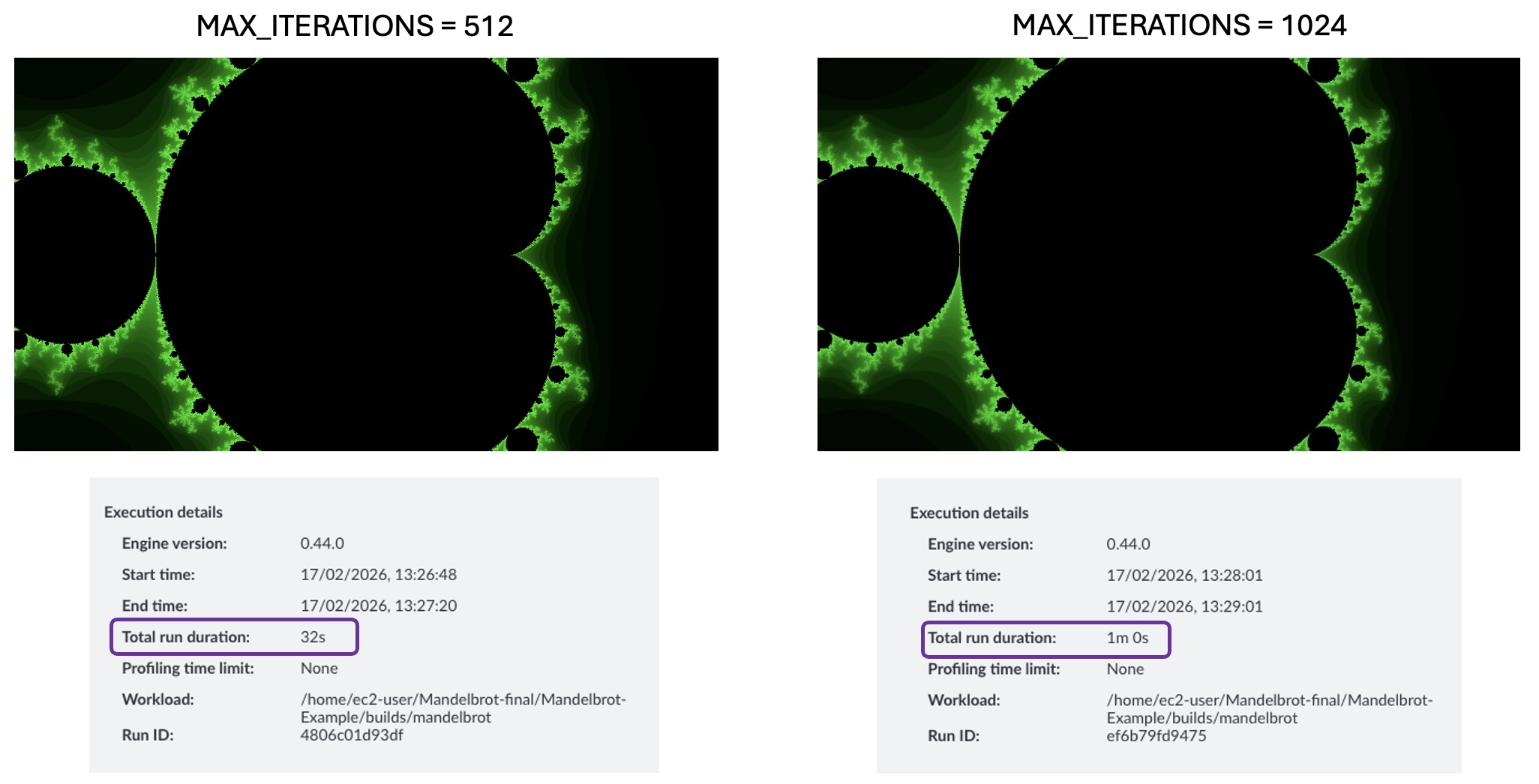 Image quality comparison: 1024 vs 512 iterations
Optimization 2: Parallelizing the hot function
The loop in Mandelbrot::getIterations has no loop-carried dependencies — each iteration’s result is independent of any other. This means you can parallelize the hot function across multiple threads if your CPU has multiple cores.
The repository contains a parallel build target.
The src/mandelbrot_parallel.cpp parallelizes the Mandelbrot::draw function, which is an earlier function in the call stack that eventually calls __hypot. Before building, update the myplot.draw() call in main.cpp to use an absolute output path:
myplot.draw("/home/ec2-user/Mandelbrot-Example/images/Green-Parallel-512.bmp", Mandelbrot::Mandelbrot::GREEN);
Build the example. This creates a binary ./builds/mandelbrot-parallel that takes a single numeric command-line argument to set the number of threads.
make clean
make parallel DEBUG=1
Update the binary path in Arm Performix to ./builds/mandelbrot_parallel_debug and pass the desired thread count as an argument, then rerun the recipe from the host.
To compare with a previous run, switch to comparison mode. Under the Run Details tab, execution time drops further from 0m 32s to 7s with 32 threads.
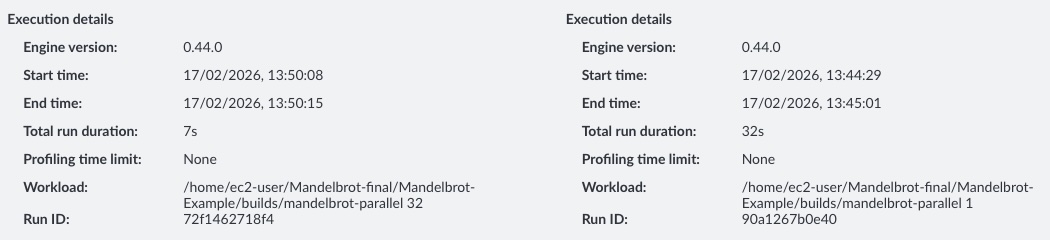 Execution time comparison: single-threaded vs parallelized build
The proportion of samples has not changed significantly overall, but with 64 threads the percentage of samples landing on Mandelbrot::draw has reduced by 7%. To further improve execution time, you can continue optimizing Mandelbrot::draw.
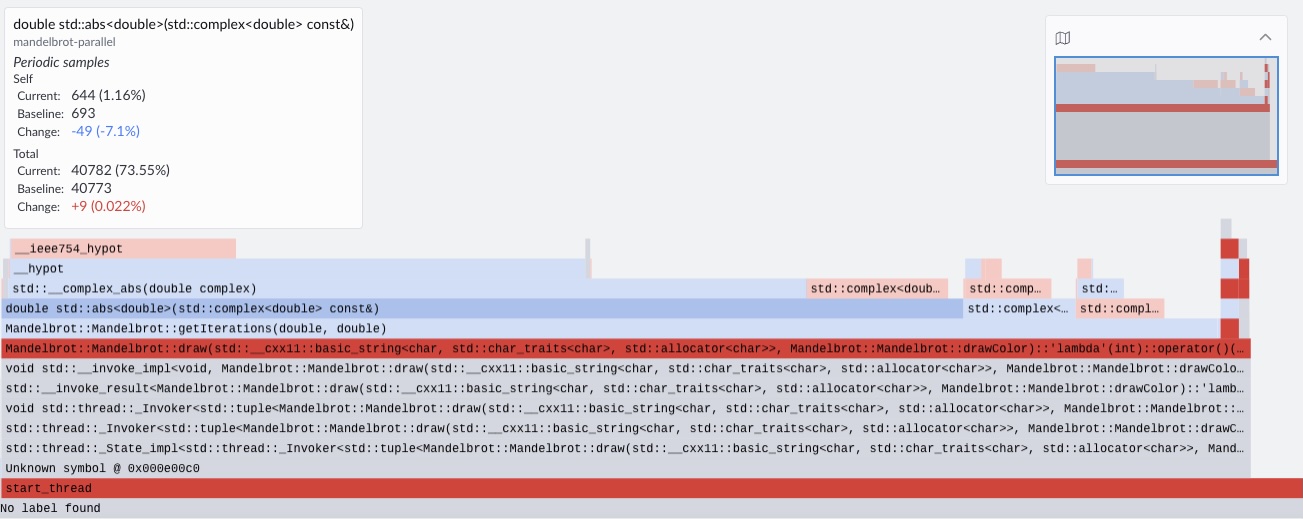 Flame graph comparison: single-threaded vs parallelized build
The total run duration shown in Arm Performix includes tooling setup and data analysis time, not just application execution time. To measure only the application, use the time command: the application now runs in approximately 1 second — close to a 100x improvement over the original single-threaded baseline.
(Optional challenge) Additional optimizations
The Makefile uses the -O0 flag when the DEBUG=1 argument is passed in. This disables all compiler optimizations. Try experimenting with higher optimization levels, different loop boundary sizes, and thread counts. See the Learning Path
Get started with compiler optimization flags
for guidance. You might also want to explore vectorized math libraries that could replace the libm hypotenuse function, such as the
Arm Performance Libraries vector math functions
.
Summary
In this Learning Path, you reduced the runtime of the Mandelbrot example by focusing on the hottest code paths—cutting execution time from around 1 minute to ~1 second through targeted optimization and parallelization. While this example is relatively simple and the optimizations are more obvious, the same principle applies to real-world workloads: optimize what matters most first, based on measurement.
The Code Hotspots recipe is designed to quickly identify an application’s most CPU-time-dominant functions, giving you a clear, evidence-based starting point for performance work. By surfacing where execution time is actually spent, it ensures your optimizations target the parts of the code most likely to deliver the largest gains.
This is often one of the first profiling steps to run when assessing an application’s performance — especially to determine which functions dominate runtime and should be prioritized. Once hotspots are identified, you can follow up with deeper function-specific analysis, such as memory investigations or top-down studies, and build microbenchmarks around hot functions to explore lower-level bottlenecks and uncover additional optimization opportunities.