Deploy CircleCI Arm Native Workflows on AWS EC2 Graviton
Introduction
Get Started with CircleCI on AWS Graviton
Create an AWS EC2 Arm64 Graviton Instance
Install CircleCI CLI
Create a resource class in CircleCI
Install CircleCI machine runner on AWS Graviton
Verify CircleCI Arm64 Self-Hosted runner
Next Steps
Deploy CircleCI Arm Native Workflows on AWS EC2 Graviton
Install CircleCI machine runner on AWS Graviton
This section provides step-by-step instructions to install and configure the CircleCI Machine Runner. With this setup, your self-hosted Arm64 environment can efficiently execute CircleCI jobs directly on the Graviton architecture, enabling faster builds and improved performance for ARM-based workloads.
Add the CircleCI package repository
For Debian/Ubuntu-based systems running on AWS Graviton (Arm64), first add the official CircleCI repository. This ensures you can install the CircleCI Runner package directly using apt.
curl -s https://packagecloud.io/install/repositories/circleci/runner/script.deb.sh?any=true | sudo bash
After successful execution, the CircleCI repository will be added under /etc/apt/sources.list.d/. Run the command to verify:
ls /etc/apt/sources.list.d/
Install the CircleCI runner
To install the CircleCI runner, use the following command:
sudo apt-get install -y circleci-runner
This command installs the latest CircleCI Machine Runner for your Arm64 system. The runner program is placed in /usr/bin/, and its configuration files are stored in /etc/circleci-runner/.
Configure the runner authentication token
Update the CircleCI runner configuration with your authentication token. This token is generated from the resource class you created in the CircleCI Dashboard.
export RUNNER_AUTH_TOKEN="YOUR_AUTH_TOKEN"
sudo sed -i "s/<< AUTH_TOKEN >>/$RUNNER_AUTH_TOKEN/g" /etc/circleci-runner/circleci-runner-config.yaml
Enable and start the CircleCI runner
Set the CircleCI runner service to start automatically and verify it is running:
sudo systemctl enable circleci-runner
sudo systemctl start circleci-runner
sudo systemctl status circleci-runner
If the status shows active (running), your runner is successfully installed and connected to CircleCI.
        ● circleci-runner.service - Run the CircleCI self-hosted runner agent
     Loaded: loaded (/usr/lib/systemd/system/circleci-runner.service; enabled; preset: enabled)
     Active: active (running) since Fri 2025-10-17 05:33:20 UTC; 51min ago
   Main PID: 2226 (circleci-runner)
      Tasks: 9 (limit: 18717)
     Memory: 53.0M (peak: 66.9M)
        CPU: 1.249s
     CGroup: /system.slice/circleci-runner.service
             └─2226 /usr/bin/circleci-runner machine -c /etc/circleci-runner/circleci-runner-config.yaml

Oct 17 05:41:28 ip-172-31-34-224 circleci-runner[2226]: 05:41:28 7b67e 24.210ms worker loop: claim:  app.backoff_ms=5000 app.>
Oct 17 06:00:08 ip-172-31-34-224 circleci-runner[2226]: 06:00:08 a8093 22.942ms POST /api/v3/runner/claim app.loop_name=claim>
Oct 17 06:00:08 ip-172-31-34-224 circleci-runner[2226]: 06:00:08 a8093 23.028ms claim app.loop_name=claim:  mode=agent result>
Oct 17 06:00:08 ip-172-31-34-224 circleci-runner[2226]: 06:00:08 a8093 23.064ms worker loop: claim:  app.backoff_ms=5000 app.>
Oct 17 06:04:49 ip-172-31-34-224 circleci-runner[2226]: 06:04:49 73039 19.847ms POST /api/v3/runner/claim app.loop_name=claim>
Oct 17 06:04:49 ip-172-31-34-224 circleci-runner[2226]: 06:04:49 73039 19.936ms claim app.loop_name=claim:  mode=agent result>
Oct 17 06:04:49 ip-172-31-34-224 circleci-runner[2226]: 06:04:49 73039 19.971ms worker loop: claim:  app.backoff_ms=5000 app.>
Oct 17 06:19:13 ip-172-31-34-224 circleci-runner[2226]: 06:19:13 c34c1 22.392ms POST /api/v3/runner/claim app.loop_name=claim>
Oct 17 06:19:13 ip-172-31-34-224 circleci-runner[2226]: 06:19:13 c34c1 22.479ms claim app.loop_name=claim:  mode=agent result>
Oct 17 06:19:13 ip-172-31-34-224 circleci-runner[2226]: 06:19:13 c34c1 22.514ms worker loop: claim:  app.backoff_ms=5000 app.>
This confirms that the CircleCI Runner is actively connected to your CircleCI account and ready to accept jobs.
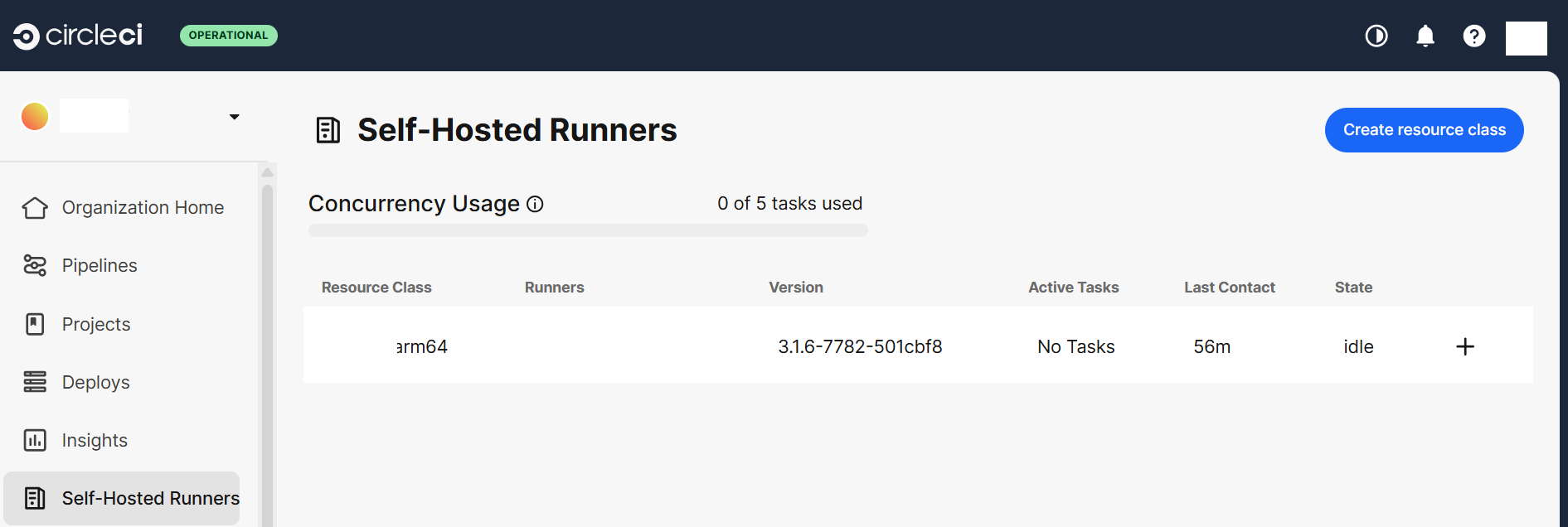
You can also verify it from the dashboard:
 Self-Hosted Runners