Automate x86-to-Arm application migration using Arm MCP Server
Introduction
Understand the Arm MCP Server for AI-driven x86-to-Arm migration
Verify Docker image compatibility with Arm using AI
Arm Cloud Migration Agent in GitHub Copilot
Configure other AI agents to automate Arm migration workflows
Next Steps
Automate x86-to-Arm application migration using Arm MCP Server
The Arm Cloud Migration Agent
When migrating applications from x86 to Arm, you might encounter SIMD (Single Instruction, Multiple Data) code that is written using architecture-specific intrinsics. On x86 platforms, SIMD is commonly implemented with SSE, AVX, or AVX2 intrinsics, while Arm platforms use Neon and SVE intrinsics to provide similar vectorized capabilities. Updating this code manually can be time-consuming and challenging. By combining the Arm MCP Server with GitHub Copilot, you can create an Arm Cloud Migration Agent that automates much of this work and guides the AI assistant through a structured, architecture-aware migration of your codebase. GitHub Copilot supports two file formats for this: prompt files (.prompt.md) that reference an already-configured MCP server, and agent files (.agent.md) that create agents which can be assigned to issues directly in the GitHub interface.
This section walks through both approaches and uses them to migrate a sample x86 application with AVX2 SIMD code to Arm Neon.
Sample x86 code with AVX2 intrinsics
The following example shows a matrix multiplication implementation using x86 AVX2 intrinsics. This is representative of performance-critical code found in compute benchmarks and scientific workloads. Copy this code into a file named matrix_operations.cpp:
#include "matrix_operations.h"
#include <iostream>
#include <random>
#include <chrono>
#include <stdexcept>
#include <immintrin.h>  // AVX2 intrinsics

Matrix::Matrix(size_t r, size_t c) : rows(r), cols(c) {
    data.resize(rows, std::vector<double>(cols, 0.0));
}

void Matrix::randomize() {
    std::random_device rd;
    std::mt19937 gen(rd());
    std::uniform_real_distribution<> dis(0.0, 10.0);

    for (size_t i = 0; i < rows; i++) {
        for (size_t j = 0; j < cols; j++) {
            data[i][j] = dis(gen);
        }
    }
}

Matrix Matrix::multiply(const Matrix& other) const {
    if (cols != other.rows) {
        throw std::runtime_error("Invalid matrix dimensions for multiplication");
    }

    Matrix result(rows, other.cols);

    // x86-64 optimized using AVX2 for double-precision
    for (size_t i = 0; i < rows; i++) {
        for (size_t j = 0; j < other.cols; j++) {
            __m256d sum_vec = _mm256_setzero_pd();
            size_t k = 0;

            // Process 4 elements at a time with AVX2
            for (; k + 3 < cols; k += 4) {
                __m256d a_vec = _mm256_loadu_pd(&data[i][k]);
                __m256d b_vec = _mm256_set_pd(
                    other.data[k+3][j],
                    other.data[k+2][j],
                    other.data[k+1][j],
                    other.data[k][j]
                );
                sum_vec = _mm256_add_pd(sum_vec, _mm256_mul_pd(a_vec, b_vec));
            }

            // Horizontal add using AVX
            __m128d sum_high = _mm256_extractf128_pd(sum_vec, 1);
            __m128d sum_low = _mm256_castpd256_pd128(sum_vec);
            __m128d sum_128 = _mm_add_pd(sum_low, sum_high);

            double sum_arr[2];
            _mm_storeu_pd(sum_arr, sum_128);
            double sum = sum_arr[0] + sum_arr[1];

            // Handle remaining elements
            for (; k < cols; k++) {
                sum += data[i][k] * other.data[k][j];
            }

            result.data[i][j] = sum;
        }
    }

    return result;
}

double Matrix::sum() const {
    double total = 0.0;
    for (size_t i = 0; i < rows; i++) {
        for (size_t j = 0; j < cols; j++) {
            total += data[i][j];
        }
    }
    return total;
}

void benchmark_matrix_ops() {
    std::cout << "\n=== Matrix Multiplication Benchmark ===" << std::endl;

    const size_t size = 200;
    Matrix a(size, size);
    Matrix b(size, size);

    a.randomize();
    b.randomize();

    auto start = std::chrono::high_resolution_clock::now();
    Matrix c = a.multiply(b);
    auto end = std::chrono::high_resolution_clock::now();

    auto duration = std::chrono::duration_cast<std::chrono::milliseconds>(end - start);

    std::cout << "Matrix size: " << size << "x" << size << std::endl;
    std::cout << "Time: " << duration.count() << " ms" << std::endl;
    std::cout << "Result sum: " << c.sum() << std::endl;
}
Create the header file matrix_operations.h:
#ifndef MATRIX_OPERATIONS_H
#define MATRIX_OPERATIONS_H

#include <vector>
#include <cstddef>

// Matrix class with x86 SSE2 optimizations
class Matrix {
private:
    std::vector<std::vector<double>> data;
    size_t rows;
    size_t cols;

public:
    Matrix(size_t r, size_t c);
    void randomize();
    Matrix multiply(const Matrix& other) const;
    double sum() const;

    size_t getRows() const { return rows; }
    size_t getCols() const { return cols; }
};

// Benchmark function
void benchmark_matrix_ops();

#endif // MATRIX_OPERATIONS_H
Create main.cpp to run the benchmark:
#include "matrix_operations.h"
#include <iostream>

int main() {
    std::cout << "x86-64 AVX2 Matrix Operations Benchmark" << std::endl;
    std::cout << "========================================" << std::endl;

#if defined(__x86_64__) || defined(_M_X64)
    std::cout << "Running on x86-64 architecture with AVX2 optimizations" << std::endl;
#else
    #error "This code requires x86-64 architecture with AVX2 support"
#endif

    benchmark_matrix_ops();

    return 0;
}
Prompt files vs. agent files
GitHub Copilot provides two ways to package persistent instructions for the AI assistant:
- Prompt files (
.prompt.md) are stored in.github/prompts/and reference MCP server tools that you have already configured in your IDE. They are invoked with a slash command such as/arm-migration. - Agent files (
.agent.md) are stored in.github/agents/(or~/.github/agents/for global access) and create agents that can be assigned to issues directly in the GitHub interface. They are selected from the agent dropdown in the Copilot Chat window or when assigning an agent to an issue.
Both formats encode the same migration logic. Choose whichever fits your workflow.
Option 1: Prompt file
A prompt file instructs the AI assistant how to analyze and transform the project using the Arm MCP Server. Prompt files act as executable migration playbooks. They encode best practices, tool usage, and migration strategy, allowing the AI assistant to operate fully autonomously through complex multi-step workflows.
Create the following prompt file at .github/prompts/arm-migration.prompt.md:
---
tools: ['search/codebase', 'edit/editFiles', 'arm-mcp/skopeo', 'arm-mcp/check_image', 'arm-mcp/knowledge_base_search', 'arm-mcp/migrate_ease_scan', 'arm-mcp/mca', 'arm-mcp/sysreport_instructions']
description: 'Scan a project and migrate to Arm architecture'
---

Your goal is to migrate a codebase from x86 to Arm. Use the mcp server tools to help you with this. Check for x86-specific dependencies (such as build flags, intrinsics, and libraries) and change them to Arm architecture equivalents, ensuring compatibility and optimizing performance. Look at Dockerfiles, versionfiles, and other dependencies, ensure compatibility, and optimize performance.

Steps to follow:
* Look in all Dockerfiles and use the check_image and/or skopeo tools to verify Arm compatibility, changing the base image if necessary.
* Look at the packages installed by the Dockerfile and send each package to the knowledge_base_search tool to check each package for Arm compatibility. If a package isn't compatible, change it to a compatible version. When invoking the tool, explicitly ask "Is [package] compatible with Arm architecture?" where [package] is the name of the package.
* Look at the contents of any requirements.txt files line-by-line and send each line to the knowledge_base_search tool to check each package for Arm compatibility. If a package isn't compatible, change it to a compatible version. When invoking the tool, explicitly ask "Is [package] compatible with Arm architecture?" where [package] is the name of the package.
* Look at the codebase that you have access to, and determine what the language used is.
* Run the migrate_ease_scan tool on the codebase, using the appropriate language scanner based on what language the codebase uses, and apply the suggested changes. Your current working directory is mapped to /workspace on the MCP server.
* OPTIONAL: If you have access to build tools, rebuild the project for Arm, if you're running on an Arm-based runner. Fix any compilation errors.
* OPTIONAL: If you have access to any benchmarks or integration tests for the codebase, run these and report the timing improvements to the user.

Pitfalls to avoid:

* Don't confuse a software version with a language wrapper package version. For example, when checking the Python Redis client, check the Python package name "redis" rather than the Redis server version. Setting the Python Redis package version to the Redis server version in requirements.txt will fail.
* NEON lane indices must be compile-time constants, not variables.
* If you're unsure about Arm equivalents, use knowledge_base_search to find documentation.
* Be sure to find out from the user or system what the target machine is, and use the appropriate intrinsics. For instance, if neoverse (Graviton, Axion, Cobalt) is targeted, use the latest SVE2 (or SVE for older neoverse).

If you have good versions to update for the Dockerfile, requirements.txt, and other files, change them immediately without asking for confirmation.

Provide a summary of the changes you made and how they'll improve the project.
This prompt file requires the Arm MCP Server to be configured in your IDE settings before use.
Option 2: Agent file
An agent file creates an agent that can be assigned to issues directly in the GitHub interface. You can download the Arm Cloud Migration Agent file directly:
wget https://raw.githubusercontent.com/github/awesome-copilot/refs/heads/main/agents/arm-migration.agent.md
To make the agent available across all your projects, place it in the global GitHub agents directory:
mkdir -p ~/.github/agents
mv arm-migration.agent.md ~/.github/agents/
If you prefer to scope the agent to a single repository, place the file in the .github/agents/ directory at the root of that repository instead:
mkdir -p .github/agents
mv arm-migration.agent.md .github/agents/
Running the migration
With either the prompt file or agent file in place, invoke the migration workflow from GitHub Copilot chat.
If you’re using the prompt file, type:
/arm-migration
If you’re using the agent file, select the arm-migration-agent from the agent dropdown in the Copilot Chat window, or assign it to an issue on GitHub.com using the agents panel dropdown.
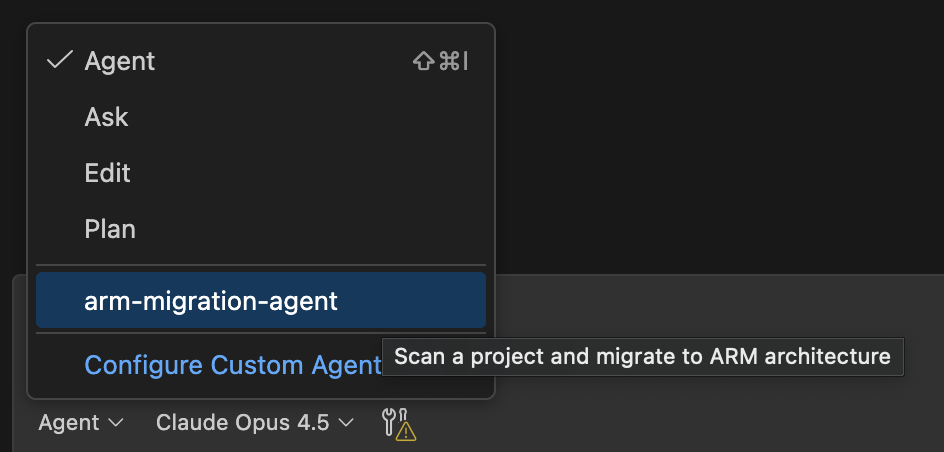
The assistant will:
- Detect x86-specific intrinsics
- Rewrite SIMD code using Neon
- Remove architecture-specific build flags
- Update container and dependency configurations as needed
Verify the migration
After reviewing and accepting the changes, build and run the application on an Arm system:
g++ -O2 -o benchmark matrix_operations.cpp main.cpp -std=c++11
./benchmark
If everything works, the output is similar to:
ARM-Optimized Matrix Operations Benchmark
==========================================
Running on ARM64 architecture with NEON optimizations

=== Matrix Multiplication Benchmark ===
Matrix size: 200x200
Time: 12 ms
Result sum: 2.01203e+08
If compilation or runtime issues occur, feed the errors back to the AI assistant. This iterative loop allows the agent to refine the migration until the application is correct, performant, and Arm-native.
What you’ve accomplished and what’s next
In this section, you’ve created an Arm Cloud Migration Agent in GitHub Copilot using either a prompt file or an agent file that can be assigned to issues in the GitHub interface, and used it to perform a fully automated migration of x86 AVX2 SIMD code to Arm Neon. You’ve seen how structured instructions enable the assistant to analyze, transform, and verify architecture-specific code.
In the next section, you’ll learn how to configure other agentic AI systems with the same migration workflow.