Run optimized Arm AI Portal LLMs on Neoverse instances
Introduction
Prepare the Arm Neoverse Linux environment
Download and run a model from the Arm AI Portal
Understand how the runner scripts work
(Optional) Explore other cloud LLM deployment options
Next Steps
Run optimized Arm AI Portal LLMs on Neoverse instances
Arm AI Portal
The Arm AI Portal is a catalog of AI models across different runtimes, use cases, and profiles that are optimized for different Arm-based targets. The AI Portal provides benchmarking and compatibility data, code examples, and deployment methods.
What you’ll build
You’ll build an application to deploy Neoverse-optimized LLMs from the Arm AI Portal.
The supplied and recommended adapter uses ONNX Runtime GenAI. The adapter has been validated with a selection of optimized LLMs from the Arm AI Portal. ONNX Runtime GenAI provides model loading, token generation, and streaming APIs for generative models exported to ONNX.
If your text-to-text package uses another compatible runtime or model format, you can use a coding agent to generate a replacement adapter. For more information, see (Optional) Explore other cloud LLM deployment options .
Confirm the machine architecture
The Arm AI Portal LLMs that you’ll use in the default flow contain quantized ONNX graphs and tokenizer assets prepared for efficient CPU inference on Arm Neoverse systems. Repository names ending in graviton-g4 identify variants tuned for AWS Graviton 4. You can also use the resources on other Arm Neoverse-based Linux machines running locally or through a cloud provider.
The following instance types provide a suitable starting configuration with four vCPUs and 16 GB of memory:
| Cloud provider | Suggested instance | Arm processor | vCPUs | Memory |
|---|---|---|---|---|
| AWS | m8g.xlarge
| Graviton4 | 4 | 16 GiB |
| Google Cloud | c4a-standard-4
| Axion | 4 | 16 GB |
| Microsoft Azure | Standard_D4ps_v6
| Cobalt 100 | 4 | 16 GiB |
Instance availability varies by region. Select a larger memory configuration for larger models or longer context lengths.
Use an Arm64 image of Ubuntu 24.04 LTS for the recommended environment. Other Arm Neoverse Linux distributions can work, but their package installation commands might differ.
On your Arm Neoverse-based machine, confirm that the operating system reports the aarch64 architecture:
uname -m
The expected output is:
aarch64
Create a Python environment
On Ubuntu 24.04 LTS, install the packages required to create a Python virtual environment:
sudo apt update
sudo apt install -y python3-venv python3-pip wget
Create a working directory and enter it:
mkdir -p arm-llm-cloud
cd arm-llm-cloud
Create and activate a virtual environment inside the working directory:
python3 -m venv .venv
source .venv/bin/activate
python -m pip install --upgrade pip
Download the shared application files
Set the Learning Path file URL and download the shared applications, adapter contract, supplied ONNX adapter, validation script, and default requirements:
BASE_URL=https://raw.githubusercontent.com/ArmDeveloperEcosystem/arm-learning-paths/main/content/learning-paths/servers-and-cloud-computing/ai-portal-cloud-text-to-text

for FILE in \
  adapter_contract.py \
  download_model.py \
  genai_web.py \
  model_adapter.py \
  run_model.py \
  runtime-requirements.txt \
  validate_adapter.py; do
  if ! wget -nv "$BASE_URL/files/$FILE" -O "$FILE.tmp"; then
    rm -f "$FILE.tmp"
    echo "Failed to download $FILE" >&2
    break
  fi
  mv "$FILE.tmp" "$FILE"
done
Choose whether to use the supplied ONNX Runtime GenAI adapter or generate a replacement for another compatible model package.
Prepare the runtime adapter
model_adapter.py and runtime-requirements.txt without modification. This is the verified path for the Arm AI Portal models listed in this Learning Path.If your selected text-to-text package uses another runtime or model format (for example, not ONNX), you can use a coding agent to generate replacements for model_adapter.py and runtime-requirements.txt. The terminal and browser applications continue to use the same adapter contract.
Ensure that you’re still using a text-to-text model.
Review all generated code before running it. Download the package-inspection script and coding-agent prompt:
for FILE in inspect_model.py generate_runtime_adapter_prompt.txt; do
  wget -q "$BASE_URL/files/$FILE" -O "$FILE"
done
Install the Hugging Face Hub dependency needed to download the package before the generated runtime dependencies are available:
python -m pip install "huggingface_hub>=0.33,<1"
Set MODEL_ID to the package selected through the Arm AI Portal. Set MODEL_RUNTIME to the runtime specified by the package. The runtime can be found on each model card on the AI Portal, and is used to tell your agent which runtime the generated adapter should use. Capitalization and punctuation don’t affect validation, but don’t abbreviate or generalize the runtime name:
export MODEL_ID="Arm/<model-repository-name>"
export MODEL_RUNTIME="<runtime-name>"
Download the complete package:
python download_model.py --repo-id "$MODEL_ID"
Create a summary of the package files and configuration for the coding agent:
python inspect_model.py \
  --model-id "$MODEL_ID" \
  --runtime "$MODEL_RUNTIME" \
  --output model-summary.json
Provide the coding agent with the following files:
adapter_contract.py
model_adapter.py
model-summary.json
generate_runtime_adapter_prompt.txt
Ask the agent to follow generate_runtime_adapter_prompt.txt. The prompt restricts changes to the following files:
model_adapter.py
runtime-requirements.txt
This workflow isn’t guaranteed to work on the first attempt. Compatibility depends on the model package, runtime, dependencies, and available Arm64 interfaces. For example, the runtime must provide an Arm64 Linux interface that the generated Python adapter can call. If the package needs an unavailable native runner, custom operator library, or platform-specific component, the coding agent should report that it can’t create a self-contained adapter.
Success might also depend on the quality of your agent.
This workflow has been successfully tested for generating an adapter to support PyTorch Transformers models.
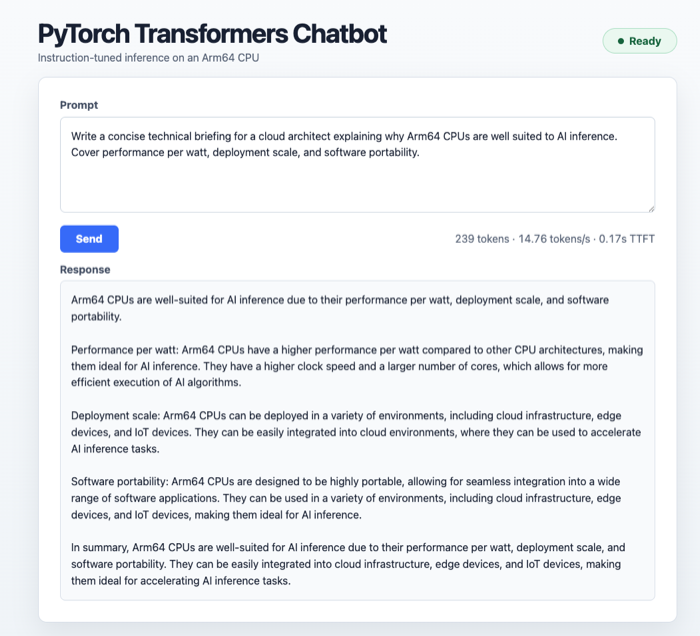 Generated adapter running a PyTorch Transformers text-to-text model
Validate the generated files before installing the new runtime:
python validate_adapter.py \
  --model-id "$MODEL_ID" \
  --runtime "$MODEL_RUNTIME"
This validation checks the adapter structure and required package files. It doesn’t load the model or confirm that native operators, prompt formatting, and generated text are correct. You’ll confirm runtime compatibility when you run a representative prompt on the target machine.
Install the dependencies for the adapter:
python -m pip install -r runtime-requirements.txt
Confirm that the common application files and selected adapter are present, with sizes greater than zero bytes:
for FILE in \
adapter_contract.py \
download_model.py \
genai_web.py \
model_adapter.py \
run_model.py \
runtime-requirements.txt \
validate_adapter.py
do
if [ -f "$FILE" ] && [ -s "$FILE" ]; then
echo Present: $FILE
else
echo Missing or zero size: $FILE
fi
done
What you’ve accomplished and what’s next
You’ve created an isolated Python environment and downloaded the shared applications. You’ve also installed the dependencies for the supplied ONNX adapter or a generated replacement.
Next, you’ll select, download, and run a model from the Arm AI Portal.