Optimize graphics performance using Frame Advisor render graphs
Introduction
What are render graphs?
Generating a render graph for your application
Understanding your render graph
Problem solving – unused resources
Problem solving – unwanted execution nodes
Problem solving – textures with excessive resolution
Problem solving – inefficient transfer workloads
Next Steps
Optimize graphics performance using Frame Advisor render graphs
Problem
Your application might contain execution nodes which are entirely unnecessary.
For example, look at the render graph below:
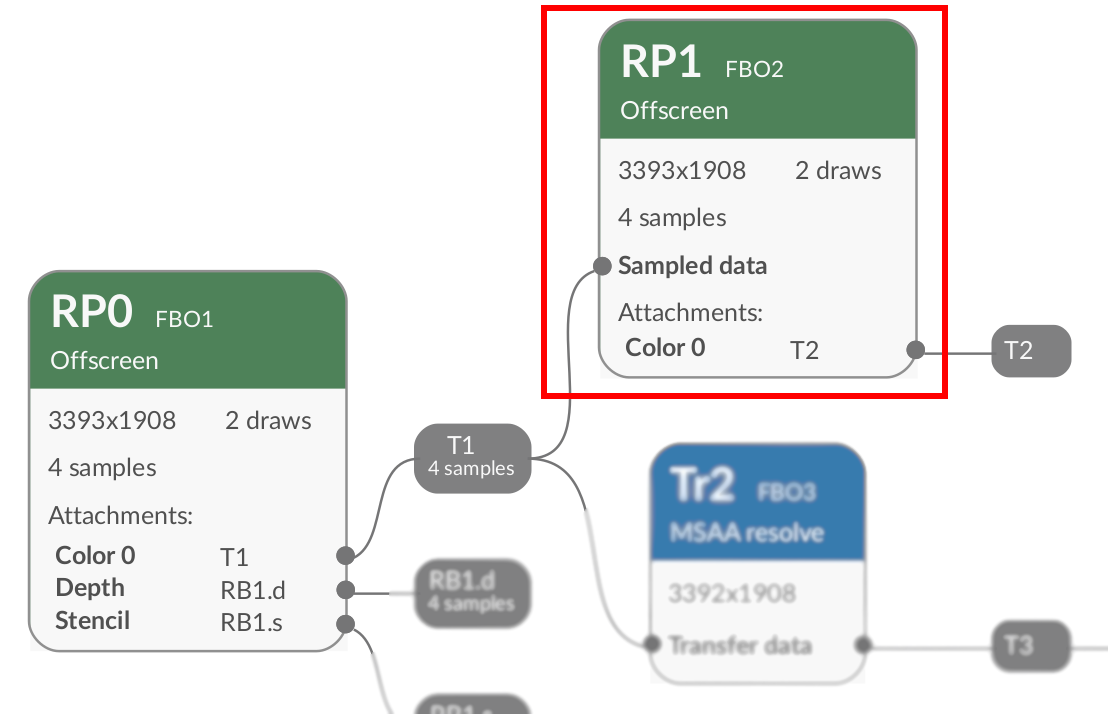 An unnecessary execution node (highlighted)
This is a more extreme version of the problem discussed in the previous section. Previously, you saw execution nodes which produced some outputs which are unnecessary. Here, all outputs are unnecessary.
You can conclude that the computation producing the output is unnecessary.
Solution
Remove any API calls which represent the unused computation.
Be careful, your application may be using an apparently “unused” output of an execution node in a later frame.