Measure LLM inference performance with KleidiAI and SME2 on Android
Introduction
Understand how SME2 and KleidiAI accelerate LLM inference in llama.cpp
Trace how KleidiAI and SME2 accelerate llama.cpp from model load to token decode
Build llama.cpp with KleidiAI and SME2 enabled
Measure SME2 acceleration in llama.cpp on Android
Next Steps
Measure LLM inference performance with KleidiAI and SME2 on Android
Overview
In this section, you trace how SME2 acceleration flows through llama.cpp across the full inference lifecycle — from model load to prefill and token decode.
Rather than treating SME2 as a feature flag, you examine where acceleration is selected, how weights and activations are packed, and which microkernels execute at each stage of inference. You follow the path from high-level llama.cpp operations down into the ggml-cpu backend and finally into the KleidiAI microkernels that use SME2, I8MM, or DotProd instructions depending on hardware support.
By the end of this section, you will understand:
- Where KleidiAI integrates into the llama.cpp CPU backend
- Which operators are eligible for SME2 acceleration
- How microkernel selection priority works (SME2 → I8MM → DotProd)
- What changes between model load, prefill, and token decode
This architectural view prepares you to build, profile, and validate SME2 acceleration in the next sections.
Where does KleidiAI fit in the llama.cpp CPU backend?
The KleidiAI library provides optimized matrix multiplication (matmul) kernels tailored for hardware features such as SME, I8MM, and Dot Product (DotProd) acceleration. In llama.cpp this feature is enabled with the build option GGML_CPU_KLEIDIAI.
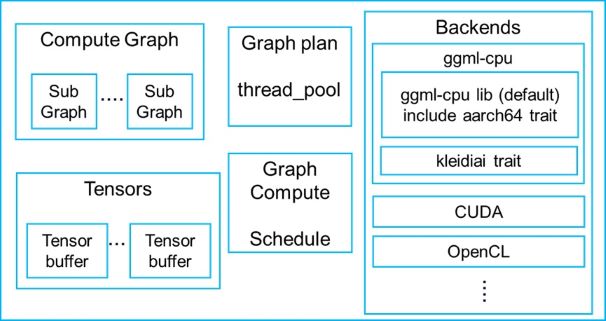 Components of llama.cpp
KleidiAI is integrated as a trait of ggml-cpu in the llama.cpp CPU backend.
The integration source code is located in the following directory of llama.cpp:
./ggml/src/ggml-cpu/kleidiai
Which matmul operators can use KleidiAI microkernels?
KleidiAI matmul microkernels can be used for some types of GGML_OP_MUL_MAT operators. The table below lists some matmul operators with specific input and output data type that can be accelerated by KleidiAI microkernels.
| LHS data type | RHS data type | Output data type |
|---|---|---|
| GGML_TYPE_F32 | GGML_TYPE_Q4_0 | GGML_TYPE_F32 |
| GGML_TYPE_F32 | GGML_TYPE_Q8_0 | GGML_TYPE_F32 |
| GGML_TYPE_F32 | GGML_TYPE_F16 | GGML_TYPE_F32 |
In this table, LHS is short for left-hand source (left-hand input matrix) and RHS is short for right-hand source (right-hand input matrix).
More operators and data types are being supported by KleidiAI microkernels.
How the KleidiAI microkernel selection and packing path works
The figure below shows how KleidiAI microkernels are used for matmul with GGML_TYPE_Q4_0 or GGML_TYPE_Q8_0 RHS(weight).
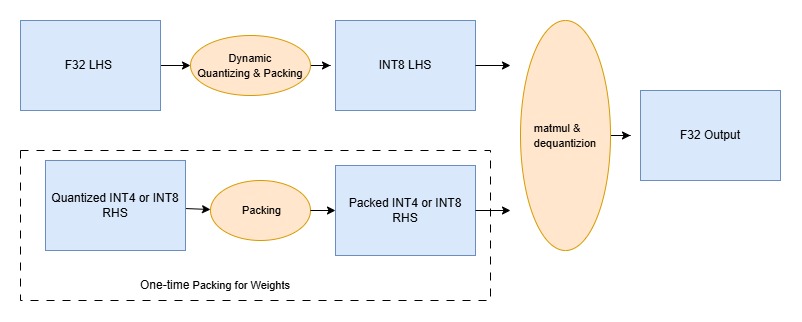 Quantization, packing and matrix multiply microkernels
The packing of GGML_TYPE_Q4_0 or GGML_TYPE_Q8_0 weight (RHS) only needs to be performed one time when llama.cpp loads the model and weight tensor data, because the weight never changes during inference. For performance, it repacks the original GGUF weights into a layout optimized for cache-friendly access and DotProd, I8MM, and SME2 operations with the KleidiAI microkernels.
Generally, if multiple KleidiAI matmul microkernels (implemented with DotProd, I8MM, or SME2) can be used for acceleration, the KleidiAI trait selects an implementation in the following order:
SME2 -> I8MM -> DotProd
Once the matmul microkernel is decided, its corresponding RHS packing and LHS quantizing & packing micro-kernel will be used.
Execution call stacks for KleidiAI microkernels
The call stacks below are included as a way to make this integration concrete. Read each stack from top to bottom: the top frames show the high-level llama.cpp operation you triggered (loading the model or decoding tokens), the middle frames show where execution enters the ggml-cpu backend, and the bottom frame is the specific KleidiAI microkernel that runs. The first stack shows a one-time weight repack during model load, which happens because the model weights are constant during inference. The later stacks show what happens during inference: activations change from token to token, so the LHS is quantized and packed each time, and then the selected SME2 GEMM or GEMV microkernel executes the matmul.
RHS weight packing during model load
In case of using the Llama-3.2-3B-Instruct-Q4_0.gguf model and SME2 microkernels, RHS packing is done by the kai_run_rhs_pack_nxk_qsi4c32ps1s0scalef16_qsu4c32s16s0_neon microkernel when loading the model. It is shown in following function call stack,
llama_model_load
   llama_model::load_tensors
       llama_model_loader::load_all_data
           ggml_backend_tensor_set
               ggml_backend_cpu_kleidiai_buffer_set_tensor
                   ggml::cpu::kleidiai::tensor_traits::repack
                       kai_run_rhs_pack_nxk_qsi4c32ps1s0scalef16_qsu4c32s16s0_neon
LHS activation quantization during inference
The F32 activation input matrix (LHS) is dynamically quantized and packed by the kai_run_lhs_quant_pack_qsi8d32p_f32_neon microkernel every time, since the activation input keeps changing during the model run. It is done by following function call stack,
llama_context::decode
   llama_context::process_ubatch
       llama_context::graph_compute
           ggml_backend_sched_compute_splits
               ggml_backend_cpu_graph_compute
                   ggml_graph_compute             //tick off the compute thread
                       ggml_graph_compute_thread   //the compute thread
                           ggml_compute_forward
                               ggml_cpu_extra_compute_forward
                                   ggml::cpu::kleidiai::tensor_traits::compute_forward
                                       ggml::cpu::kleidiai::tensor_traits::compute_forward_q4_0
                                           kai_run_lhs_quant_pack_qsi8d32p_f32_neon
Once the LHS and RHS is ready, KleidiAI matmul microkernel can be executed.
SME2 GEMM microkernel execution during prefill
Llama-3.2-3B-Instruct-Q4_0.gguf model and 512-bit SME2 streaming vector length are used as an example. At the Prefill stage, the KleidiAI GEMM microkernel optimized with SME2, kai_matmul_clamp_f32_qsi8d32p1vlx4_qsi4c32p4vlx4_1vlx4vl_sme2_mopa, is selected by the KleidiAI trait, it produces a dequantized F32 output matrix. It is done right after LHS quantizing and packing by function call stack shown below.
llama_context::decode
    llama_context::process_ubatch
        llama_context::graph_compute
            ggml_backend_sched_compute_splits
                ggml_backend_cpu_graph_compute
                    ggml_graph_compute             //tick off the compute thread
                        ggml_graph_compute_thread   //the compute thread
                            ggml_compute_forward
                                ggml_cpu_extra_compute_forward
                                    ggml::cpu::kleidiai::tensor_traits::compute_forward
                                        ggml::cpu::kleidiai::tensor_traits::compute_forward_q4_0
                                            kai_run_lhs_quant_pack_qsi8d32p_f32_neon
                                            kai_matmul_clamp_f32_qsi8d32p1vlx4_qsi4c32p4vlx4_1vlx4vl_sme2_mopa
SME2 GEMV microkernel execution during token decode
At the LLM decode stage, KleidiAI GEMV micro-kernel optimized with SME2, kai_run_matmul_clamp_f32_qsi8d32p1x4_qsi4c32p4vlx4_1x4vl_sme2_sdot, is selected by the KleidiAI trait in llama.cpp, it produces a dequantized F32 output vector. It is done right after LHS quantizing & packing by function call stack shown below,
llama_context::decode
    llama_context::process_ubatch
        llama_context::graph_compute
            ggml_backend_sched_compute_splits
                ggml_backend_cpu_graph_compute
                    ggml_graph_compute             //tick off the compute thread
                        ggml_graph_compute_thread   //the compute thread
                            ggml_compute_forward
                                ggml_cpu_extra_compute_forward
                                    ggml::cpu::kleidiai::tensor_traits::compute_forward
                                        ggml::cpu::kleidiai::tensor_traits::compute_forward_q4_0
                                            kai_run_lhs_quant_pack_qsi8d32p_f32_neon
                                            kai_run_matmul_clamp_f32_qsi8d32p1x4_qsi4c32p4vlx4_1x4vl_sme2_sdot
What you’ve accomplished and what’s next
In this section:
- You traced the KleidiAI SME2 path through the llama.cpp CPU backend, from model load through prefill and token decode
- You identified the specific microkernels that handle each stage and the priority order (SME2 → I8MM → DotProd) used for microkernel selection
In the next section, you’ll set up the cross-compile toolchain and build a statically linked llama-cli binary with SME2 and KleidiAI enabled.