Evaluate Opacity Micromaps for ray-traced game assets
Introduction
Decide if an asset needs OMM
Choose an OMM representation
Connect OMM to Arm Mali G2-Ultra NX
Build and validate an OMM adoption plan
Next Steps
Evaluate Opacity Micromaps for ray-traced game assets
Connect baked data to hardware traversal
So far, you’ve treated Opacity Micromaps (OMM) as asset data: a grid of microtriangles with opacity states. To gain a runtime benefit, the engine must turn that data into a GPU resource and connect it to the matching scene geometry.
Arm Mali G2-Ultra NX can read OMM data in its hardware ray tracing path. Your engine prepares and links the data before traversal begins. When a ray reaches a triangle, the hardware reads the state for the microtriangle that it hit and decides whether it can resolve the intersection immediately.
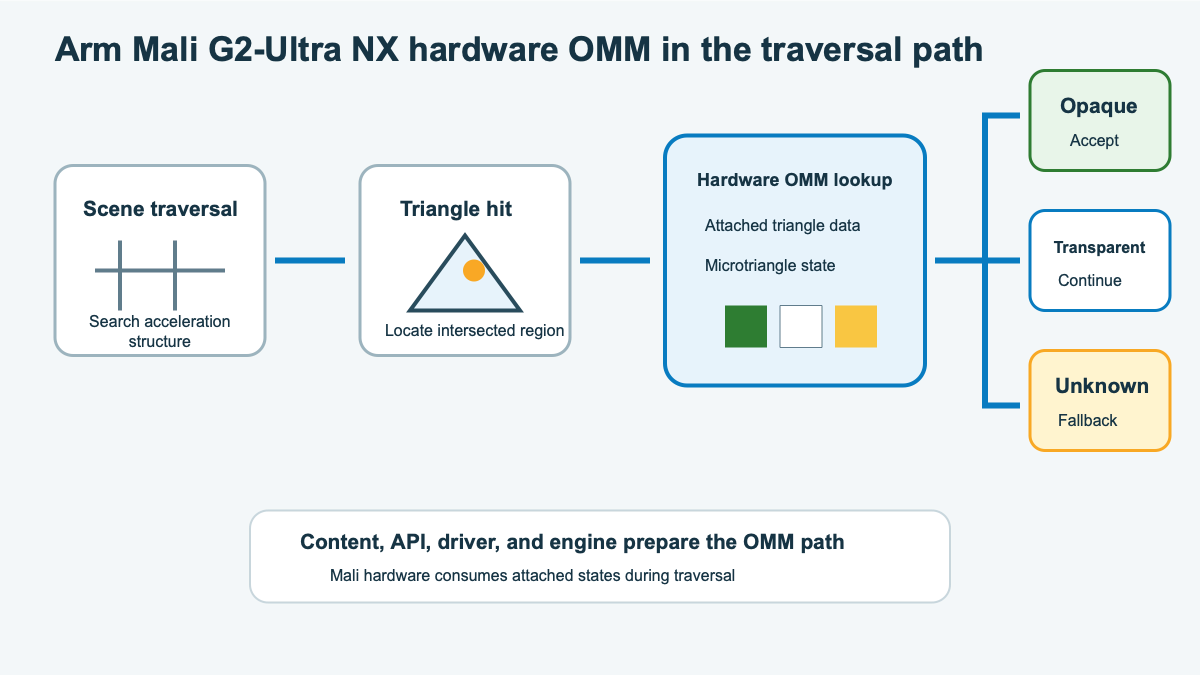 Hardware OMM lookup during Mali G2-Ultra NX ray traversal
This distinction is important when you debug the feature. A successful offline bake proves that you produced OMM data, but it doesn’t prove that the GPU is using the data. The resource build, triangle mapping, and traversal controls also need to be correct.
Follow the runtime lifecycle
Follow one asset from its source files to a rendered frame. At each stage, keep evidence that you can inspect if the final image or performance doesn’t match your expectations.
| Stage | What your engine does | Evidence to retain |
|---|---|---|
| Prepare and bake | Keeps the mesh, triangle order, UVs, alpha source, cutoff, filtering, format, and subdivision on one asset version | Bake report and source version |
| Build the micromap | Queries build sizes, allocates result and scratch storage, and builds the OMM data | Successful build and resource sizes |
| Link triangle data | Maps each source triangle to its OMM record during the bottom-level acceleration structure (BLAS) build | Triangle mapping and BLAS build input |
| Enable traversal | Configures the ray pipeline or ray-query shader for OMM | Active pipeline flag or execution mode |
| Keep resources valid | Synchronizes builds and keeps the micromap alive while the BLAS uses it | Resource lifetime and synchronization records |
Under VK_KHR_opacity_micromap, the micromap GPU resource uses a VkAccelerationStructureKHR handle. When your engine builds the BLAS, it attaches the micromap and provides a mapping from every source triangle to the correct OMM record. This mapping is what connects an intersection in the scene to the opacity states created by the baker.
Query device support
Knowing that your target uses Mali G2-Ultra NX isn’t enough to enable OMM. The Vulkan driver also needs to expose the extension and feature. Query VK_KHR_opacity_micromap, then enable its micromap feature before you create OMM resources.
The driver also reports limits that you need to compare with the data produced by your asset pipeline:
| Property | Decision it constrains |
|---|---|
maxOpacity2StateSubdivisionLevel | Highest usable 2-state detail level |
maxOpacity4StateSubdivisionLevel | Highest lossless 4-state detail level |
maxOpacityLossy4StateSubdivisionLevel | Highest level available to a lossy 4-state build |
maxMicromapTriangles | Maximum number of triangles in one micromap |
These limits turn device support into an asset compatibility decision. For example, a device can support OMM while rejecting an asset whose subdivision level is too high. Confirm the extension, feature, relevant limits, and engine configuration before loading an OMM-enabled BLAS.
Enable the traversal path
Vulkan doesn’t assume that every shader is prepared to traverse geometry with OMM data. You need to opt in through the path that your renderer uses. Ray pipelines and inline ray queries use different controls:
| Traversal path | Required enablement |
|---|---|
| Ray pipeline | Create the pipeline with VK_PIPELINE_CREATE_RAY_TRACING_OPACITY_MICROMAP_BIT_KHR. |
| Ray query | Declare the OpacityMicromapIdKHR SPIR-V execution mode with a value that resolves to true. |
For a GLSL shader that uses ray queries, enable GL_EXT_opacity_micromap_ray_query_mode and redeclare the built-in constant:
#extension GL_EXT_opacity_micromap_ray_query_mode : require
const bool gl_EnableOpacityMicromapEXT = true;
You can use a specialization constant instead if the engine selects the behavior when it creates the pipeline. In either form, the value must resolve to true before the shader performs a ray query against an acceleration structure that can contain OMM data.
Traversing an OMM-enabled acceleration structure without enabling OpacityMicromapIdKHR is undefined behavior. The implementation doesn’t automatically fall back to shader-side opacity evaluation.
Define the unsupported fallback
Not every device or configuration will take the OMM path, so preserve the renderer’s original alpha-tested path as a fallback. The two paths should differ in how they resolve opacity, not in what the player sees.
| Path | Micromap and BLAS behavior | Opacity behavior |
|---|---|---|
| Supported | Build the micromap and attach its triangle mapping to the BLAS. | Traversal resolves known states. Unknown states retain shader-side evaluation. |
| Unsupported or disabled | Build the original alpha-tested BLAS without OMM data. | The ray pipeline uses its any-hit path, or the ray query uses its existing candidate handler. |
Both paths must use the same alpha source, cutoff, filtering, and material logic. When you disable OMM, the amount of traversal and shader work can change. The rendered image shouldn’t change.
If you have a Mali G2-Ultra NX test device, record its reported limits. Compare the limits with the format and subdivision level that you selected.
What you’ve learned and what’s next
You can now trace an OMM from asset data into a BLAS, identify the required Vulkan opt-in, and define a safe fallback.
Next, you’ll use that information to make and validate a sample adoption decision.