Evaluate Opacity Micromaps for ray-traced game assets
Introduction
Decide if an asset needs OMM
Choose an OMM representation
Connect OMM to Arm Mali G2-Ultra NX
Build and validate an OMM adoption plan
Next Steps
Evaluate Opacity Micromaps for ray-traced game assets
Turn an alpha mask into traversal data
After you identify a suitable asset, you need to describe its opacity in a form that ray traversal can use. Opacity Micromaps (OMM) do this by dividing each original triangle into smaller regions called microtriangles. Each microtriangle records whether its part of the alpha mask is opaque, transparent, or still uncertain.
A microtriangle changes the OMM data, not the mesh. It doesn’t add polygons to the source model or to the bottom-level acceleration structure (BLAS). You can think of it as placing a finer decision grid over the original triangle.
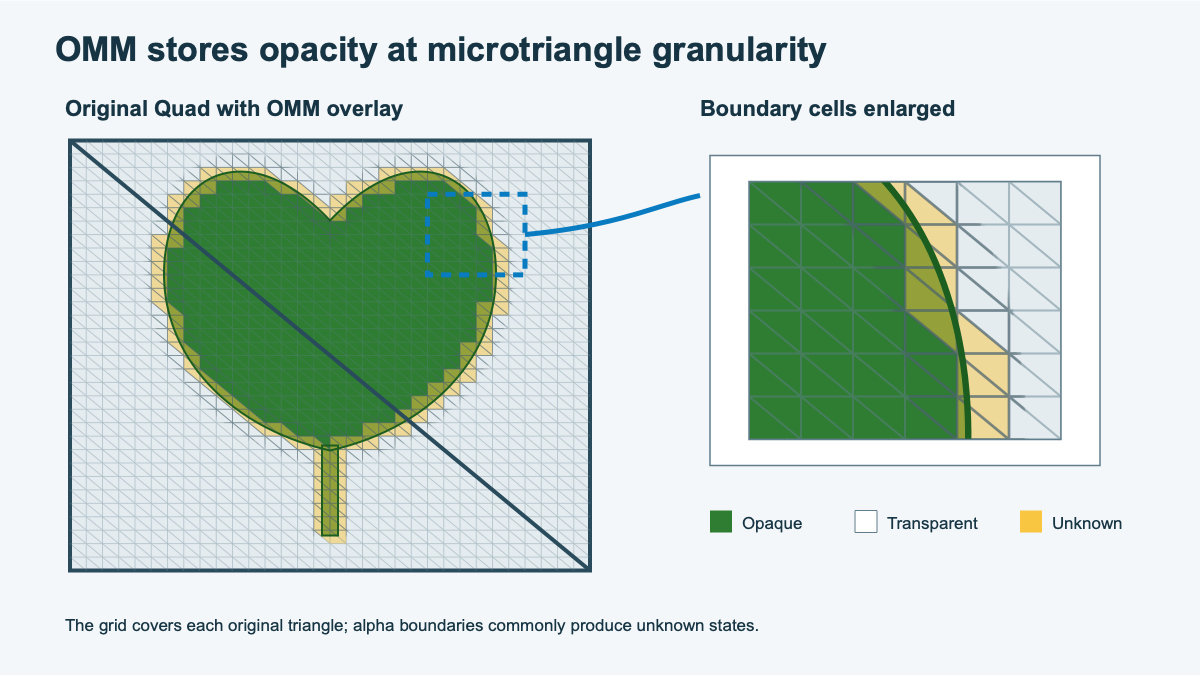 Microtriangle states follow the leaf's alpha boundary
The figure keeps the two original triangles and overlays a finer OMM grid. Opaque regions cover the inside of the leaf. Transparent regions cover empty parts of the quad. Unknown regions follow the detailed edge. The closer the grid follows that edge, the more opacity decisions traversal can make without shader help.
Choose a subdivision level
The subdivision level controls the resolution of the OMM grid. A low level uses a few large regions. A higher level uses many smaller regions and can follow a curved or detailed alpha boundary more closely.
This extra detail has a cost: each step up creates four times as many microtriangles. For level N, the number in each original triangle is:
microtriangle count = 4^N = 2^(2N)
| Level | Microtriangles per original triangle | Typical use |
|---|---|---|
| 0 | 1 | One state for the complete triangle |
| 1 | 4 | A coarse cutout |
| 2 | 16 | Large silhouette changes |
| 3 | 64 | Curved alpha edges |
| 4 | 256 | Fine detail with higher data cost |
Choose the level by comparing the size of the source triangle with the detail in its alpha mask. Also consider the intended level of detail (LOD) and viewing distance. Don’t map the subdivision level directly to screen pixels because the same triangle can appear at many sizes on screen.
Choose a state format
The subdivision level decides how small the regions are. The state format decides what each region can say about its opacity.
The VK_KHR_opacity_micromap extension defines 2-state and 4-state formats. A 2-state OMM must call every region opaque or transparent. A 4-state OMM can also leave a region unknown, allowing the existing shader path to resolve difficult edges at runtime.
| Format | State | Normal traversal action | If forced to 2-state |
|---|---|---|---|
| 2-state | Fully transparent | Ignore the hit. | No change |
| 2-state | Fully opaque | Handle the region as opaque. | No change |
| 4-state | Fully transparent | Ignore the hit. | No change |
| 4-state | Fully opaque | Handle the region as opaque. | No change |
| 4-state | Unknown-transparent | Keep shader-side evaluation available. | Treat the region as transparent. |
| 4-state | Unknown-opaque | Keep shader-side evaluation available. | Treat the region as opaque. |
During normal 4-state traversal, both unknown values mean that more evaluation is needed. The transparent and opaque variants produce different results only when a ray or instance forces the OMM into 2-state evaluation.
This gives you two practical starting strategies:
| Strategy | OMM setup | Main tradeoff |
|---|---|---|
| Shader-assisted edge detail | 4-state with low or moderate subdivision | Smaller OMM data, but unknown edges retain some shader-side work |
| Hardware-resolved binary detail | 2-state with higher subdivision | No unknown states, but more microtriangles and possible silhouette error |
Use the 2-state strategy only when you can classify every region without damaging the image. Marking visible detail as transparent can remove a valid hit. Marking empty space as opaque can create false shadows or reflections.
Classify sample microtriangles
You can practice classification without OMM-capable hardware. Classify using an alpha cutoff of 0.5. Values less than the cutoff are transparent, while values greater than or equal to it are opaque.
Each row contains representative samples from one microtriangle. Classify each region as opaque, transparent, or unknown:
| Region | Representative alpha samples |
|---|---|
| A | 1.00, 0.92, 0.87 |
| B | 0.00, 0.08, 0.14 |
| C | 0.05, 0.62, 0.91 |
| D | 0.42, 0.45, 0.48 |
| E | 0.49, 0.50, 0.51 |
After classifying each region, calculate the raw state payload for one level-2 triangle. Level 2 contains 16 microtriangles. The 2-state format uses one bit per microtriangle, while the 4-state format uses two bits.
Check your classification and payload calculation
Compare your answers with the following classifications:
| Region | Classification | Reason |
|---|---|---|
| A | Opaque | Every sample is on the visible side of the cutoff. |
| B | Transparent | Every sample is below the cutoff. |
| C | Unknown | The region crosses the cutoff. |
| D | Transparent | Every sample is below the cutoff. |
| E | Unknown | The region lies on both sides of the cutoff. |
A level-2 triangle needs 16 bits, or 2 bytes, of raw 2-state data. It needs 32 bits, or 4 bytes, of raw 4-state data. These values describe only the state payload. Record metadata, alignment, and implementation-specific storage can increase the final size.
Interpret the result
The result should contain large areas of opaque and transparent microtriangles, with a narrow band of unknown regions around the alpha boundary. If much of the triangle remains unknown, traversal still needs shader help for many hits.
A wide unknown band can mean the following:
- The subdivision level is too low
- There’s a mismatch in filtering or cutoff
- The texture detail is too fine for the grid
- There’s material logic that the baker can’t reproduce
What you’ve accomplished and what’s next
You’ve classified opacity regions and compared the accuracy and storage implications of the two formats.
Next, you’ll connect the baked representation to the Mali G2-Ultra NX traversal path.