Run ExecuTorch Llama 3.2 1B Instruct on an Android phone with Vulkan
Introduction
Prepare a Linux host and Android device for ExecuTorch Vulkan
Install ExecuTorch and download the model on the Linux host
Export the Vulkan PTE
Build the Android Vulkan runtime
Deploy and measure Llama 3.2 with ExecuTorch Vulkan on Android
Next Steps
Run ExecuTorch Llama 3.2 1B Instruct on an Android phone with Vulkan
Android device architecture
The following diagram shows what you’ll run on the Android device:
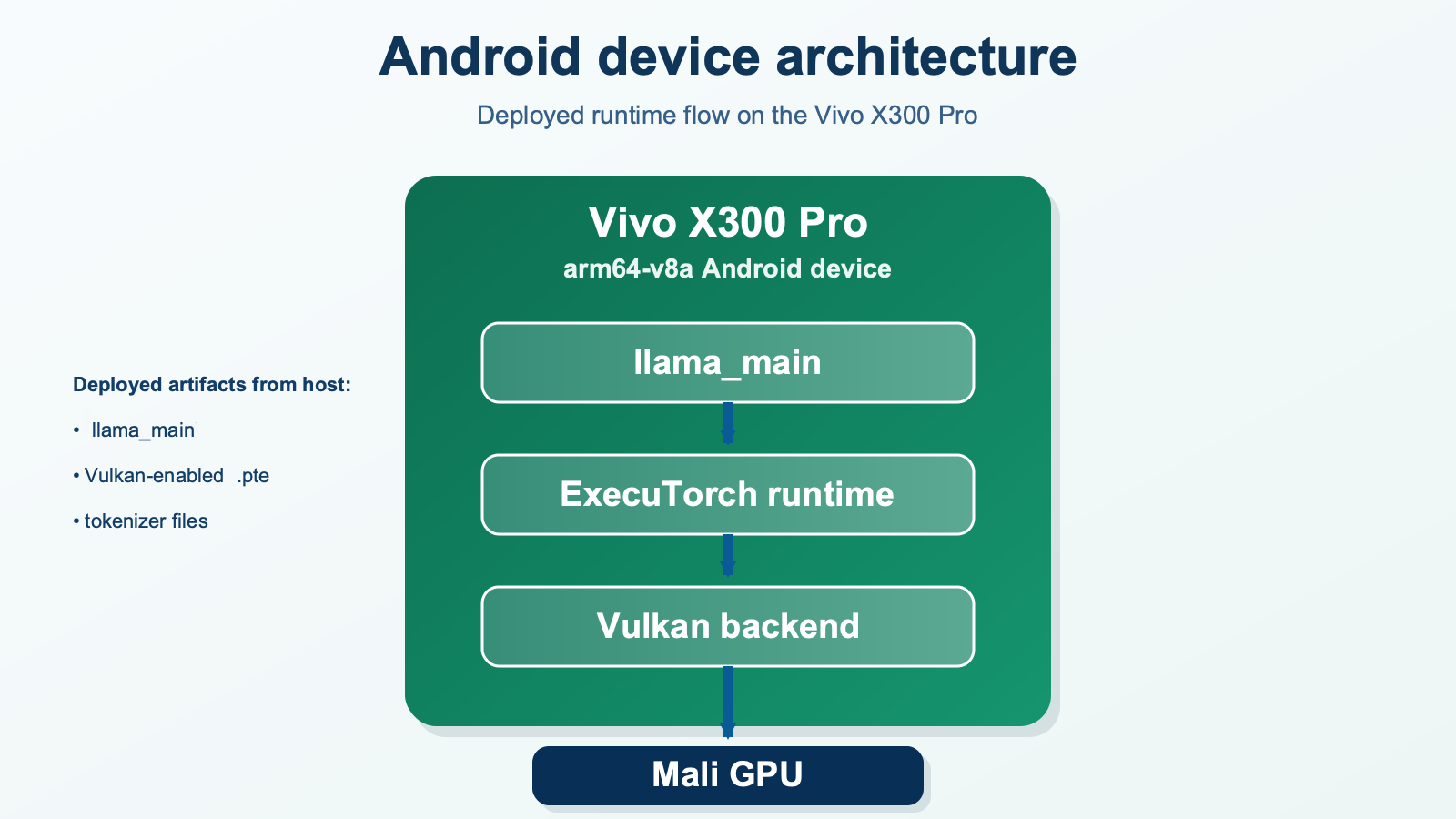 Android device architecture for the ExecuTorch Vulkan workflow
Push the runner, model, and tokenizer
Create a runtime directory on the phone and push the artifacts:
export MODEL_DIR="$HOME/Llama-3.2-1B-Instruct/original"

adb shell mkdir -p /data/local/tmp/llama

adb push \
  cmake-out-android-so/examples/models/llama/llama_main \
  /data/local/tmp/llama/llama_main

adb push \
  "$MODEL_DIR/Llama3.2-1B-Instruct_vulkan_8da4w_g64_c2048.pte" \
  /data/local/tmp/llama/llama32-vulkan.pte

adb push \
  "$MODEL_DIR/tokenizer.model" \
  /data/local/tmp/llama/tokenizer.model

adb shell chmod 755 /data/local/tmp/llama/llama_main
adb shell ls -lh /data/local/tmp/llama
Run the first successful inference
The measured run used a plain text prompt and one warmup pass:
adb shell 'cd /data/local/tmp/llama && \
./llama_main \
  --model_path=llama32-vulkan.pte \
  --tokenizer_path=tokenizer.model \
  --prompt="What is the capital of France?" \
  --seq_len=120 \
  --temperature=0 \
  --warmup=1'
In the output, confirm performance metrics similar to:
| Metric | Observed value |
|---|---|
| Model load time | 3.033 s |
| Prompt tokens | 7 |
| Generated tokens | 112 |
| Prompt evaluation | 0.157 s / 44.586 tokens/s |
| Decode | 112 tokens in 3.760 s / 29.787 tokens/s |
| Total measured inference | 3.917 s / 28.593 tokens/s overall |
| Time to first generated token | 0.157 s |
| RSS after model load, prefill, and generation | about 2404.8 MiB |
| Sampling time | 0.190 s over 119 tokens |
The runtime also emits a PyTorchObserver summary similar to:
        prefill_token_per_sec = 44.586
decode_token_per_sec = 29.7872
Use the instruct chat template
The first prompt was useful for validation, but it’s not the cleanest prompt shape for an instruct model.
A better test uses the chat control tokens and max_new_tokens as follows:
adb shell /data/local/tmp/llama/llama_main \
  --model_path=/data/local/tmp/llama/llama32-vulkan.pte \
  --tokenizer_path=/data/local/tmp/llama/tokenizer.model \
  --temperature=0 \
  --max_new_tokens=32 \
  --prompt="<|begin_of_text|><|start_header_id|>user<|end_header_id|>What is the capital of France?<|eot_id|><|start_header_id|>assistant<|end_header_id|>"
If the runner warns that max_new_tokens wasn’t provided and it is falling back to seq_len, update the command. For instruct models, max_new_tokens is the clearer control for generation length.
Confirm that Vulkan is in use
While an inference is running, open a second terminal on the host and inspect the libraries mapped into the llama_main process:
PID=$(adb shell pidof llama_main | tr -d '\r')
adb shell "cat /proc/$PID/maps | grep -Ei 'vulkan|mali'"
Seeing libvulkan and the Mali driver libraries confirms that the process loaded the Vulkan stack.
For stronger evidence, rebuild with tracing enabled:
-DEXECUTORCH_BUILD_DEVTOOLS=ON
-DEXECUTORCH_ENABLE_EVENT_TRACER=ON
Then, capture ETDump data from the runner and inspect it with ExecuTorch Inspector to see delegated regions and delegate-call timings.
What you’ve accomplished
You have built Llama 3.2 1B Instruct for the ExecuTorch Vulkan backend, compiled the standalone Android runner, deployed the required artifacts, and measured an on-device inference baseline.
You can now repeat the measured run with different prompts and generation settings, using the same metrics to compare performance while keeping the model, device, and runtime configuration consistent.