Build a Hands-Free Selfie Android Application with MediaPipe
Introduction
Set up the Development Environment
Manage Camera Permissions
Integrate MediaPipe solutions
Manage UI state with ViewModel
Use SharedFlow to View Events
Use StateFlow to View Controller States
Mediate flows to trigger photo capture
Avoid duplicate photo capture requests
Next Steps
Build a Hands-Free Selfie Android Application with MediaPipe
Kotlin Flow APIs
SharedFlow and StateFlow are Kotlin Flow APIs that enable Flows to optimally emit state updates and emit values to multiple consumers.
In this Learning Path, you will experiment with both SharedFlow and StateFlow. This section focuses on SharedFlow, and the next section focuses on StateFlow.
SharedFlow is a general-purpose, hot flow that can emit values to multiple subscribers. It is highly configurable, allowing you to configure settings such as the replay cache size and buffer capacity.
Expose UI events in SharedFlow
- Navigate to
MainViewModeland define a sealed class namedUiEvent, with two direct subclasses namedFaceandGesture.
    sealed class UiEvent {
        data class Face(
            val face: FaceResultBundle
        ) : UiEvent()

        data class Gesture(
            val gestures: GestureResultBundle,
        ) : UiEvent()
    }
- Expose a
SharedFlownameduiEvents:
    private val _uiEvents = MutableSharedFlow<UiEvent>(1)
    val uiEvents: SharedFlow<UiEvent> = _uiEvents
This SharedFlow is initialized with a replay size of 1. This retains the most recent value and ensures that new subscribers don’t miss the latest event.
- Replace the logging with value emissions in the listener callbacks:
    override fun onFaceLandmarkerResults(resultBundle: FaceResultBundle) {
        _uiEvents.tryEmit(UiEvent.Face(resultBundle))
    }

    override fun onGestureResults(resultBundle: GestureResultBundle) {
        _uiEvents.tryEmit(UiEvent.Gesture(resultBundle))
    }
Visualize face and gesture results
To visualize the results of Face Landmark Detection and Gesture Recognition tasks, based on MediaPipe’s samples follow the instructions in this section.
- Create a new file named
FaceLandmarkerOverlayView.ktand copy the content below:
/*
 * Copyright 2023 The TensorFlow Authors. All Rights Reserved.
 *
 * Licensed under the Apache License, Version 2.0 (the "License");
 * you may not use this file except in compliance with the License.
 * You may obtain a copy of the License at
 *
 *             http://www.apache.org/licenses/LICENSE-2.0
 *
 * Unless required by applicable law or agreed to in writing, software
 * distributed under the License is distributed on an "AS IS" BASIS,
 * WITHOUT WARRANTIES OR CONDITIONS OF ANY KIND, either express or implied.
 * See the License for the specific language governing permissions and
 * limitations under the License.
 */
package com.example.holisticselfiedemo

import android.content.Context
import android.graphics.Canvas
import android.graphics.Color
import android.graphics.Paint
import android.util.AttributeSet
import android.view.View
import com.google.mediapipe.tasks.vision.core.RunningMode
import com.google.mediapipe.tasks.vision.facelandmarker.FaceLandmarker
import com.google.mediapipe.tasks.vision.facelandmarker.FaceLandmarkerResult
import kotlin.math.max
import kotlin.math.min

class FaceLandmarkerOverlayView(context: Context?, attrs: AttributeSet?) :
    View(context, attrs) {

    private var results: FaceLandmarkerResult? = null
    private var linePaint = Paint()
    private var pointPaint = Paint()

    private var scaleFactor: Float = 1f
    private var imageWidth: Int = 1
    private var imageHeight: Int = 1

    init {
        initPaints()
    }

    fun clear() {
        results = null
        linePaint.reset()
        pointPaint.reset()
        invalidate()
        initPaints()
    }

    private fun initPaints() {
        linePaint.color = Color.BLUE
        linePaint.strokeWidth = LANDMARK_STROKE_WIDTH
        linePaint.style = Paint.Style.STROKE

        pointPaint.color = Color.YELLOW
        pointPaint.strokeWidth = LANDMARK_STROKE_WIDTH
        pointPaint.style = Paint.Style.FILL
    }

    override fun draw(canvas: Canvas) {
        super.draw(canvas)
        if (results == null || results!!.faceLandmarks().isEmpty()) {
            clear()
            return
        }

        results?.let { faceLandmarkerResult ->

            for(landmark in faceLandmarkerResult.faceLandmarks()) {
                for(normalizedLandmark in landmark) {
                    canvas.drawPoint(normalizedLandmark.x() * imageWidth * scaleFactor, normalizedLandmark.y() * imageHeight * scaleFactor, pointPaint)
                }

                FaceLandmarker.FACE_LANDMARKS_CONNECTORS.forEach {
                    canvas.drawLine(
                        landmark[it.start()].x() * imageWidth * scaleFactor,
                        landmark[it.start()].y() * imageHeight * scaleFactor,
                        landmark[it.end()].x() * imageWidth * scaleFactor,
                        landmark[it.end()].y() * imageHeight * scaleFactor,
                        linePaint)
                }
            }
        }
    }

    fun setResults(
        faceLandmarkerResults: FaceLandmarkerResult,
        imageHeight: Int,
        imageWidth: Int,
        runningMode: RunningMode = RunningMode.IMAGE
    ) {
        results = faceLandmarkerResults

        this.imageHeight = imageHeight
        this.imageWidth = imageWidth

        scaleFactor = when (runningMode) {
            RunningMode.IMAGE,
            RunningMode.VIDEO -> {
                min(width * 1f / imageWidth, height * 1f / imageHeight)
            }
            RunningMode.LIVE_STREAM -> {
                // PreviewView is in FILL_START mode. So we need to scale up the
                // landmarks to match with the size that the captured images will be
                // displayed.
                max(width * 1f / imageWidth, height * 1f / imageHeight)
            }
        }
        invalidate()
    }

    companion object {
        private const val LANDMARK_STROKE_WIDTH = 8F
    }
}
- Create a new file named
GestureOverlayView.ktand copy in the text below:
/*
 * Copyright 2022 The TensorFlow Authors. All Rights Reserved.
 *
 * Licensed under the Apache License, Version 2.0 (the "License");
 * you may not use this file except in compliance with the License.
 * You may obtain a copy of the License at
 *
 *             http://www.apache.org/licenses/LICENSE-2.0
 *
 * Unless required by applicable law or agreed to in writing, software
 * distributed under the License is distributed on an "AS IS" BASIS,
 * WITHOUT WARRANTIES OR CONDITIONS OF ANY KIND, either express or implied.
 * See the License for the specific language governing permissions and
 * limitations under the License.
 */
package com.example.holisticselfiedemo

import android.content.Context
import android.graphics.Canvas
import android.graphics.Color
import android.graphics.Paint
import android.util.AttributeSet
import android.view.View
import com.google.mediapipe.tasks.vision.core.RunningMode
import com.google.mediapipe.tasks.vision.gesturerecognizer.GestureRecognizerResult
import com.google.mediapipe.tasks.vision.handlandmarker.HandLandmarker
import kotlin.math.max
import kotlin.math.min

class GestureOverlayView(context: Context?, attrs: AttributeSet?) :
    View(context, attrs) {

    private var results: GestureRecognizerResult? = null
    private var linePaint = Paint()
    private var pointPaint = Paint()

    private var scaleFactor: Float = 1f
    private var imageWidth: Int = 1
    private var imageHeight: Int = 1

    init {
        initPaints()
    }

    fun clear() {
        results = null
        linePaint.reset()
        pointPaint.reset()
        invalidate()
        initPaints()
    }

    private fun initPaints() {
        linePaint.color = Color.BLUE
        linePaint.strokeWidth = LANDMARK_STROKE_WIDTH
        linePaint.style = Paint.Style.STROKE

        pointPaint.color = Color.YELLOW
        pointPaint.strokeWidth = LANDMARK_STROKE_WIDTH
        pointPaint.style = Paint.Style.FILL
    }

    override fun draw(canvas: Canvas) {
        super.draw(canvas)
        results?.let { gestureRecognizerResult ->
            for (landmark in gestureRecognizerResult.landmarks()) {
                for (normalizedLandmark in landmark) {
                    canvas.drawPoint(
                        normalizedLandmark.x() * imageWidth * scaleFactor,
                        normalizedLandmark.y() * imageHeight * scaleFactor,
                        pointPaint)
                }

                HandLandmarker.HAND_CONNECTIONS.forEach {
                    canvas.drawLine(
                        landmark[it.start()].x() * imageWidth * scaleFactor,
                        landmark[it.start()].y() * imageHeight * scaleFactor,
                        landmark[it.end()].x() * imageWidth * scaleFactor,
                        landmark[it.end()].y() * imageHeight * scaleFactor,
                        linePaint)
                }
            }
        }
    }

    fun setResults(
        gestureRecognizerResult: GestureRecognizerResult,
        imageHeight: Int,
        imageWidth: Int,
        runningMode: RunningMode = RunningMode.IMAGE
    ) {
        results = gestureRecognizerResult

        this.imageHeight = imageHeight
        this.imageWidth = imageWidth

        scaleFactor = when (runningMode) {
            RunningMode.IMAGE,
            RunningMode.VIDEO -> {
                min(width * 1f / imageWidth, height * 1f / imageHeight)
            }
            RunningMode.LIVE_STREAM -> {
                // PreviewView is in FILL_START mode. So we need to scale up the
                // landmarks to match with the size that the captured images will be
                // displayed.
                max(width * 1f / imageWidth, height * 1f / imageHeight)
            }
        }
        invalidate()
    }

    companion object {
        private const val LANDMARK_STROKE_WIDTH = 8F
    }
}
Update UI in the view controller
- Add the two overlay views to
activity_main.xmllayout file:
    <com.example.holisticselfiedemo.FaceLandmarkerOverlayView
        android:id="@+id/overlay_face"
        android:layout_width="match_parent"
        android:layout_height="match_parent" />

    <com.example.holisticselfiedemo.GestureOverlayView
        android:id="@+id/overlay_gesture"
        android:layout_width="match_parent"
        android:layout_height="match_parent" />
- Collect the new SharedFlow
uiEventsinMainActivityby appending the code below to the end ofonCreatemethod, belowsetupCamera()method call.
        lifecycleScope.launch {
            repeatOnLifecycle(Lifecycle.State.RESUMED) {
                launch {
                    viewModel.uiEvents.collect { uiEvent ->
                        when (uiEvent) {
                            is MainViewModel.UiEvent.Face -> drawFaces(uiEvent.face)
                            is MainViewModel.UiEvent.Gesture -> drawGestures(uiEvent.gestures)
                        }
                    }
                }
            }
        }
- Implement
drawFacesanddrawGestures:
    private fun drawFaces(resultBundle: FaceResultBundle) {
        // Pass necessary information to OverlayView for drawing on the canvas
        viewBinding.overlayFace.setResults(
            resultBundle.result,
            resultBundle.inputImageHeight,
            resultBundle.inputImageWidth,
            RunningMode.LIVE_STREAM
        )
        // Force a redraw
        viewBinding.overlayFace.invalidate()
    }
    private fun drawGestures(resultBundle: GestureResultBundle) {
        // Pass necessary information to OverlayView for drawing on the canvas
        viewBinding.overlayGesture.setResults(
            resultBundle.results.first(),
            resultBundle.inputImageHeight,
            resultBundle.inputImageWidth,
            RunningMode.LIVE_STREAM
        )
        // Force a redraw
        viewBinding.overlayGesture.invalidate()
    }
- Build and run the app again. Now you should see face and gesture overlays on top of the camera preview as shown below. Good job!
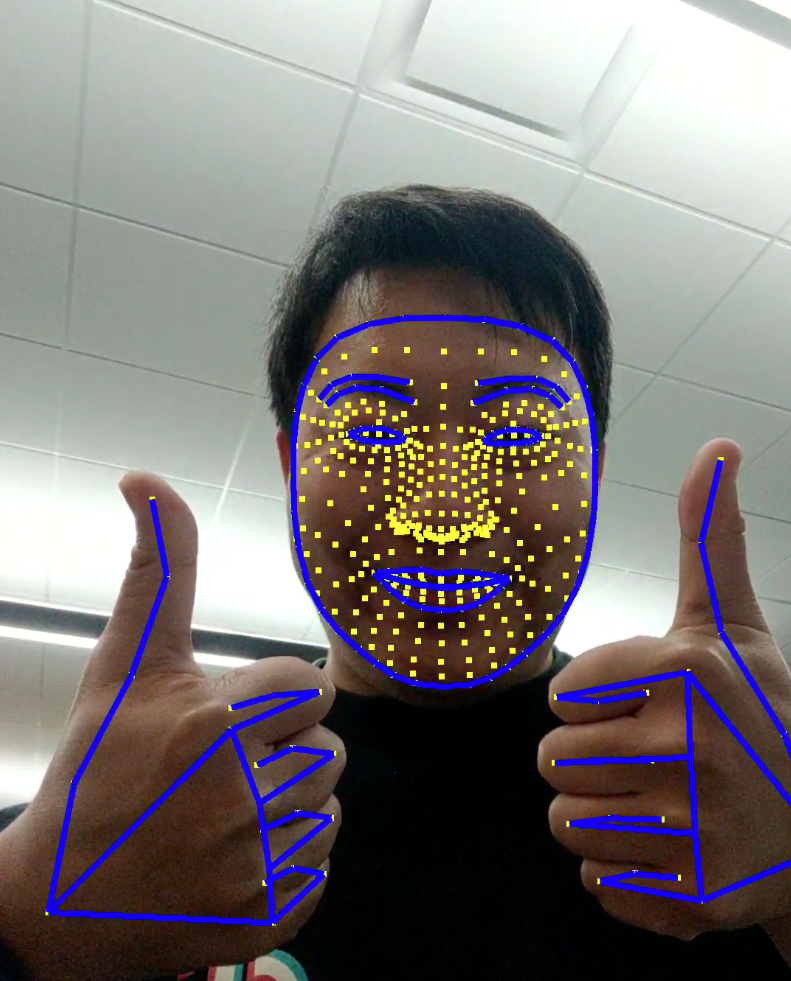 Figure 7: Face and Gesture Overlays.