Accelerate Denoising, Background Blur and Low-Light Camera Effects with SME2
Introduction
Prerequisites
Overview
Build the pipelines
Run the pipelines
Performance
Next Steps
Accelerate Denoising, Background Blur and Low-Light Camera Effects with SME2
About SME/SME2
Arm Scalable Matrix Extension (SME) is an architecture extension that provides enhanced support for matrix operations. SME builds on the Scalable Vector Extensions (SVE and SVE2), adding new capabilities to efficiently process matrices.
Key features include:
- Outer product between two vectors
- Matrix tile storage
- Load, store, insert, and extract of tile vectors, including on-the-fly transposition
- Streaming SVE mode
SME defines the following new features:
- A new architectural state capable of holding two-dimensional matrix tiles.
- Streaming SVE mode which supports execution of SVE2 instructions with a vector length that matches the tile width.
- New instructions that accumulate the outer product of two vectors into a tile.
- New load, store, and move instructions that transfer a vector to or from a tile row or column.
- Like SVE2, SME is a scalable vector length extension which enables Vector Length Agnostic (VLA), per-lane predication, predicate-driven loop control and management features.
This makes SME and SME2 particularly fit for image processing. In this learning path, you will use SME2 instructions thru the KleidiAI and KleidiCV libraries:
KleidiAI
KleidiAI is an open-source library of optimized, performance-critical routines (micro-kernels) for AI workloads on Arm CPUs. These routines are tuned for specific Arm microarchitectures to maximize performance and are designed for straightforward integration into C/C++ ML and AI frameworks.
Several popular AI frameworks already take advantage of KleidiAI to improve performance on Arm platforms.
KleidiCV
KleidiCV is an open-source library that provides high-performance image-processing functions for AArch64. It is lightweight and simple to integrate, and computer-vision frameworks such as OpenCV can leverage KleidiCV to accelerate image processing on Arm devices.
AI camera pipelines
This Learning Path provides three example applications that combine AI and computer vision (CV) techniques:
- Background blur
- Low-light enhancement (LLE)
- Neural denoising
Background blur and low-light enhancement
The applications:
- Use input and output images in PNG format with three RGB channels (8-bit per channel, often written as RGB8)
- Convert images to YUV 4:2:0 for processing
- Apply the relevant effect (background blur or low-light enhancement)
- Convert the processed images back to RGB8 and save as .png
Background blur
The background blur pipeline is implemented as follows:
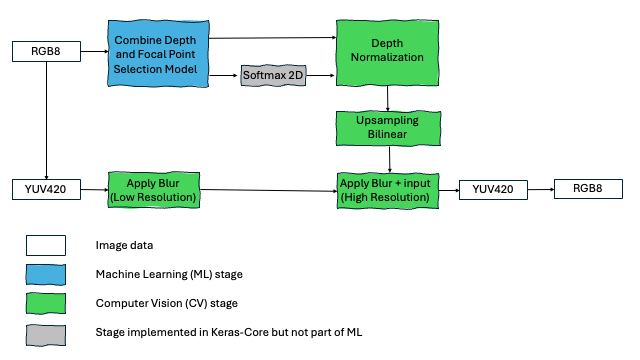 Background blur pipeline
Low-light enhancement
The low-light enhancement pipeline is adapted from the LiveHDR+ method proposed by Google Research (2017):
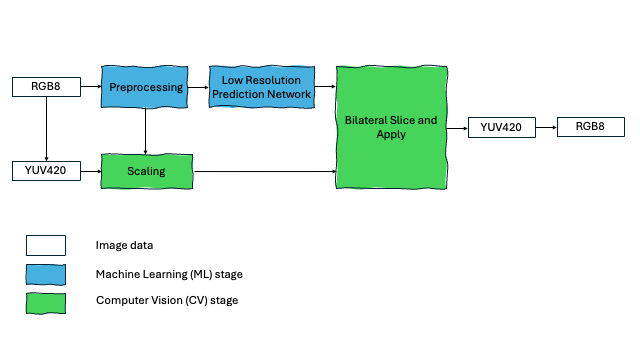 Low-light enhancement pipeline
The low-resolution coefficient-prediction network (implemented with LiteRT) performs operations such as:
- Strided convolutions
- Local feature extraction using convolutional layers
- Global feature extraction using convolutional and fully connected layers
- Add, convolve, and reshape ops
Neural denoising
Every smartphone photographer has experienced it: images that look sharp in daylight but degrade in dim lighting. This is because signal-to-noise ratio (SNR) drops sharply when sensors capture fewer photons. At 1000 lux, the signal dominates and images look clean; at 1 lux, readout noise becomes visible as grain, color speckling, and loss of fine detail.
That’s why neural camera denoising is a critical, computationally-demanding, stage in modern camera pipelines. Done well, it can transform noisy frames into sharp, vibrant captures; done poorly, it leaves smudges and artifacts.
As shown below, the neural-denoising pipeline uses two algorithms:
- Temporal denoising,
ultralitein the repository (uses a history of previous frames) - Spatial denoising,
collapsenetin the repository - Or a combination of both
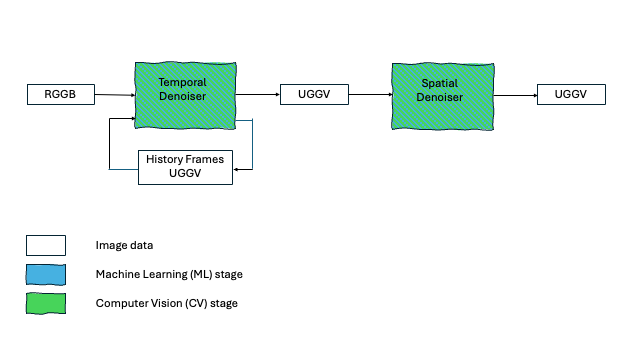 Neural denoising pipeline
The Neural Denoising application works on frames, as emitted by a camera sensor in Bayer format:
- The input frames are in RGGB 1080x1920x4 format
- The output frames in YGGV 4x1080x1920 format