Convert SmolVLA to ExecuTorch for inference on Arm CPUs
Quantize and export the INT8 model
You’ve seen each stage of the pipeline. You’ll now use TorchAO to quantize eligible parts of the model to INT8 and run the complete conversion pipeline.
Run pipeline.sh with INT8 quantization and save the results to artifacts/int8:
./scripts/pipeline.sh \
    --variant int8 \
    --input-suite "$SMOLVLA_INPUT_SUITE" \
    --output-dir artifacts/int8
The pipeline runs eight stages. A successful run ends with:
        [8/8] Native accuracy gate passed
Artifacts: artifacts/int8
The --variant int8 option applies dynamic per-channel INT8 quantization to eligible linear operations in vision_encoder and denoise_step. Weights use per-channel INT8 quantization, while activations are quantized dynamically at runtime. prefix_forward remains FP32 to preserve accuracy.
Quantization occurs immediately after loading the model, before splitting and exporting.
Different SmolVLA configurations can benefit from different quantizations. In particular, fine-tuned models can use static INT8, where real robot task data influences the quantization.
Compare the FP32 and INT8 executions
To compare the FP32 and INT8 executions, complete the following steps:
Inspect the CPU layout and usage
You can assign CPU cores to the native runner to keep the FP32 and INT8 configurations consistent. CPU affinity also lets you tune each component on systems with different core types.
Inspect your CPU layout:
lscpu -e=CPU,ONLINE,MAXMHZ,MODELNAME
For example, an NVIDIA DGX Spark has the following layout:
        CPU ONLINE    MAXMHZ MODELNAME
  0    yes 2808.0000 Cortex-A725
  1    yes 2808.0000 Cortex-A725
  2    yes 2808.0000 Cortex-A725
  3    yes 2808.0000 Cortex-A725
  4    yes 2808.0000 Cortex-A725
  5    yes 3900.0000 Cortex-X925
  6    yes 3900.0000 Cortex-X925
  7    yes 3900.0000 Cortex-X925
  8    yes 3900.0000 Cortex-X925
  9    yes 3900.0000 Cortex-X925
 10    yes 2808.0000 Cortex-A725
 11    yes 2808.0000 Cortex-A725
 12    yes 2808.0000 Cortex-A725
 13    yes 2808.0000 Cortex-A725
 14    yes 2808.0000 Cortex-A725
 15    yes 3900.0000 Cortex-X925
 16    yes 3900.0000 Cortex-X925
 17    yes 3900.0000 Cortex-X925
 18    yes 3900.0000 Cortex-X925
 19    yes 3900.0000 Cortex-X925
The runner lets you allocate one group of cores to vision and another group to prefix and denoise. On the DGX Spark, cores 5-9 and 15-19 are the faster Cortex-X925 cores. If your system has enough cores, a useful starting point is eight to ten cores for vision and five to eight cores for the other components.
Use only the CPU IDs that are online on your system. You can also omit affinity options, which is useful on smaller systems or CPUs with one core type.
Other resource-intensive processes affect inference latency. Inspect the live CPU load with top:
top
Press q to exit.
Run benchmarks
First, benchmark both models without CPU affinity. Using nproc gives each run the number of processing units available to the current environment:
python scripts/benchmark.py \
    --artifacts-dir artifacts/fp32 \
    --warmup-runs 3 \
    --benchmark-runs 10 \
    --cpu-threads "$(nproc)"

python scripts/benchmark.py \
    --artifacts-dir artifacts/int8 \
    --warmup-runs 3 \
    --benchmark-runs 10 \
    --cpu-threads "$(nproc)"
Experiment with the following options to suit your system:
--cpu-affinityspecifies the cores allocated toprefixanddenoise--cpu-threadsspecifies the ExecuTorch and XNNPACK thread pool size; match the thread pool size to the number of cores in--cpu-affinity--vision-cpu-affinityand--vision-cpu-threadsset a separate core allocation and thread pool size for the vision encoder
For example, the DGX Spark configuration uses --cpu-threads 5 --cpu-affinity 15-19 --vision-cpu-threads 8 --vision-cpu-affinity 5-9,15-19. Apply identical options to the FP32 and INT8 benchmark commands for a fair comparison.
Compare benchmark results
Compare the latency and output accuracy to the PyTorch reference, and visualize the six action-dimension output values:
python scripts/compare.py \
    --fp32 artifacts/fp32 \
    --int8 artifacts/int8
The output from the DGX Spark configuration is similar to:
        variant  median_ms  PTE_MB  cosine      MAE       SQNR_dB
FP32       1443.36  1611.7  0.999995944  0.000982  49.34
INT8        720.74  1022.9  0.999376578  0.010765  28.86
INT8 speedup: 2.00x
For this run, INT8 reduces median latency by about 50%, resulting in a 2.00x speedup. INT8 also reduces the combined .pte size while keeping the action trajectories close to the FP32 reference. Your results depend on the CPU and core allocation.
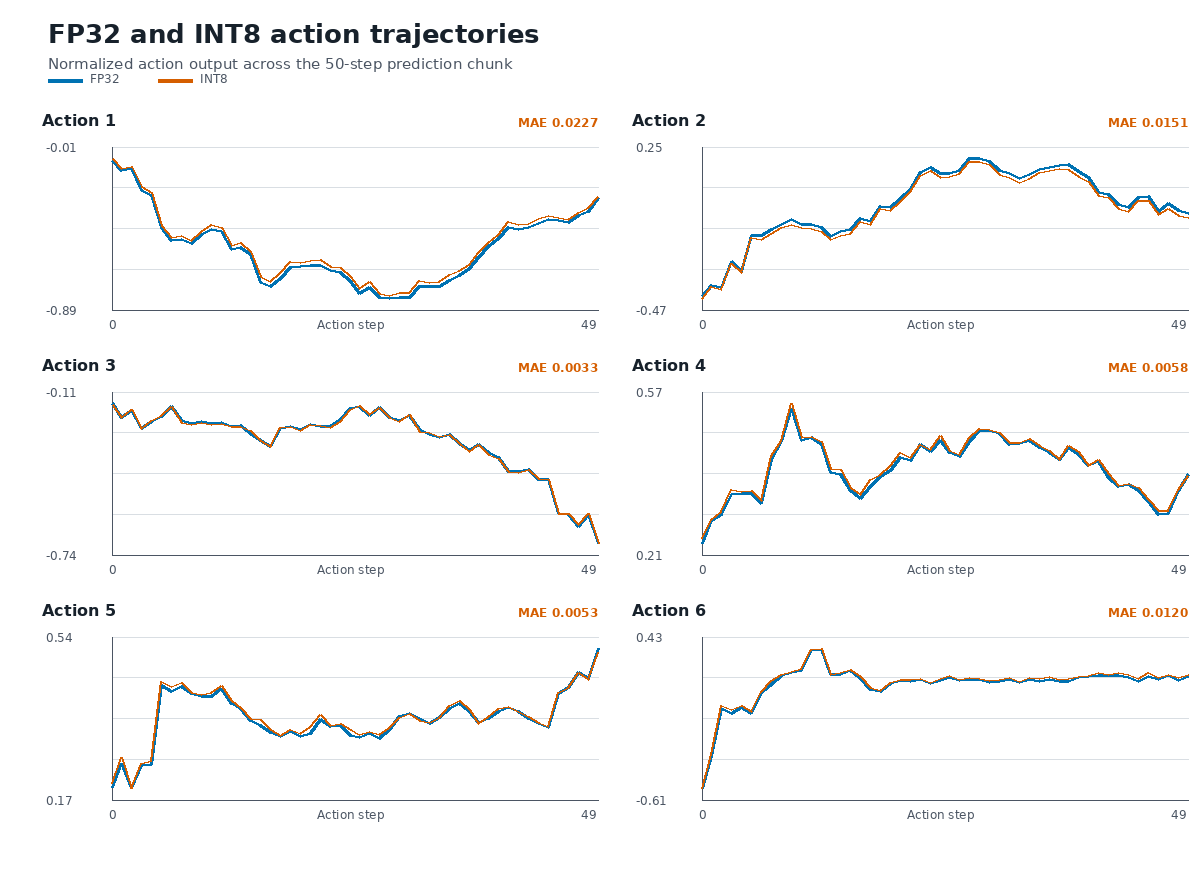 FP32 and INT8 action trajectories
What you’ve accomplished
You’ve converted selected SmolVLA operations to INT8, run the FP32 and INT8 models with identical inputs on an Arm CPU, and compared their output error and native runtime latency.
From here, you can integrate the ExecuTorch model into a robotics pipeline, experiment with more quantizations and SmolVLA configurations, or optimize for other Arm CPU layouts.