Extend OpenClaw for a local-first AI assistant across Arm platforms
Introduction
Understand the architecture and local data boundaries
Prepare the DGX Spark host and local services
Configure and start the OpenClaw runtime on DGX Spark
Validate memory persistence and routing with Telegram and Qdrant
Validate document RAG, web search, and proactive tasks
(Optional) Port the app to a CPU-only Armv9 system
Next Steps
Extend OpenClaw for a local-first AI assistant across Arm platforms
Introduction
Understand the architecture and local data boundaries
Prepare the DGX Spark host and local services
Configure and start the OpenClaw runtime on DGX Spark
Validate memory persistence and routing with Telegram and Qdrant
Validate document RAG, web search, and proactive tasks
(Optional) Port the app to a CPU-only Armv9 system
Next Steps
Define the household test scenario
You’ll create a shared household assistant to test local memory. You’ll save and retrieve a synthetic maintenance reminder without sending it to a public cloud LLM.
Telegram transports the messages. Ollama, Qdrant, and the local LLM process them on your host.
Household data is treated as shared data. You won’t implement separate access control for each family member.
Store and query local memory
Send the following command to the Telegram bot:
/mem #home The boiler should be inspected every October.
The runtime stores the reminder through the following path:
Telegram / Mem command
    -> Memory skill
    -> Ollama embedding
    -> Qdrant collection: personal_tracker_memory
Wait for the confirmation, then retrieve the memory:
/rag memory: When should the boiler be inspected?
The response should mention October:
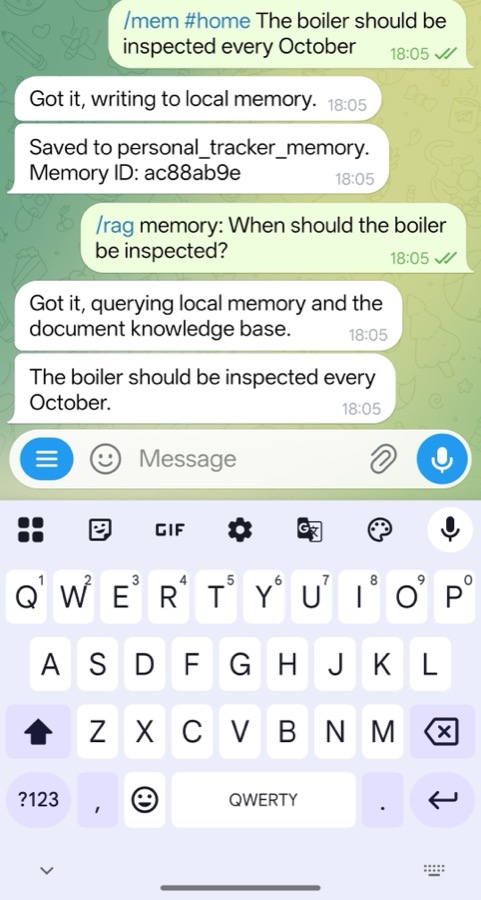 Saving and retrieving a household memory in Telegram
The retrieval request uses the following local path:
Telegram question
    -> Ollama query embedding
    -> Qdrant similarity search
    -> Retrieved context
    -> Local vLLM response
    -> Telegram answer
Verify Qdrant vector collections
Confirm that the personal memory collection exists:
curl http://127.0.0.1:6333/collections/personal_tracker_memory
The relevant fields are similar to:
        {
  "result": {
    "status": "green",
    "optimizer_status": "ok",
    "points_count": 102,
    "config": {
      "params": {
        "vectors": {
          "size": 768,
          "distance": "Cosine"
        },
        "on_disk_payload": true
      }
    }
  },
  "status": "ok"
}
The point count depends on existing data. A green status with optimizer_status set to ok confirms collection health. The vector size of 768 matches nomic-embed-text.
The collection metadata doesn’t prove that the boiler reminder was stored. Query the point payload directly to verify the synthetic record:
curl -sS -X POST \
  http://127.0.0.1:6333/collections/personal_tracker_memory/points/scroll \
  -H 'Content-Type: application/json' \
  -d '{
    "filter": {
      "must": [
        {
          "key": "text",
          "match": {
            "value": "#home The boiler should be inspected every October."
          }
        }
      ]
    },
    "limit": 5,
    "with_payload": true,
    "with_vector": false
  }'
Look for the boiler reminder in the returned payload. The filter finds it even when the personal collection contains other records. This verifies the stored data directly instead of relying on the assistant’s response.
Inspect active agents and task execution
Send the following command to the Telegram bot:
/agents
The response lists the thin agents registered by the reference runtime, including memory, RAG, browser search, weather, and chat routes.
To inspect recent tasks, send the following command to the Telegram bot:
/tasks last 5
Task history shows which agent handled the request, its status, and its runtime. All routes use the configured LLM endpoint.
Test external skill integration
Send a weather question in plain language:
Cambridge weather tomorrow
The runtime sends this question to the weather skill. Don’t add /search, which selects the general browser worker instead.
This request contacts the public wttr.in weather service, but generation still uses the local model.
Your household assistant should now:
- Save and retrieve the synthetic boiler reminder from Telegram.
- Store the reminder in
personal_tracker_memory. - Show the selected agent in
/agentsand/tasks last 5. - Return weather data through the external weather skill.
What you’ve accomplished and what’s next
You’ve now saved and retrieved a synthetic household memory, verified it in Qdrant, and inspected both local and external request paths.
Next, you’ll add document RAG, browser search, and a proactive cron reminder.