Extend OpenClaw for a local-first AI assistant across Arm platforms
Introduction
Understand the architecture and local data boundaries
Prepare the DGX Spark host and local services
Configure and start the OpenClaw runtime on DGX Spark
Validate memory persistence and routing with Telegram and Qdrant
Validate document RAG, web search, and proactive tasks
(Optional) Port the app to a CPU-only Armv9 system
Next Steps
Extend OpenClaw for a local-first AI assistant across Arm platforms
Introduction
Understand the architecture and local data boundaries
Prepare the DGX Spark host and local services
Configure and start the OpenClaw runtime on DGX Spark
Validate memory persistence and routing with Telegram and Qdrant
Validate document RAG, web search, and proactive tasks
(Optional) Port the app to a CPU-only Armv9 system
Next Steps
Transition from inference to an assistant
Running a local LLM gives you private text generation, but not a complete assistant. You still need an interface for questions, saved information, document searches, and reminders.
In this Learning Path, you’ll deploy OpenClaw Arm Continuum and use it from Telegram. You’ll save a household note, query a local document, search the web, and schedule a notification. Inference, embeddings, documents, vector memory, and task state remain on hardware that you control.
Telegram is the messaging interface. The runtime can support another platform through a gateway that translates its messages and events.
OpenClaw provides the foundation for the assistant. The reference runtime connects it to Telegram, local generation through vLLM or llama.cpp, Ollama embeddings, Qdrant memory, browser search, and scheduled tasks. It routes each request to the relevant local service or tool.
Understand the data boundary
Local-first doesn’t mean that every byte stays offline. Telegram and web search use external services, while the core AI data remains under your control.
| Data or operation | Location | External interaction |
|---|---|---|
| LLM inference | DGX Spark or CPU-only Arm host | Model weights are downloaded during setup |
| Embeddings | Local Ollama service | Model weights are downloaded during setup |
| Vector memory and RAG | Local Qdrant service | None during normal retrieval |
| Uploaded documents | Local runtime workspace | Telegram transports the original upload |
| Cron state and task history | Local workspace and Gateway state | Telegram transports push messages |
| External data lookup | Local skill | Public data service selected by the skill |
| Browser search | Local Playwright worker | Search engine and selected public pages |
The runtime doesn’t use a public cloud LLM API. Telegram transports bot messages, and browser searches send requests to external websites.
Don’t enter real personal, household, or organizational information. Instead, use synthetic or public data. If the host already contains personal runtime data, set environment variables by following the instructions in Configure and start the OpenClaw runtime on DGX Spark .
Trace the application request path
The architecture shows how Telegram requests reach local services and persistent data:
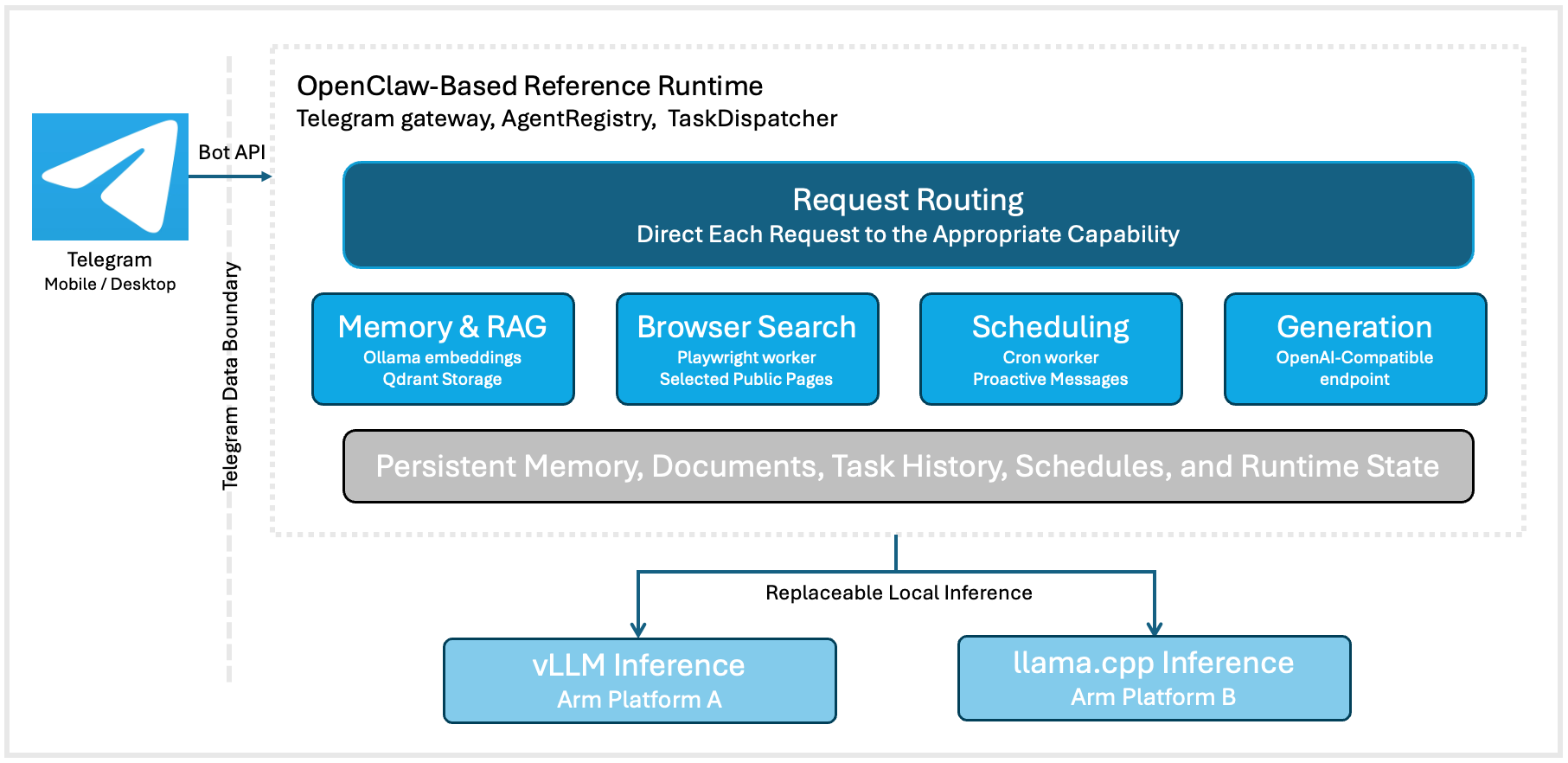 OpenClaw-based local-first reference runtime
The reference runtime can also start a configured workflow automatically, without requiring a new Telegram message from the user:
Cron schedule
    -> Reference runtime cron worker
    -> Local skill and local LLM
    -> Telegram push notification
Slash commands follow fixed routes. For example, /search always selects browser search, while a plain-language weather question selects the weather skill.
The runtime uses a text-first architecture, fixed skill routes, and one local LLM endpoint. This Learning Path doesn’t cover multi-model routing, multi-agent handoffs, or hardware benchmarking.
Understand the shared API contract across Arm platforms
The same workflow uses an inference engine suited to each platform:
| Platform | Inference engine |
|---|---|
| NVIDIA DGX Spark | vLLM server |
| Radxa Orion O6 | llama.cpp server |
Both expose an OpenAI-compatible chat-completions API, so only the configured endpoint and model name change.
What you’ve learned and what’s next
You now understand the runtime components, data boundary, and shared inference API.
Next, you’ll prepare the NVIDIA DGX Spark and configure Ollama and Qdrant.