Implement a voice translation pipeline on Apple silicon
Introduction
Set up the voice translation project
Transcribe microphone audio with Sherpa-ONNX
Translate text with Gemma 4 E2B
Synthesize translated speech with Supertonic 3
Build the voice translator with Gradio
Validate the voice translation pipeline
Next Steps
Implement a voice translation pipeline on Apple silicon
Connect the inference stages
You’ll create app.py to connect the functions from stt.py, translate.py, and tts.py to a local Gradio page. The browser will provide recording and playback controls, and the Python backend will run the three models.
After creating and launching the application, you’ll test it with an English recording and Spanish as the target language. The application will transcribe the recording, display the Spanish translation as it’s generated, then synthesize Spanish speech.
Using a file editor of your choice, create a file named app.py in the ~/voice-translator directory. Copy and paste the following code into the file and save it:
from contextlib import ExitStack

import gradio as gr
import litert_lm
import numpy as np

from languages import LANGUAGES, translation_prompt
from stt import create_recogniser, transcribe
from translate import MODEL_PATH, translation_chunks
from tts import create_tts, synthesise


def normalise_audio(audio):
    if audio is None:
        raise gr.Error("record sentence")

    sample_rate, samples = audio
    samples = np.asarray(samples)

    if np.issubdtype(samples.dtype, np.integer):
        sample_info = np.iinfo(samples.dtype)
        limit = max(abs(sample_info.min), sample_info.max)
        samples = samples.astype(np.float32) / limit
    else:
        samples = samples.astype(np.float32)

    if samples.ndim > 1:
        samples = samples.mean(axis=1)

    return np.ascontiguousarray(samples), int(sample_rate)


def main():
    litert_lm.set_min_log_severity(litert_lm.LogSeverity.ERROR)

    print("Loading STT")
    recogniser = create_recogniser()
    print("Loading TTS")
    tts = create_tts()
    print("Loading Gemma 4")

    with litert_lm.Engine(
        str(MODEL_PATH),
        backend=litert_lm.Backend.GPU(),
        enable_speculative_decoding=True,
    ) as engine:
        conversation_resources = ExitStack()
        conversation = None
        conversation_language = None

        def select_conversation(language):
            nonlocal conversation_resources
            nonlocal conversation
            nonlocal conversation_language

            if language != conversation_language:
                conversation_resources.close()
                conversation_resources = ExitStack()
                system_message = litert_lm.Message.system(
                    translation_prompt(language)
                )
                conversation = conversation_resources.enter_context(
                    engine.create_conversation(messages=[system_message])
                )
                conversation_language = language

            return conversation

        def reset_language(language):
            select_conversation(language)
            return "", "", None, f"Ready to translate to {language}."

        def run_pipeline(audio, language):
            samples, sample_rate = normalise_audio(audio)
            transcript = transcribe(recogniser, samples, sample_rate)

            if not transcript:
                raise gr.Error(
                    "No speech was detected. Please try again."
                )

            yield transcript, "", None, "Translating..."

            translated_text = ""
            active_conversation = select_conversation(language)
            for text_part in translation_chunks(
                active_conversation, transcript
            ):
                translated_text += text_part
                yield transcript, translated_text, None, "Translating..."

            translated_text = translated_text.strip()
            if not translated_text:
                raise gr.Error("Model did not return a translation")

            yield transcript, translated_text, None, "Synthesizing..."
            generated_audio = synthesise(
                tts, translated_text, LANGUAGES[language]
            )
            yield (
                transcript,
                translated_text,
                (
                    generated_audio.sample_rate,
                    np.asarray(generated_audio.samples, dtype=np.float32),
                ),
                "Ready",
            )

        with gr.Blocks(
            title="Voice Translator",
            analytics_enabled=False,
        ) as demo:
            gr.Markdown(
                "# Voice translator\n"
                "Record a sentence and translate it locally."
            )

            with gr.Row():
                microphone = gr.Audio(
                    sources=["microphone"],
                    type="numpy",
                    label="English speech",
                )
                with gr.Column():
                    language = gr.Dropdown(
                        choices=list(LANGUAGES),
                        value="Spanish",
                        label="Translate to",
                    )
                    translate_button = gr.Button(
                        "Translate",
                        variant="primary",
                    )
                    status = gr.Markdown("Ready to translate.")

            with gr.Row():
                transcript_output = gr.Textbox(
                    label="Transcript",
                    interactive=False,
                )
                translation_output = gr.Textbox(
                    label="Translation",
                    interactive=False,
                )

            speech_output = gr.Audio(
                label="Translated speech",
                autoplay=True,
                interactive=False,
            )

            outputs = [
                transcript_output,
                translation_output,
                speech_output,
                status,
            ]
            translate_button.click(
                run_pipeline,
                inputs=[microphone, language],
                outputs=outputs,
                concurrency_limit=1,
                concurrency_id="models",
            )
            language.change(
                reset_language,
                inputs=language,
                outputs=outputs,
                concurrency_limit=1,
                concurrency_id="models",
            )

        try:
            demo.queue(default_concurrency_limit=1).launch(
                inbrowser=True,
                share=False,
                server_name="127.0.0.1",
            )
        finally:
            conversation_resources.close()


if __name__ == "__main__":
    main()
The code is arranged as follows:
normalise_audio()prepares browser audio for the recognizer.main()loads the models and owns their lifetime.select_conversation()andreset_language()handle the selected language.run_pipeline()yields the transcript, translation, audio, and status as processing advances.- The Gradio components connect those functions to the recording and translation controls.
Prepare browser audio
normalise_audio() accepts the sample-rate and sample-array pair from Gradio. It scales integer samples to floating-point values, averages multiple channels into mono, and returns a contiguous float32 array. It preserves the sample rate of the recording so that Sherpa-ONNX can resample it.
Keep the models loaded
main() creates the recognizer, synthesizer, and Gemma engine before Gradio starts serving requests. select_conversation() reuses the current conversation while the target language stays the same. When the language changes, it closes that conversation and creates one with a new system instruction. ExitStack handles this replaceable conversation, and the finally block closes it at shutdown.
Update the interface in order
Each yield in run_pipeline() supplies values in the same order as the outputs list: transcript, translation, audio, and status. The audio value remains None until Supertonic has synthesized the complete translation.
Both event handlers use concurrency_id="models" with a limit of one. This serializes translation and language changes, preventing a language change from closing a conversation while a translation is using it. A language change requested during translation waits for that work to finish.
Launch the desktop interface
Continuing in the ~/voice-translator directory with the active virtual environment, start the application:
python app.py
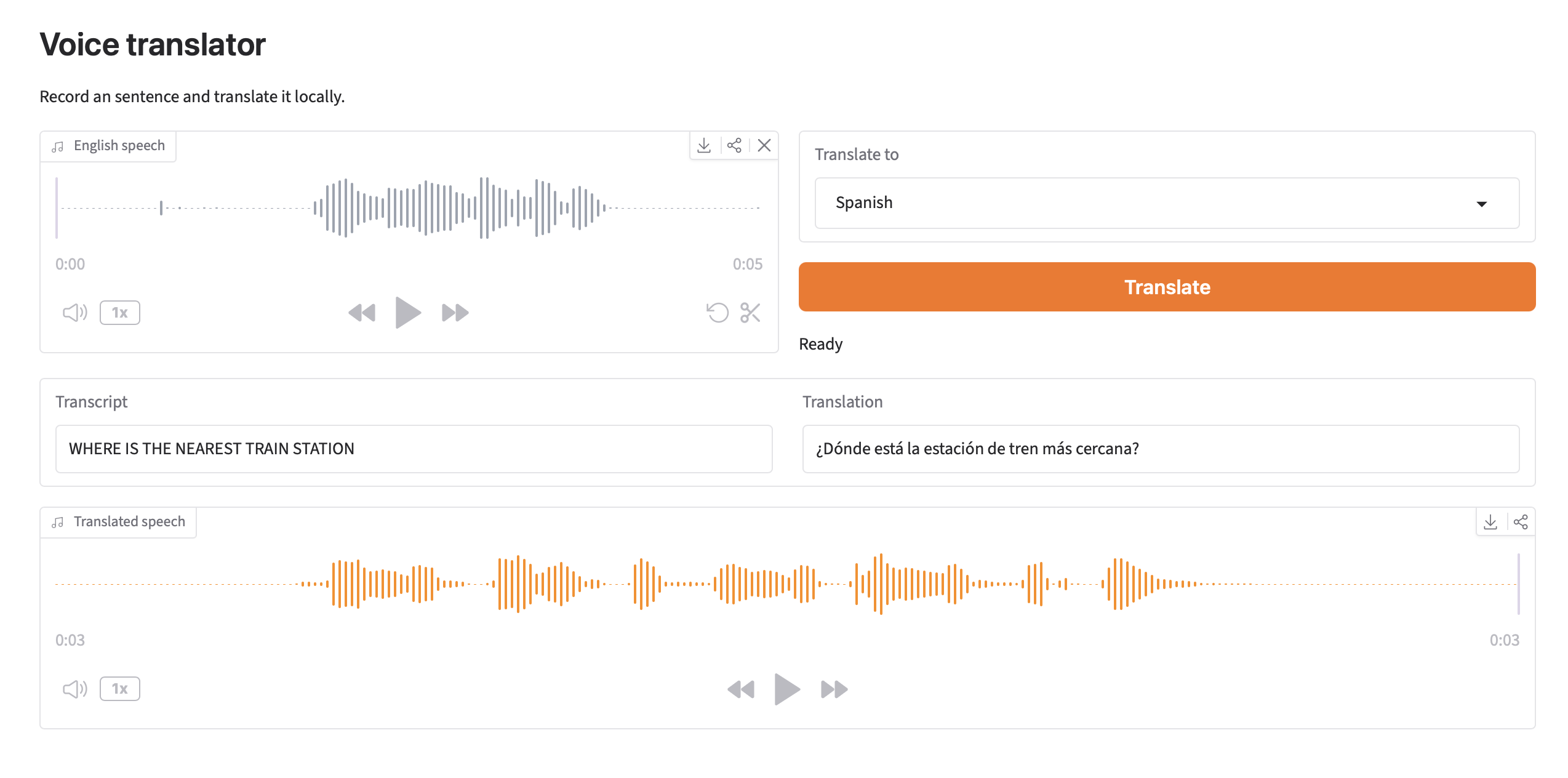
The three loading messages appear once, then Gradio prints a local address and opens the application in your default browser. The following screenshot shows the completed result after translating a recording:
 Completed English-to-Spanish voice translation
The browser might request microphone access the first time you record. Select Allow.
If recording is unavailable, open System Settings. Select Privacy & Security, select Microphone, and enable access for your browser.
Leave Translate to set to its default of Spanish. Record the following sentence, stop the recording, and select Translate:
Where is the nearest train station?
The interface displays the recognized text in Transcript, streams the Spanish translation into Translation, and adds playable audio to Translated speech.
What you’ve accomplished and what’s next
You’ve set up the desktop voice translator by combining functions for transcription, translation, and speech generation. The three command-line stages now run from one browser recording, with their models kept in memory between requests.
Next, you’ll check the transcript, Spanish translation, and spoken Spanish result, then repeat the test without a network connection.