Build an offline voice chatbot with faster-whisper and vLLM on DGX Spark
Introduction
Build an offline voice assistant with whisper and vLLM
Install faster-whisper for local speech recognition
Build a real-time STT pipeline on CPU
Fine-tune segmentation parameters
Build a real-time offline voice chatbot using STT and vLLM
Connect speech recognition to vLLM for real-time voice interaction
Specialize offline voice assistants for customer service
Enable context-aware dialogue with short-term memory
Next Steps
Build an offline voice chatbot with faster-whisper and vLLM on DGX Spark
Introduction
Build an offline voice assistant with whisper and vLLM
Install faster-whisper for local speech recognition
Build a real-time STT pipeline on CPU
Fine-tune segmentation parameters
Build a real-time offline voice chatbot using STT and vLLM
Connect speech recognition to vLLM for real-time voice interaction
Specialize offline voice assistants for customer service
Enable context-aware dialogue with short-term memory
Next Steps
Build a CPU-based speech-to-text engine
In this section, you’ll build a real-time speech-to-text (STT) pipeline using only the CPU. Starting from a basic 10-second recorder, you’ll incrementally add noise filtering, sentence segmentation, and parallel audio processing to achieve a transcription engine for Arm-based systems like DGX Spark.
You’ll start from a minimal loop and iterate toward a multithreaded, VAD-enhanced STT engine.
Step 1: Upgrade model and add Voice Activity Detection
Build on the transcribe.py script from the previous section by upgrading to a more accurate model and adding Voice Activity Detection (VAD) to filter out silence and background noise.
This step makes two important improvements:
Model upgrade: Replace small.en with medium.en for better transcription quality, especially for conversational speech or uncommon vocabulary. The medium model provides significantly better recognition for less common words and accents, while compute_type="int8" on CPU provides the best balance of speed and accuracy.
Voice Activity Detection: Add webrtcvad to classify each 30ms audio frame as either speech or silence. If no speech is detected in the 10-second window, transcription is skipped. This provides an efficient first filter before buffering or turn detection, avoiding wasted processing on silent periods.
Update your existing transcribe.py with the following complete code:
import sounddevice as sd
import numpy as np
import webrtcvad
from faster_whisper import WhisperModel

SAMPLE_RATE = 16000
DURATION = 10  # seconds per loop
device = "cpu"  # or "gpu"
compute_type = "int8"  # or "float16", "int8", "int4"

FRAME_DURATION_MS = 30
FRAME_SIZE = int(SAMPLE_RATE * FRAME_DURATION_MS / 1000)

VAD_MODE = 3   # Aggressive mode
vad = webrtcvad.Vad(VAD_MODE)

def record_audio():
    print(" Recording for 10 seconds...")
    with sd.InputStream(samplerate=SAMPLE_RATE, channels=1, dtype='float32') as stream:
        audio = stream.read(int(SAMPLE_RATE * DURATION))[0]
    sd.wait()
    print(" Recording complete.")
    return audio.flatten()

def contains_speech(audio):
    pcm = (audio * 32768).astype(np.int16).tobytes()
    for i in range(0, len(pcm), FRAME_SIZE * 2):
        frame = pcm[i:i + FRAME_SIZE * 2]
        if len(frame) < FRAME_SIZE * 2:
            break
        if vad.is_speech(frame, SAMPLE_RATE):
            return True
    return False

def transcribe_audio(audio):
    model = WhisperModel("medium.en", device=device, compute_type=compute_type)
    print(" Transcribing...")
    segments, _ = model.transcribe(audio, language="en")
    for segment in segments:
        print(f"[{segment.start:.2f}s - {segment.end:.2f}s] {segment.text.strip()}")
    print(" Done.\n")

if __name__ == "__main__":
    try:
        while True:
            audio_data = record_audio()
            if contains_speech(audio_data):
                transcribe_audio(audio_data)
            else:
                print(" No speech detected. Skipping transcription.")
    except KeyboardInterrupt:
        print(" Stopped by user.")
Run the updated script:
python3 ./transcribe.py
When you speak to the device, the output is similar to:
         Recording for 10 seconds...
 Recording complete.
 No speech detected. Skipping transcription.
 Recording for 10 seconds...
 Recording complete.
 Transcribing...
[0.00s - 10.00s] Hi, I forgot my account password and need help resetting it as soon as possible.
 Done.

 Recording for 10 seconds...
 Recording complete.
 Transcribing...
[0.00s - 10.00s] I want to cancel my subscription this month.
 Done.
faster-whisper supports many models like tiny, base, small, medium and large-v1/2/3. See the GitHub repository for more model details.
Step 2: Add turn segmentation with multi-threaded audio capture
While VAD helps detect the presence of speech, natural conversations require more sophisticated handling. Users often pause briefly or trail off in their speech, and if a voice assistant transcribes audio too early, it produces incomplete or fragmented sentences.
This step adds two critical improvements:
Turn segmentation with timing thresholds: Use SILENCE_LIMIT_SEC to wait until the user is silent for a set duration before deciding a speech segment has ended, and MIN_SPEECH_SEC to discard segments that are too short to be meaningful (such as false starts or background chatter). This ensures the assistant captures full sentences before running inference.
Multi-threaded audio collection: Separate audio input into a background thread while keeping transcription in the main loop. This enables continuous frame capture with no blocking, smooth real-time responsiveness, and modular code that’s easier to scale or extend. Use Python’s threading.Thread to read audio in the background and a thread-safe queue.Queue to pass frames to the main loop.
Here’s the complete implementation:
import pyaudio
import numpy as np
import webrtcvad
import time
import torch
import threading
import queue
from faster_whisper import WhisperModel
from collections import deque

# --- Parameters ---
SAMPLE_RATE = 16000
FRAME_DURATION_MS = 30
FRAME_SIZE = int(SAMPLE_RATE * FRAME_DURATION_MS / 1000)
VAD_MODE = 3
SILENCE_LIMIT_SEC = 1.0
MIN_SPEECH_SEC = 2.0

# --- Init VAD and buffers ---
vad = webrtcvad.Vad(VAD_MODE)
speech_buffer = deque()
speech_started = False
last_speech_time = time.time()

# --- Init Thread and Queue ---
audio_queue = queue.Queue()
stop_event = threading.Event()

# --- Init Whisper model ---
device = "cpu"  # "cpu" or "gpu"
compute_type = "int8"  # "int8" or "float16", "int8", "int4"
model = WhisperModel("medium.en", device=device, compute_type=compute_type)

# --- Audio capture thread ---
def audio_capture():
    pa = pyaudio.PyAudio()
    stream = pa.open(format=pyaudio.paInt16,
                     channels=1,
                     rate=SAMPLE_RATE,
                     input=True,
                     frames_per_buffer=FRAME_SIZE)
    print(" Listening... Press Ctrl+C to stop")
    try:
        while not stop_event.is_set():
            frame = stream.read(FRAME_SIZE, exception_on_overflow=False)
            audio_queue.put(frame)
    finally:
        stream.stop_stream()
        stream.close()
        pa.terminate()

# --- Start audio capture thread ---
threading.Thread(target=audio_capture, daemon=True).start()

# --- Main loop: process queue and transcribe ---
try:
    while True:
        if audio_queue.empty():
            time.sleep(0.01)
            continue

        frame = audio_queue.get()
        is_speech = vad.is_speech(frame, SAMPLE_RATE)

        if is_speech:
            speech_buffer.append(frame)
            speech_started = True
            last_speech_time = time.time()
        elif speech_started:
            speech_duration = len(speech_buffer) * (FRAME_DURATION_MS / 1000.0)
            silence_duration = time.time() - last_speech_time

            if silence_duration > SILENCE_LIMIT_SEC:
                if speech_duration >= MIN_SPEECH_SEC:
                    print(" Transcribing buffered speech...")
                    audio_bytes = b"".join(speech_buffer)
                    audio_np = np.frombuffer(audio_bytes, dtype=np.int16).astype(np.float32) / 32768.0

                    segments, _ = model.transcribe(audio_np, language="en")
                    for seg in segments:
                        print(f"[{seg.start:.2f}s - {seg.end:.2f}s] {seg.text.strip()}")
                    print(" Segment done.\n")
                else:
                    print(f" Skipped short segment ({speech_duration:.2f}s < {MIN_SPEECH_SEC}s)")

                speech_buffer.clear()
                speech_started = False
except KeyboardInterrupt:
    print(" Stopped")
finally:
    stop_event.set()
Run the updated code:
python transcribe.py
Speak into your microphone. The system now captures audio in a background thread, buffers speech segments, and transcribes them when you pause. You’ll see cleaner turn segmentation with minimal latency.
When you say a long sentence with multiple clauses, the output is similar to:
         Skipped short segment (0.81s < 2.0s)
 Transcribing buffered speech...
[0.00s - 3.76s] Hi, I forgot my account password and I need to help in resetting
 Segment done.
 Transcribing buffered speech...
[0.00s - 5.36s] Please help me to tracking my recent order and let me know when I can have my package.
 Segment done.
 Transcribing buffered speech...
[0.00s - 3.76s] I want to cancel my subscription and ensure I will not be charged.
[3.76s - 7.60s] I would like to speak to the live customer support representative.
 Segment done.
The result is a smoother and more accurate voice UX - particularly important when integrating with downstream LLMs in later sections.
Demo: Real-time speech transcription on Arm CPU with faster-whisper
This demo shows the real-time transcription pipeline in action, running on an Arm-based DGX Spark system. Using a USB microphone and the faster-whisper model (medium.en), the system records voice input, processes it on the CPU, and returns accurate transcriptions with timestamps - all without relying on cloud services.
Notice the clean terminal output and low latency, demonstrating how the pipeline is optimized for local, real-time voice recognition on resource-efficient hardware.
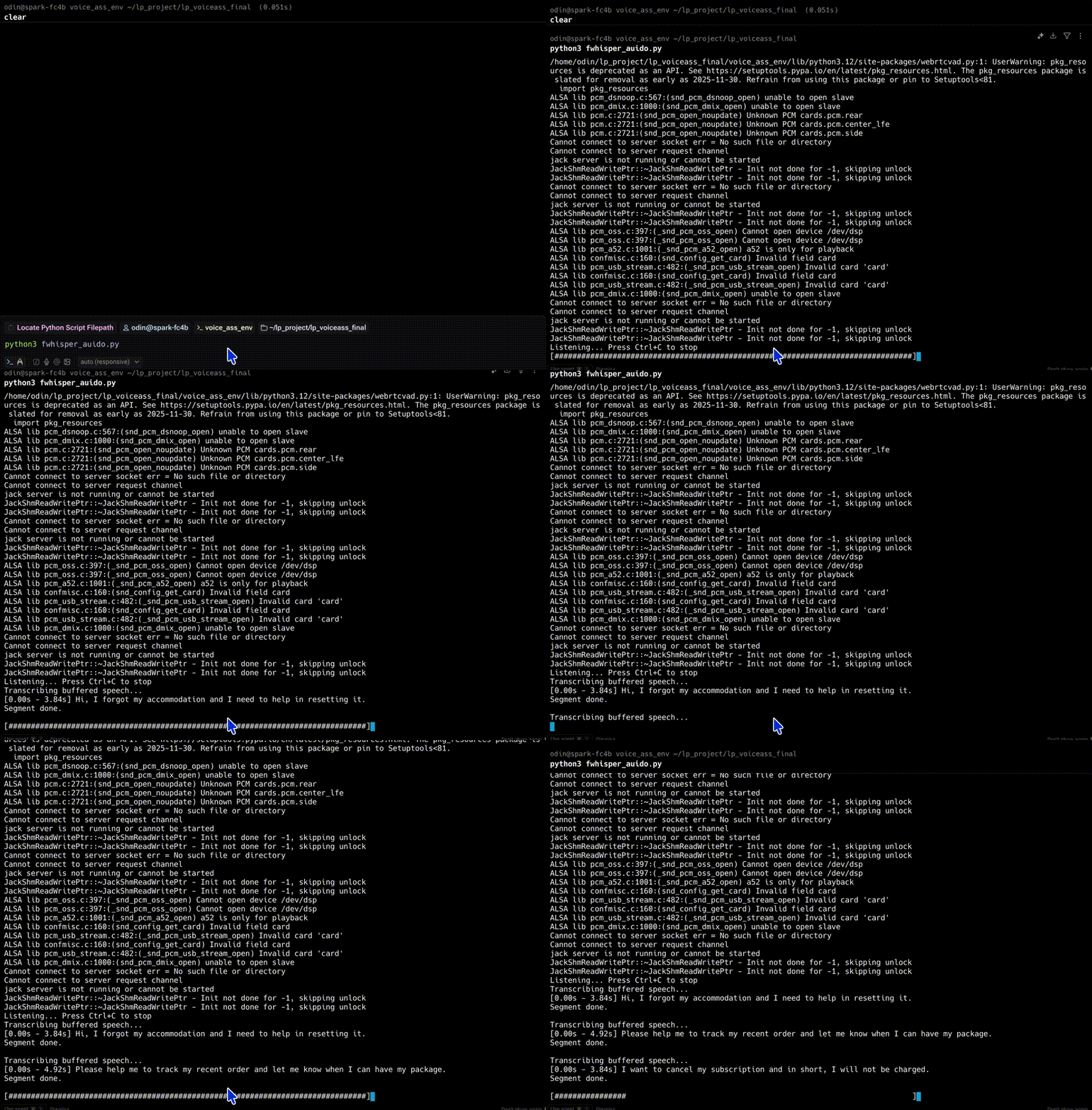 Real-time speech transcription with audio volume bar
The device runs audio capture and transcription in parallel. Use threading.Thread to collect audio without blocking, store audio frames in a queue.Queue, and in the main thread, poll for new data and run STT.
What you’ve accomplished and what’s next
You’ve implemented a complete real-time voice-to-text (STT) system running on the CPU. Each stage in the pipeline is open-source, modular, tunable, and optimized for offline usage.
USB Microphone (16kHz mono)
        ↓
PyAudio (32ms frames via stream.read)
        ↓
WebRTC VAD (speech vs silence classification)
        ↓
Audio Buffer (deque of active frames)
        ↓
Smart Turn Detection
  ├── silence_limit: wait for user pause
  └── min_speech: skip too-short segments
        ↓
WhisperModel ("medium.en" via faster-whisper)
        ↓
Print Transcription Result (timestamped text)
With this, you have a complete, low-latency, CPU-optimized STT engine. The next section covers optional fine-tuning of segmentation parameters for different environments. After that, you’ll integrate this STT system with vLLM to build a full local voice assistant.