Integrate retrieval and generation on Arm
In the previous sections, you prepared the environment, validated the e5-base-v2 embedding model, and verified that the Llama 3.1 8B Instruct model runs successfully on the Grace–Blackwell (GB10) platform.
In this section, you will bring all components together to build a complete Retrieval-Augmented Generation (RAG) workflow.
This stage connects the CPU-based retrieval and indexing with GPU-accelerated language generation, creating an end-to-end system capable of answering technical questions using real documentation data.
Building upon the previous modules, you will now:
- Connect the e5-base-v2 embedding model and FAISS vector index.
- Integrate the llama.cpp REST server for GPU-accelerated inference.
- Execute a complete Retrieval-Augmented Generation (RAG) workflow for end-to-end question answering.
Start the llama.cpp REST server
Before running the RAG query script, ensure the LLM server is active by running:
cd ~/llama.cpp/build-gpu/
./bin/llama-server \
  -m ~/models/Llama-3.1-8B-gguf/Meta-Llama-3.1-8B-Instruct-Q8_0.gguf \
  -ngl 40 --ctx-size 8192 \
  --port 8000 --host 0.0.0.0
Verify the server status from another terminal:
curl http://127.0.0.1:8000/health
The output is:
{"status":"ok"}
Create the RAG query script
This script performs the full pipeline using the flow:
User Query ─> Embedding ─> Vector Search ─> Context ─> Generation ─> Answer
Save the code below in a file named rag_query_rest.py in the ~/rag directory.
import os
import requests, faiss, json, numpy as np
from sentence_transformers import SentenceTransformer
from langchain_community.vectorstores import FAISS
from langchain_huggingface import HuggingFaceEmbeddings

# --- Paths ---
index_path = os.path.expanduser("~/rag/faiss_index")
model_path = os.path.expanduser("~/models/e5-base-v2")
LLAMA_URL  = "http://127.0.0.1:8000/completion"

# --- Load Embedding Model & FAISS Index ---
embedder = HuggingFaceEmbeddings(model_name=model_path, model_kwargs={"device": "cpu"})
db = FAISS.load_local(index_path, embedder, allow_dangerous_deserialization=True)

def rag_query(question, top_k=3, max_new_tokens=256):
    # Step 1: Retrieve documents
    results = db.similarity_search(question, k=top_k)
    context = "\n\n".join([r.page_content for r in results])

    print("\nRetrieved sources:")
    for i, r in enumerate(results, 1):
        print(f"{i}. {r.metadata.get('source', 'unknown')}")

    # Step 2: Construct prompt
    prompt = f"""You are a helpful engineering assistant.
Use the following context to answer the question.

Context:
{context}

Question:
{question}

Answer:"""

    # Step 3: Call llama.cpp REST Server
    payload = {"prompt": prompt, "n_predict": max_new_tokens, "temperature": 0.2}
    try:
       resp = requests.post(LLAMA_URL, json=payload, timeout=300)
       data = resp.json()
       return data.get("content", data)
    except Exception as e:
        print(f"llama.cpp server error or invalid response: {e}")

if __name__ == "__main__":
    answer = rag_query("How many CPU core inside the RaspberryPi 4?")
#    answer = rag_query("On the Raspberry Pi 4, which GPIOs have a default pull-down (pull low) configuration? Please specify the source and the section of the datasheet where this information can be found.")
    print("\n=== RAG Answer ===\n")
    print(answer)
Make sure you are in the Python virtual environment in each terminal. If needed, run:
cd ~/rag
source rag-venv/bin/activate
Run the python script to ask the question, “How many CPU core inside the RaspberryPi 4?”.
python rag_query_rest.py
You will receive an answer similar to the following.
        Retrieved sources:
1. cm4-datasheet.txt
2. raspberry-pi-4-datasheet.txt
3. cm4s-datasheet.txt

=== RAG Answer ===

 4
The Raspberry Pi 4 has 4 CPU cores.
The retrieved context referenced three datasheets and produced the correct answer: “4”.
Try a different question.
Comment out the first question answer = rag_query("How many CPU core inside the RaspberryPi 4?")
and uncomment the second question to test a more detailed query.
Run the script again with the new question.
python rag_query_rest.py
The output is:
        Retrieved sources:
1. cm3-plus-datasheet.txt
2. raspberry-pi-4-datasheet.txt
3. cm4s-datasheet.txt

=== RAG Answer ===

 Low
Step 1:  The question asks about the default pull state of GPIO12 on a Raspberry Pi 4.
Step 2:  To answer this question, we need to refer to the provided table, which lists the default pin pull state and available alternate GPIO functions for the Raspberry Pi 4.
Step 3:  Specifically, we are looking for the default pull state of GPIO12. We can find this information in the table by locating the row corresponding to GPIO12.
Step 4:  The table shows that GPIO12 has a default pull state of Low.
Step 5:  Therefore, the default pull of GPIO12 on a Raspberry Pi 4 is Low.

Retrieved sources:
1. raspberry-pi-4-datasheet.txt
2. cm4-datasheet.txt
3. cm3-plus-datasheet.txt

=== RAG Answer ===

The GPIOs with a default pull-down (pull low) configuration are:
- GPIO 9 (SPI0 MISO)
- GPIO 10 (SPI0 MOSI)
- GPIO 11 (SPI0 SCLK)
- GPIO 12 (PWM0)
- GPIO 13 (PWM1)
- GPIO 14 (TXD0)
- GPIO 15 (RXD0)
- GPIO 16 (FL0)
- GPIO 17 (FL1)
- GPIO 19 (PCM FS)

Source: Table 5: Raspberry Pi 4 GPIO Alternate Functions, section 5.1.2 GPIO Alternate Functions.
This demonstrates that the RAG system correctly retrieved relevant sources and generated the right answer using both CPU retrieval and GPU inference.
You can reference the section 5.1.2 on the PDF to verify the result.
Observe CPU and GPU utilization
If you have installed htop and nvtop, you can observe CPU and GPU utilization.
If you do not have them, run:
sudo apt install -y nvtop htop
The screenshots below show nvtop on the left and htop on the right side.
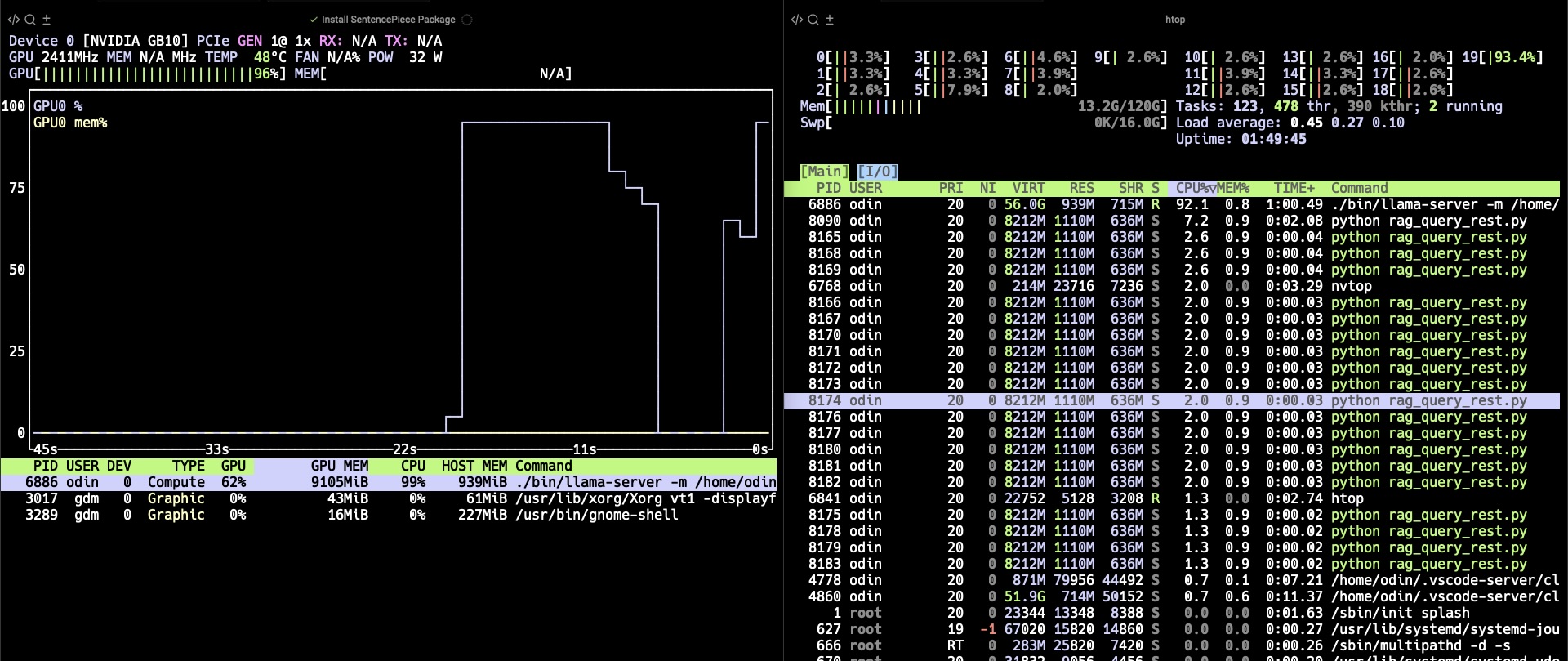
From the screenshots, you can see how the Grace CPU and the Blackwell GPU collaborate during RAG execution.
On the left, the GPU utilization graph shows a clear spike reaching 96%, indicating that the llama.cpp inference engine is actively generating tokens on the GPU.
Meanwhile, on the right, htop shows multiple Python processes running on the Grace CPU cores, maintaining around 93% per-core utilization.
This demonstrates the hybrid execution model of the RAG pipeline:
- The Grace CPU handles embedding computation, FAISS retrieval, and orchestration of REST API calls.
- The Blackwell GPU performs heavy matrix multiplications for LLM token generation.
- Both operate concurrently within the same Unified Memory space, eliminating data copy overhead between the CPU and GPU.
You have now connected the components of the RAG pipeline on the GB10 platform.
With the RAG pipeline now complete, the next section focuses on unified memory. You will learn how the CPU and GPU share data seamlessly within the same memory space.