Advance robotics reinforcement learning with Isaac Lab on DGX Spark
Introduction
Manipulate objects with a Franka 7-DOF robot arm
Train contact-rich manipulation policies with Isaac Lab on DGX Spark
Train multiple agents to coordinate two Shadow Hands in one simulation
Reproduce natural motion with Adversarial Motion Priors
Choose a reinforcement learning library for your task
Next Steps
Advance robotics reinforcement learning with Isaac Lab on DGX Spark
Introduction
Manipulate objects with a Franka 7-DOF robot arm
Train contact-rich manipulation policies with Isaac Lab on DGX Spark
Train multiple agents to coordinate two Shadow Hands in one simulation
Reproduce natural motion with Adversarial Motion Priors
Choose a reinforcement learning library for your task
Next Steps
Move from locomotion to interaction
Before continuing, complete the previous Isaac Sim and Isaac Lab Learning Path . By completing the Learning Path, you’ll build Isaac Sim and install Isaac Lab. You’ll configure both Isaac Sim and Isaac Lab on an Arm-based DGX Spark system.
Use one compatible Isaac Lab API version set when completing this Learning Path:
| Command tab | Isaac Lab | Isaac Sim | Python |
|---|---|---|---|
| Isaac Lab 2.3 API | v2.3.2 | 5.1.0 | 3.11 |
| Isaac Lab 3.0 API | v3.0.0-beta2.patch1 | 6.0.0 or 6.0.1 | 3.12 |
For a direct continuation from the previous Learning Path, use the 2.3 version set. Use the 3.0 version set only if you’ve installed the 3.0 Beta 2 release .
By completing the previous Learning Path, you’ll install packages into the Isaac Sim Python environment. There’s no virtual environment to activate.
Restore the environment variables and check the installed versions before selecting a tab:
source ~/.bashrc
cd ~/IsaacLab
git describe --tags --always
head -n 1 "${ISAACSIM_PATH}/VERSION"
"${ISAACSIM_PYTHON_EXE}" --version
If the versions don’t match, follow the documentation for your installed release before continuing. Isaac Lab 3.0 uses the unified train and play commands.
You’ll start by training policies for a seven-degree-of-freedom Franka arm on two tasks:
- Reach: Move the arm’s end effector to a target pose
- Lift: Grasp a cube and move it to a target position
These tasks continue the same source-built Isaac Sim and Isaac Lab workflow from the previous Learning Path.
DGX Spark has one GPU, so run the tasks in this Learning Path as single-GPU jobs. If you move the same checkout to a system with two GPUs, Isaac Lab supports distributed training.
PyTorch’s distributed launcher creates one process per GPU. Replace <example task> with the task to train on a two-GPU system:
python -m torch.distributed.run --nnodes=1 --nproc_per_node=2 \
    scripts/reinforcement_learning/rsl_rl/train.py \
    --task=<example task> \
    --headless \
    --distributed
python -m torch.distributed.run --nnodes=1 --nproc_per_node=2 \
    scripts/reinforcement_learning/train.py \
    --rl_library rsl_rl \
    --task=<example task> \
    --viz none \
    --distributed
For multi-node options and troubleshooting, use the guide for Isaac Lab 2.3.2 or Isaac Lab 3.0 Beta 2 .
Build spatial control
The reach task trains the Franka 7-DOF arm to move its end-effector to a randomly sampled target pose. This is your first manipulation baseline because it teaches position control before adding grasping.
Run the reach task
Use your existing Isaac Lab setup from the previous Learning Path. Run the following command to train the Isaac-Reach-Franka-v0 task from the rsl_rl library:
cd ~/IsaacLab

# Improve runtime compatibility on aarch64 systems
export LD_PRELOAD="$LD_PRELOAD:/lib/aarch64-linux-gnu/libgomp.so.1"

./isaaclab.sh -p scripts/reinforcement_learning/rsl_rl/train.py \
    --task=Isaac-Reach-Franka-v0 \
    --headless \
    --num_envs=2048
cd ~/IsaacLab

# Improve runtime compatibility on aarch64 systems
export LD_PRELOAD="$LD_PRELOAD:/lib/aarch64-linux-gnu/libgomp.so.1"

./isaaclab.sh train \
    --rl_library rsl_rl \
    --task=Isaac-Reach-Franka-v0 \
    --viz none \
    --num_envs=2048
This training flow uses the RSL-RL implementation of proximal policy optimization (PPO). Its hyperparameters and actor-critic network sizes are defined in source/isaaclab_tasks/isaaclab_tasks/manager_based/manipulation/<task>/config/franka/agents/rsl_rl_ppo_cfg.py.
In these config files, the example PPO model sizes are:
- Reach actor and critic:
[64, 64] - Lift actor and critic:
[256, 128, 64]
The default training iterations are:
- Reach:
1000iterations - Lift:
1500iterations
Training the reach task on the DGX Spark will take approximately 10 minutes.
The entry point controls the task configuration, the RL library, and runtime options such as visualization and environment count.
An environment is one simulated task instance. With --num_envs=2048, Isaac Lab runs 2048 Franka arms and targets in parallel. PPO uses their combined trajectories to update the actor and critic each iteration.
Verify the reach task
Set --checkpoint to the model file that you want to evaluate. Two environments keep the simulation quick to load:
./isaaclab.sh -p scripts/reinforcement_learning/rsl_rl/play.py \
    --task=Isaac-Reach-Franka-Play-v0 \
    --num_envs=2 \
    --checkpoint=logs/rsl_rl/franka_reach/<run_timestamp>/model_<iteration>.pt
./isaaclab.sh play \
    --rl_library rsl_rl \
    --task=Isaac-Reach-Franka-Play-v0 \
    --num_envs=2 \
    --checkpoint=logs/rsl_rl/franka_reach/<run_timestamp>/model_<iteration>.pt
To inspect the Franka arm, right-click in the viewport and use the W, A, S, and D keys to fly the camera. These are standard industry viewport navigation controls used in many 3D tools.
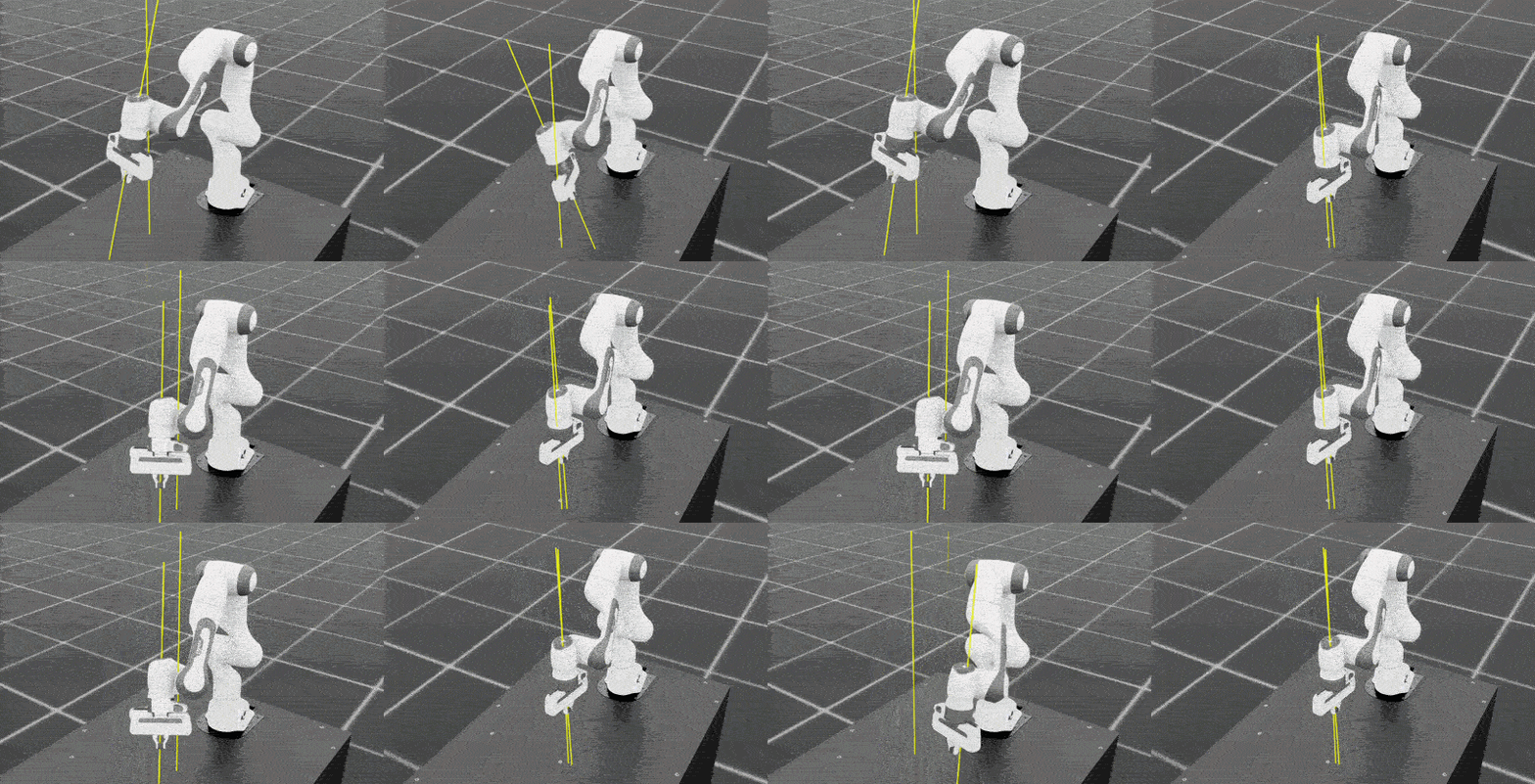 Franka reach training comparison that shows early and late policy behavior. The left side shows less stable motion around iteration 100, and the right side shows improved target tracking near iteration 999
After training, confirm the following:
- The robotic arm can consistently move its end-effector to the target position.
- Multiple environments execute the reaching behavior in parallel.
- The policy no longer shows obvious random oscillation or unstable motion.
The coherent unified memory lets you quickly start and stop training with little data transfer overhead and flexibly scale memory for large environments. The Arm CPU orchestrates training, enabling rapid experimentation and iteration.
Add physical interaction
After the robot can reach reliably, the next step is physical interaction. In the lift task, you’ll train the arm to grasp a cube on the table and lift it to a target height. The policy must coordinate approach, alignment, gripper closure, and stable lifting under contact and gravity.
Run the lift task
Run the following command to train the Isaac-Lift-Cube-Franka-v0 task with the PPO algorithm from the rsl_rl library:
./isaaclab.sh -p scripts/reinforcement_learning/rsl_rl/train.py \
    --task=Isaac-Lift-Cube-Franka-v0 \
    --headless \
    --num_envs=2048
./isaaclab.sh train \
    --rl_library rsl_rl \
    --task=Isaac-Lift-Cube-Franka-v0 \
    --viz none \
    --num_envs=2048
After an initial run, the end-effector might still fail to lift consistently. To continue training from a checkpoint, rerun with the following additional arguments:
./isaaclab.sh -p scripts/reinforcement_learning/rsl_rl/train.py \
  --task=Isaac-Lift-Cube-Franka-v0 \
  --headless \
  --num_envs=2048 \
  --resume \
  --experiment_name=franka_lift \
  --load_run=<run_timestamp_folder> \
  --checkpoint=model_<iteration>.pt \
  --max_iterations=<additional_iterations>
./isaaclab.sh train \
  --rl_library rsl_rl \
  --task=Isaac-Lift-Cube-Franka-v0 \
  --viz none \
  --num_envs=2048 \
  --resume \
  --experiment_name=franka_lift \
  --load_run=<run_timestamp_folder> \
  --checkpoint=model_<iteration>.pt \
  --max_iterations=<additional_iterations>
Use the run folder format YYYY-MM-DD_HH-MM-SS for --load_run. Note the underscore between date and time, for example 2026-05-15_09-24-13.
The output is similar to:
        Learning iteration 902/2650
Episode_Reward/lifting_object: 11.2984
ETA: 00:23:11
Watch Episode_Reward/lifting_object to assess whether the policy is learning to lift the cube without explicitly running a visual simulation of the model. You can see jumps and plateaus during PPO training, so short flat periods are normal. Use the broader trend across many iterations, together with ETA, to decide whether to keep training.
Verify the lift task
After training, confirm the following:
- The robotic arm can approach the cube and adjust its gripper position.
- The gripper closes at an appropriate time.
- The cube is lifted off the table rather than slipping away or bouncing after collision.
Set --checkpoint to the model file that you want to evaluate:
./isaaclab.sh -p scripts/reinforcement_learning/rsl_rl/play.py \
    --task=Isaac-Lift-Cube-Franka-v0 \
    --num_envs=2 \
    --checkpoint=<path_to_checkpoint>
./isaaclab.sh play \
    --rl_library rsl_rl \
    --task=Isaac-Lift-Cube-Franka-v0 \
    --num_envs=2 \
    --checkpoint=<path_to_checkpoint>
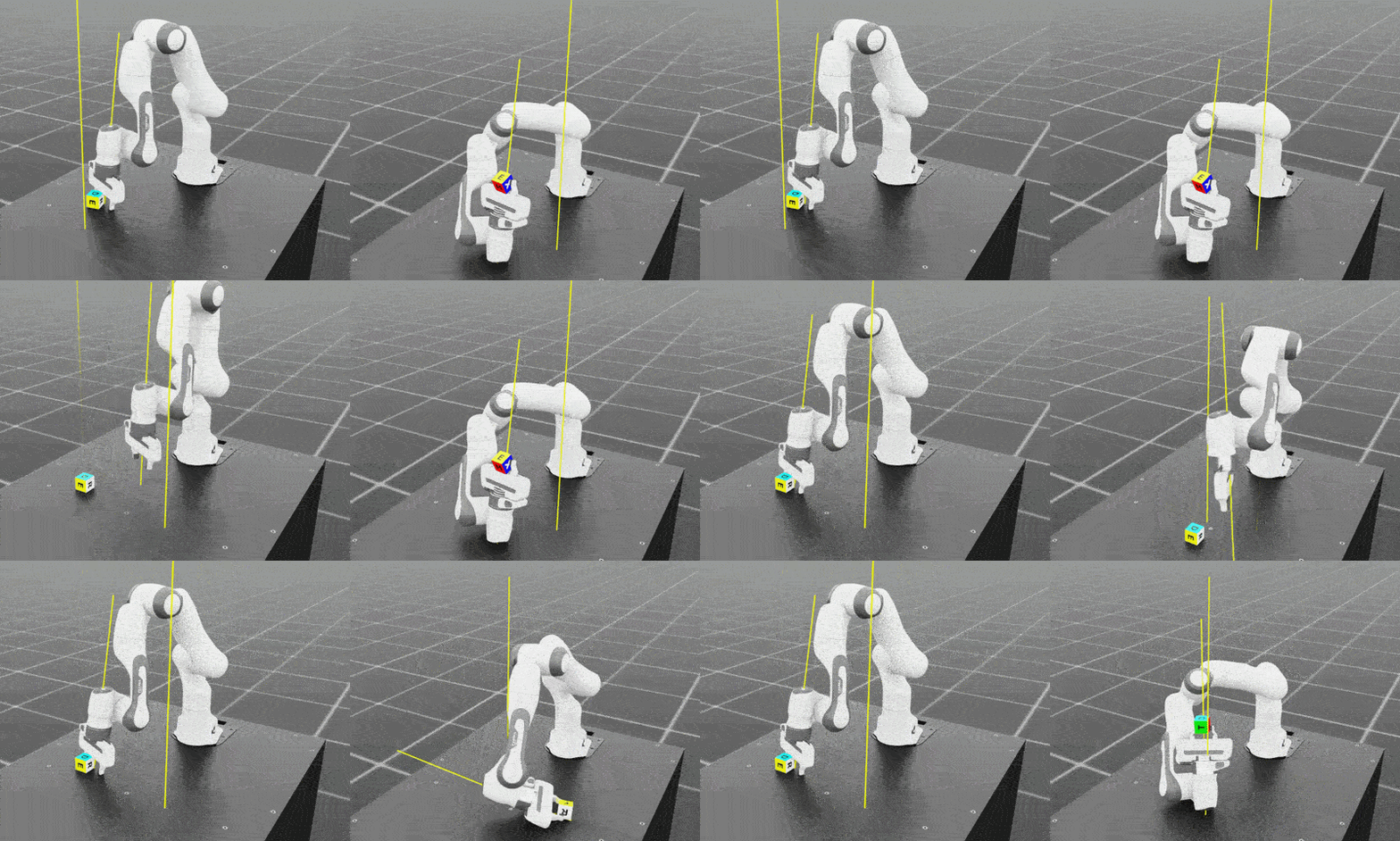 Franka 7-DOF arm progressing through Reach and Lift. The left panel shows iteration 150, where grasp stability is still developing. The right panel shows around iteration 900, where the policy keeps the end-effector inverted to reduce cube drops during lifting
What you’ve accomplished and what’s next
You’ve evaluated policies for reaching a target pose and lifting a cube, and trained the Franka robot to complete reach and lift tasks. The arm now has basic grasping ability. However, objects in the real world often introduce more complex mechanical constraints.
Next, you’ll explore how a robot can interact with joint-constrained objects such as drawers, and move one step closer to high-precision industrial manipulation tasks.