Build Robot Simulation and Reinforcement Learning Workflows with Isaac Sim and Isaac Lab on DGX Spark
Introduction
Explore Isaac Sim and Isaac Lab for robotic workflows on DGX Spark
Set up Isaac Sim and Isaac Lab on DGX Spark
Run and Understand a Sample Robot Simulation with Isaac Sim
Train a Humanoid Locomotion Policy with Isaac Lab on DGX Spark
Next Steps
Build Robot Simulation and Reinforcement Learning Workflows with Isaac Sim and Isaac Lab on DGX Spark
Train a reinforcement learning policy using Isaac Lab and RSL-RL
In this section you’ll train a reinforcement learning (RL) policy for the Unitree H1 humanoid robot to walk over rough terrain. The training workflow uses Isaac Lab’s integration with the RSL-RL library, which implements the Proximal Policy Optimization (PPO) algorithm. This integration connects Isaac Sim’s physics simulation with an efficient RL training pipeline. By the end of this section you’ll understand the key stages of the RL training pipeline, including:
- Task configuration and environment selection
- PPO training parameters and rollout collection
- Monitoring training progress
- Evaluating the trained policy in simulation
What is RSL-RL?
RSL-RL (Robotic Systems Lab Reinforcement Learning) is a lightweight RL library developed at ETH Zurich specifically for locomotion tasks. It implements PPO with features tailored to robotics:
- GPU-accelerated rollout collection across thousands of parallel environments
- Efficient on-policy training with generalized advantage estimation (GAE)
- Asymmetric actor-critic support (the critic can observe more than the actor)
- Minimal dependencies and tight integration with Isaac Lab
Isaac Lab includes ready-to-use training scripts for RSL-RL under scripts/reinforcement_learning/rsl_rl/.
Step 1: Understand the training task
In this section you’ll train the Isaac-Velocity-Rough-H1-v0 environment. This is a locomotion task where the Unitree H1 humanoid robot must track a velocity command while navigating rough terrain.
The task details are:
| Property | Value |
|---|---|
| Environment ID | Isaac-Velocity-Rough-H1-v0 |
| Robot | Unitree H1 (19 actuated joints, bipedal humanoid) |
| Terrain | Procedurally generated rough terrain with slopes, stairs, and obstacles |
| Workflow | Manager-Based |
| Objective | Track a commanded forward velocity, lateral velocity, and yaw rate |
| Observation space | Joint positions, joint velocities, gravity projection, velocity commands, and previous actions |
| Action space | Target joint positions for all actuated joints |
| RL library | RSL-RL (PPO) |
The robot receives a velocity command (for example, “walk forward at 1.0 m/s”) and must learn to coordinate all 19 joints to achieve that velocity while maintaining balance on uneven ground.
This setup provides a high-dimensional control problem ideal for testing locomotion learning under challenging terrain.
Step 2: Launch the training
Navigate to the Isaac Lab directory and start the training job. Running in headless mode disables visualization so that more GPU resources can be used for physics simulation and neural network computation:
cd ~/IsaacLab
export LD_PRELOAD="$LD_PRELOAD:/lib/aarch64-linux-gnu/libgomp.so.1"
./isaaclab.sh -p scripts/reinforcement_learning/rsl_rl/train.py \
    --task=Isaac-Velocity-Rough-H1-v0 \
    --headless
Once training begins, the terminal displays iteration progress, reward statistics, and performance metrics.
Example output:
                               Learning iteration 15/3000

                       Computation: 65955 steps/s (collection: 1.256s, learning 0.235s)
             Mean action noise std: 1.04
          Mean value_function loss: 0.0911
               Mean surrogate loss: 0.0003
                 Mean entropy loss: 27.6371
                       Mean reward: -5.35
               Mean episode length: 61.42
Episode_Reward/track_lin_vel_xy_exp: 0.0179
Episode_Reward/track_ang_vel_z_exp: 0.0058
      Episode_Reward/ang_vel_xy_l2: -0.0220
     Episode_Reward/dof_torques_l2: 0.0000
         Episode_Reward/dof_acc_l2: -0.0081
     Episode_Reward/action_rate_l2: -0.0127
      Episode_Reward/feet_air_time: 0.0002
Episode_Reward/flat_orientation_l2: -0.0170
     Episode_Reward/dof_pos_limits: -0.0012
Episode_Reward/termination_penalty: -0.2000
         Episode_Reward/feet_slide: -0.0119
Episode_Reward/joint_deviation_hip: -0.0083
Episode_Reward/joint_deviation_arms: -0.0079
Episode_Reward/joint_deviation_torso: -0.0013
         Curriculum/terrain_levels: 0.1577
Metrics/base_velocity/error_vel_xy: 0.1221
Metrics/base_velocity/error_vel_yaw: 0.4705
      Episode_Termination/time_out: 0.0000
  Episode_Termination/base_contact: 1.0000
--------------------------------------------------------------------------------
                   Total timesteps: 1572864
                    Iteration time: 1.49s
                      Time elapsed: 00:00:26
                               ETA: 01:21:49
During training:
- The Blackwell GPU accelerates physics simulation, neural network inference, and PPO training updates.
- The Grace CPU manages environment orchestration, logging, and experiment control.
- Multiple simulation environments run in parallel, enabling efficient rollout collection for reinforcement learning.
Each PPO iteration collects experience from all parallel environments, then updates the policy network using the gathered trajectories.
Known issue: NVRTC GPU architecture error on DGX Spark
When running RL training on the Blackwell GPU (GB10, compute capability 12.1), you may encounter an error similar to:
RuntimeError: nvrtc: error: invalid value for --gpu-architecture (-arch)
This error occurs because the NVRTC runtime compiler inside PyTorch does not yet fully support the sm_121 architecture. It is a known compatibility issue tracked in
Isaac Lab Discussion #2406
and
PyTorch Issue #87595
.
Workaround: Make sure you are using the Isaac Sim build from source (as described in the setup section) rather than a pip-installed version. The source build includes the correct CUDA 13 runtime for Blackwell. If the error persists, try running with --headless mode, which avoids some NVRTC code paths used by the renderer. Also ensure your NVIDIA driver is up to date (nvidia-smi should show driver 580.x or later).
Support for Blackwell GPUs is expected to improve in upcoming PyTorch and Isaac Sim releases.
Adjust training parameters
You can also override default parameters from the command line.
For example:
./isaaclab.sh -p scripts/reinforcement_learning/rsl_rl/train.py \
    --task=Isaac-Velocity-Rough-H1-v0 \
    --headless \
    --num_envs=2048 \
    --max_iterations=1500 \
    --seed=42
Command-line arguments
The following table explains the key command-line arguments:
| Argument | Default | Description |
|---|---|---|
--task | (required) | The Isaac Lab environment ID. Use Isaac-Velocity-Rough-H1-v0 for rough-terrain humanoid locomotion |
--headless | off | Disables visualization for faster training. All GPU resources go to simulation and training |
--num_envs | 4096 | Number of parallel environments. Each environment runs an independent simulation of the H1 robot |
--max_iterations | 1500 | Total number of PPO training iterations. Each iteration collects a batch of experience and updates the policy |
--seed | 0 | Random seed for reproducibility. Set this to get deterministic results across runs |
Each environment runs an independent simulation of the robot, allowing the RL algorithm to collect experience efficiently.
On DGX Spark, 2048 - 4096 parallel environments typically work well for locomotion tasks. Higher values increase sample throughput but require more GPU memory. Start with 2048 if you want faster iteration cycles during development.
Step 3: Understand the PPO hyperparameters
This section explains the core PPO training parameters used by RSL-RL and how they influence learning quality and stability.
PPO (Proximal Policy Optimization) is the RL algorithm used by RSL-RL. Understanding each hyperparameter helps you tune training for different tasks. The following table describes the key hyperparameters and their roles:
Policy network hyperparameters
| Hyperparameter | Typical value | Description |
|---|---|---|
policy_class_name | ActorCritic | The neural network architecture. ActorCritic uses separate networks for the policy (actor) and value function (critic) |
actor_hidden_dims | [512, 256, 128] | Hidden layer sizes for the actor (policy) network. Larger networks can represent more complex behaviors but train more slowly |
critic_hidden_dims | [512, 256, 128] | Hidden layer sizes for the critic (value) network. The critic estimates how good each state is |
activation | elu | Activation function between hidden layers. ELU (Exponential Linear Unit) provides smooth gradients and avoids dead neurons |
init_noise_std | 1.0 | Initial standard deviation of the exploration noise. Higher values encourage more exploration early in training |
PPO algorithm hyperparameters
| Hyperparameter | Typical value | Description |
|---|---|---|
num_learning_epochs | 5 | Number of times the policy is updated using each batch of collected experience. Higher values extract more learning from each batch but risk overfitting |
num_mini_batches | 4 | Number of mini-batches the experience buffer is split into for each epoch. More mini-batches mean smaller gradient updates |
learning_rate | 1e-3 | Step size for the Adam optimizer. Controls how much the network weights change per update. Too high causes instability; too low slows convergence |
discount_factor (gamma) | 0.99 | How much the agent values future rewards vs. immediate rewards. A value of 0.99 means the agent considers rewards ~100 steps into the future |
gae_lambda (lambda) | 0.95 | Generalized Advantage Estimation smoothing parameter. Balances bias (low lambda) vs. variance (high lambda) in advantage estimates |
clip_param | 0.2 | PPO clipping range. Prevents the policy from changing too much in a single update. Keeps training stable |
value_loss_coef | 1.0 | Weight of the value function loss relative to the policy loss. Ensures the critic learns at an appropriate rate |
entropy_coef | 0.01 | Weight of the entropy bonus. Encourages exploration by penalizing overly deterministic policies. Reduce this as training converges |
desired_kl | 0.01 | Target KL divergence between old and new policies. If KL exceeds this value, the learning rate is reduced adaptively |
max_grad_norm | 1.0 | Maximum gradient norm for gradient clipping. Prevents exploding gradients during training |
Rollout hyperparameters
| Hyperparameter | Typical value | Description |
|---|---|---|
num_steps_per_env | 24 | Number of simulation steps collected per environment per iteration. Together with num_envs, this determines the total batch size: batch_size = num_envs × num_steps_per_env |
save_interval | 50 | Save a model checkpoint every N iterations. Useful for resuming training or evaluating intermediate policies |
How the hyperparameters interact
During training, each iteration collects experience from all parallel environments. The total batch size per iteration is:
batch_size = num_envs × num_steps_per_env
For example, with num_envs=4096 and num_steps_per_env=24, the batch size per iteration is:
batch_size = 4096 × 24 = 98,304 environment steps per iteration
This batch is then split into num_mini_batches (4) mini-batches of ~24,576 steps each. The policy is updated num_learning_epochs (5) times per iteration, meaning each batch of experience is used for 5 × 4 = 20 gradient updates.
Step 4: Monitor the training
During training, RSL-RL periodically prints progress statistics to the terminal. A typical log output looks like:
        Learning iteration 100/1500
    mean reward:              12.45
    mean episode length:      234.5
    value function loss:       0.032
    surrogate loss:           -0.0156
    mean std:                  0.42
    learning rate:             0.001
    fps:                       48523
These metrics help you track learning progress and detect issues such as unstable gradients or stagnating policies.
The following table explains each metric:
| Metric | What it means | What to look for |
|---|---|---|
mean reward | Average cumulative reward across all environments per episode | Should increase over time. Higher values mean the robot is walking better |
mean episode length | Average number of steps before the episode ends | Should increase as the robot learns to stay upright longer |
value function loss | How well the critic predicts future rewards | Should decrease and stabilize |
surrogate loss | The PPO policy loss (negative because PPO maximizes the objective) | Should be small and negative |
mean std | Average exploration noise standard deviation | Should decrease as the policy becomes more confident |
learning rate | Current learning rate (may be adjusted by the adaptive KL mechanism) | Stays at the initial value unless KL divergence exceeds desired_kl |
fps | Frames (environment steps) per second | Indicates training throughput. On DGX Spark, expect 40,000-60,000+ fps for locomotion tasks |
Training checkpoints are saved to the logs/rsl_rl/ directory. Each run creates a timestamped folder containing the model weights, configuration, and training logs.
Step 5: Evaluate the trained policy
After training completes, evaluate the policy by running inference with visualization. Use the play.py script with the trained checkpoint:
./isaaclab.sh -p scripts/reinforcement_learning/rsl_rl/play.py \
    --task=Isaac-Velocity-Rough-H1-Play-v0 \
    --num_envs=512
For evaluation, use the inference task name Isaac-Velocity-Rough-H1-Play-v0 instead of the training task name. The play variant disables runtime perturbations used during training and loads the checkpoint automatically.
The play script loads the most recent checkpoint and runs the policy in real time. You will observe the Unitree H1 humanoid walking over procedurally generated rough terrain, responding to live velocity commands.
You can also run inference with a specific checkpoint. This is useful for comparing policy performance at different stages of training.
./isaaclab.sh -p scripts/reinforcement_learning/rsl_rl/play.py \
    --task=Isaac-Velocity-Rough-H1-Play-v0 \
    --num_envs=512 \
    --checkpoint=logs/rsl_rl/h1_rough/<timestamp>/model_1500.pt
This command loads the specified checkpoint and runs the policy using the same simulation environment.
Understanding the evaluation
During evaluation, you can observe how the robot’s behavior evolves as training progresses.
Typical training behavior follows three stages:
- Early training (iterations 0–200): The robot often collapses immediately or performs erratic, uncoordinated motions.
- Mid training (iterations 200–800): The robot begins to walk forward with some success, though it may still stumble or lose balance on rough terrain.
- Late training (iterations 800–1500): The robot consistently walks over uneven terrain, responds to velocity commands, and recovers from disturbances.
This progression—from falling to stable walking—demonstrates how PPO gradually improves the policy through trial and error across thousands of parallel environments.
The following visualizations compare two training stages using num_envs=512, showcasing the benefit of large-scale parallel training on DGX Spark.
Iteration 50 (Early Stage, num_envs=512)
At iteration 50, the policy is still in its exploration phase. Most robots exhibit noisy joint actions, lack coordination, and frequently fall. There is no observable response to the velocity command, and no stable gait has emerged.
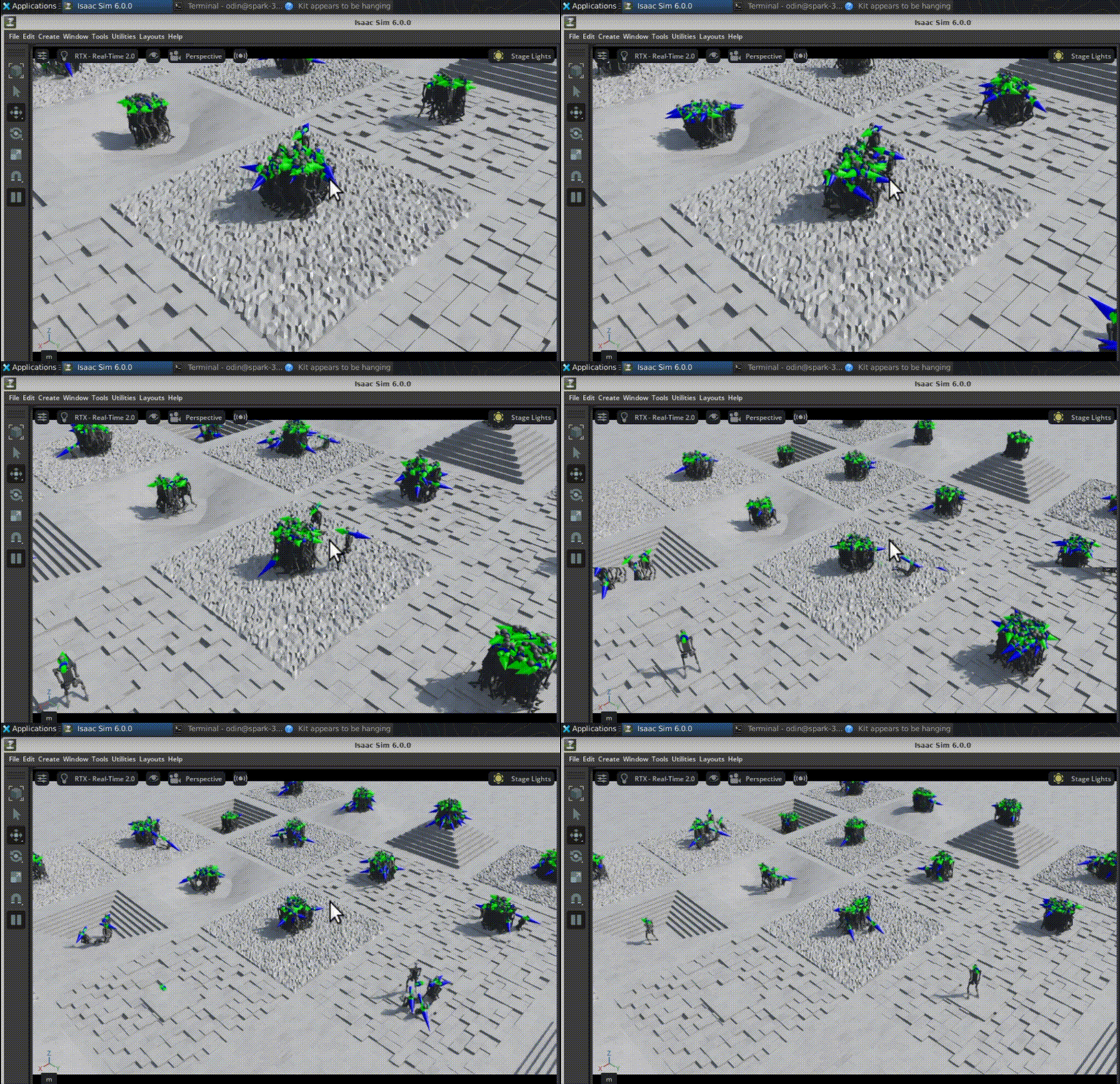 Early Stage
Iteration 1350 (Late Stage, num_envs=512)
By iteration 1350, the policy has matured. Most robots demonstrate coordinated walking behavior, balance maintenance, and accurate velocity tracking, even on rough terrain. The improvement in foot placement and heading stability is clearly visible.
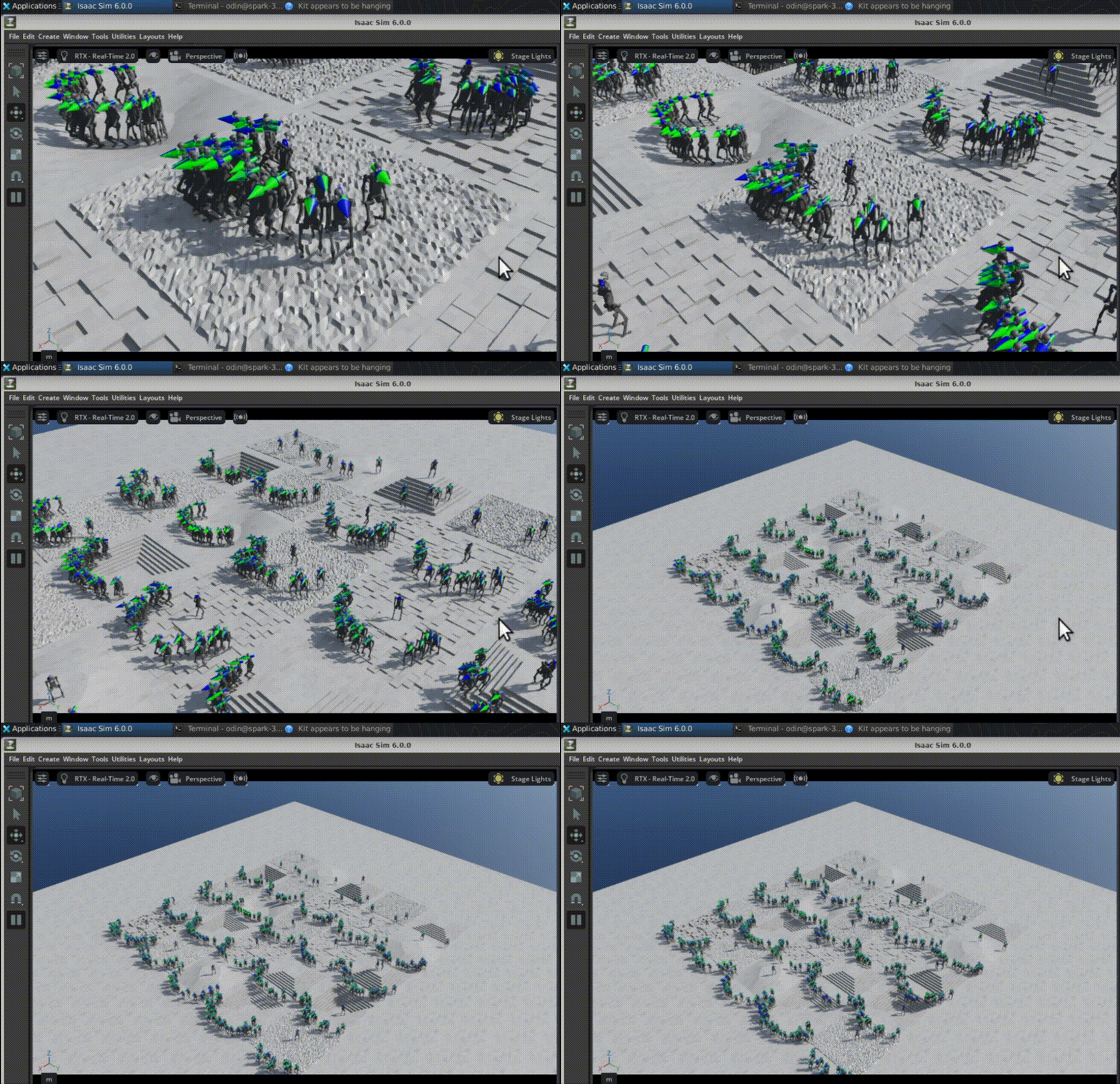 Late Stage
What you’ve learned
In this section, you’ve:
- Trained a reinforcement learning policy for the Unitree H1 humanoid robot using RSL-RL and the PPO algorithm
- Understood key hyperparameters in the training pipeline, including policy architecture, rollout strategy, and PPO optimization settings
- Monitored training progress using reward curves, episode statistics, and performance metrics
- Evaluated the trained policy through interactive visualization and behavior analysis
You’ve now completed the end-to-end workflow of training and validating a reinforcement learning policy for humanoid locomotion on DGX Spark.