Deploy a Zephyr-based machine learning application on Arm Corstone-320 MPS4 with ExecuTorch
Introduction
Set up the Zephyr and ExecuTorch development environment
Build and run a machine learning application on the Corstone-320 MPS4 platform
Next Steps
Deploy a Zephyr-based machine learning application on Arm Corstone-320 MPS4 with ExecuTorch
Port hello-executorch for the Corstone-320 MPS4 platform
hello-executorch
is a machine learning sample application in ExecuTorch. The application deploys a model using the ExecuTorch runtime. You’ll port the application to the Corstone-320 MPS4 platform to validate the ML application workflow on this platform.
Change NPU region configuration settings for the project
ethosu_config_select() is a weak function defined in the Ethos-U driver file ethosu_device_u85.c. The function configures the QCONFIG and REGIONCFG registers for the Ethos-U85.
Because the model is preprocessed in SRAM-only mode, all command streams, weights, and scratch data must reside in SRAM on the Corstone-320 platform. Therefore, you’ll override ethosu_config_select() in the application to configure the AXI regions for the command stream and memory regions required by SRAM-only mode.
Create a new file, ethosu_config_corstone320.c, in the hello-executorch/src directory with the following content:
unsigned int ethosu_config_select(uint64_t address, int index)
{
    (void)(address);  /* Not used in fixed configuration */

    assert(index >= -1 && index <= 7);

    switch (index)
    {
    case -1:
        /* QCONFIG: Command stream uses region 1 (SRAM path). Value = 1 */
        return 1;

    case 0:
        /* REGIONCFG_0: Read-only data region uses SRAM. Value = 1 */
        return 1;

    case 1:
      /* REGIONCFG_1: scratch/input/output buffer uses SRAM via MEM_ATTR[0]. */
        return 0;
    case 2:
     /* REGIONCFG_2: fast scratch uses SRAM via MEM_ATTR[0]. */
        return 0;
    case 3:
    case 4:
    case 5:
    case 6:
    case 7:
        /* Other regions are not used by this model; keep them on SRAM. */
        return 0;

    default:
        /* Should not reach here due to assert */
        return 0;
    }
}
Add ethosu_config_corstone320.c to the app_sources list in modules/lib/executorch/zephyr/samples/hello-executorch/CMakeLists.txt:
set(app_sources
    src/arm_executor_runner.cpp
    src/ethosu_config_corstone320.c
    ${EXECUTORCH_DIR}/examples/arm/executor_runner/arm_memory_allocator.cpp
)
Add the Zephyr configuration files for the Corstone-320 MPS4 platform
Create the board-specific Kconfig file boards/mps4_corstone320_fpga.conf in the hello-executorch sample directory and add the following content:
CONFIG_ETHOS_U=y
CONFIG_ETHOS_U85_1024=y
CONFIG_EXECUTORCH_METHOD_ALLOCATOR_POOL_SIZE=1048576
CONFIG_EXECUTORCH_TEMP_ALLOCATOR_POOL_SIZE=32768
Add the following settings to prj.conf to enable logging:
CONFIG_LOG=y
CONFIG_LOG_MODE_IMMEDIATE=y
CONFIG_LOG_DEFAULT_LEVEL=3
CONFIG_CONSOLE=y
CONFIG_SERIAL=y
CONFIG_UART_CONSOLE=y
CONFIG_PRINTK=y

CONFIG_ASSERT=y
CONFIG_FAULT_DUMP=2
Build the project
To build the hello-executorch application:
Activate the Python virtual environment for Zephyr.
Set the toolchain environment variables. The path should match where you installed the Arm GNU Toolchain while completing Port Zephyr RTOS and run applications on the Arm Corstone-320 MPS4 platform . On aarch64, replace
x86_64withaarch64in the directory name.export ZEPHYR_TOOLCHAIN_VARIANT=gnuarmemb export GNUARMEMB_TOOLCHAIN_PATH=$HOME/arm-gnu-toolchain-13.2.Rel1-x86_64-arm-none-eabiBuild the sample application for the Corstone-320 FPGA variant:
west build -p always \
  -b mps4/corstone320/fpga \
  -d build_hello_et_fpga \
  modules/lib/executorch/zephyr/samples/hello-executorch \
  -- -DET_PTE_FILE_PATH=add_u85_1024_sram_only.pte \
  -DSYSTEM_CONFIG=Ethos_U85_SYS_DRAM_Mid \
  -DMEMORY_MODE=Sram_Only
After a successful build, the output file zephyr.elf is available in build_hello_et_fpga/zephyr/.
Verify the build output exists:
ls -la build_hello_et_fpga/zephyr/zephyr.elf
The ELF image contains the Zephyr kernel, the Ethos-U driver, the ExecuTorch runtime, the generated .pte file, and the ML application.
Run the application on the MPS4 board
To run the application:
- Download the board files from FI101 board files .
- Set up the MPS4 platform. For instructions, see Using the FI101 on MPS4 board .
For the hello-executorch application, place the vector table in the FPGA boot ROM at address 0x11000000. Place the remaining code and data in SRAM at address 0x31000000. Create vector.bin and app.bin from zephyr.elf by using arm-none-eabi-objcopy.
Update images.txt under /MB/HBI0376B/FI101 to load the two images:
IMAGE0PORT: 2
IMAGE0ADDRESS: 0x00_1100_0000           ; Address to load into
IMAGE0UPDATE: RAM
IMAGE0FILE: \SOFTWARE\vector.bin        ; Image/data to be loaded

IMAGE1PORT: 1
IMAGE1ADDRESS: 0x31000000               ; Address to load into
IMAGE1UPDATE: RAM
IMAGE1FILE: \SOFTWARE\app.bin           ; Image/data to be loaded
Copy vector.bin and app.bin to \SOFTWARE, then power on the board.
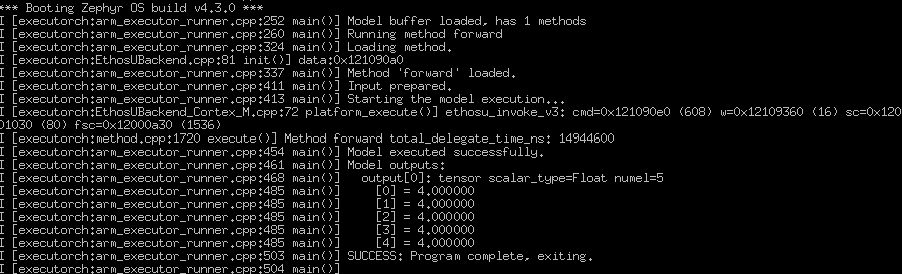
If the setup is correct, the UART console prints the model delegate flow, similar to the following example:
What you’ve accomplished
You’ve learned how to develop and deploy a Zephyr-based machine learning application on the Arm Corstone-320 MPS4 platform using ExecuTorch, preprocess a model for Ethos-U NPU delegation, and integrate the ExecuTorch runtime.
You can use these steps to validate machine learning applications on the platform and develop more advanced ML workloads.