Boot a signed Zephyr image with U-Boot on Arm Cortex-A
Introduction
Understand where U-Boot verifies Zephyr in the Cortex-A boot chain
Set up the host tools for your target
Build a Zephyr image that U-Boot can start
Create signing keys and sign the Zephyr image into a FIT
Build U-Boot with the public key and a boot command that fails closed
Boot the signed Zephyr FIT with U-Boot on QEMU or the TI AM62L EVM
(Optional) Test that U-Boot refuses a wrong key and a tampered image
Review the Zephyr FIT verification boundary and production needs
Next Steps
Boot a signed Zephyr image with U-Boot on Arm Cortex-A
Introduction
Understand where U-Boot verifies Zephyr in the Cortex-A boot chain
Set up the host tools for your target
Build a Zephyr image that U-Boot can start
Create signing keys and sign the Zephyr image into a FIT
Build U-Boot with the public key and a boot command that fails closed
Boot the signed Zephyr FIT with U-Boot on QEMU or the TI AM62L EVM
(Optional) Test that U-Boot refuses a wrong key and a tampered image
Review the Zephyr FIT verification boundary and production needs
Next Steps
Where Zephyr fits in the Cortex-A boot chain
On a microcontroller (MCU), Zephyr runs first, so secure boot means adding a bootloader such as MCUboot. A Cortex-A processor starts in a read-only memory (ROM) inside the system on chip (SoC), and several firmware stages run before your code. Zephyr is the last stage, so the stage before it — usually U-Boot — can check it before starting it.
You’ll package Zephyr in a Flattened Image Tree (FIT) with a signature that U-Boot verifies before starting the image.
You’ll build and boot a verified Zephyr image either in QEMU without hardware, or on a TI AM62L evaluation module (EVM). You can use the same signing and verification workflow for both targets. The Learning Path includes separate instructions where setup differs.
The boot chain on a Cortex-A board
On an Armv8-A board using U-Boot, boot proceeds from the boot ROM of the SoC through early firmware to U-Boot. U-Boot then loads and starts the payload.
The early firmware is usually the Secondary Program Loader (SPL), a small U-Boot that loads the full one. In addition, Trusted Firmware-A (TF-A) and Open Portable Trusted Execution Environment (OP-TEE) run in the Secure world. Many SoCs add security firmware from the vendor, which checks the later stages.
You’ll build the SPL with U-Boot. The rest comes prebuilt in the SDK from the vendor.
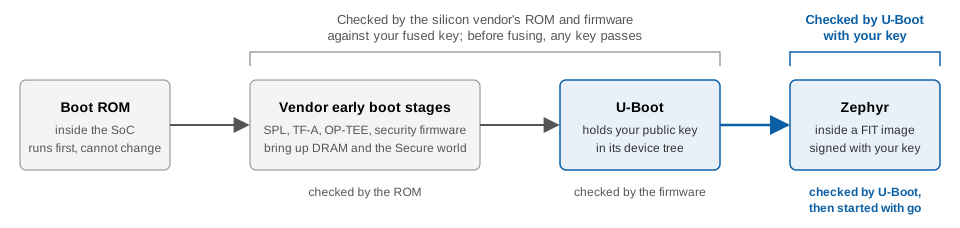 U-Boot verifies Zephyr in the Cortex-A boot chain
Choose your target
Choose between QEMU and AM62L EVM. QEMU is the default target for which you need nothing but your host. The AM62L EVM shows the same work on real silicon.
| Requirement or feature | QEMU | AM62L EVM |
|---|---|---|
| Hardware | None | The board, a micro-SD card and reader, a micro-USB cable, and a USB-C PD supply |
| Download | U-Boot source, 32 MB | TI Processor SDK, 4.5 GB, unpacks to 11 GB |
| Stages before U-Boot | None, as QEMU starts u-boot.bin directly | Boot ROM, tiboot3.bin, tispl.bin |
| Zephyr board | qemu_cortex_a53 | am62l_evm/am62l3/a53 |
| Boot media | File Allocation Table (FAT) partition in a 64 MiB disk image, virtio 0:1 | FAT partition on a micro-SD card, mmc 1:1 |
| Console | The terminal that you start QEMU in | USB serial at 115200 baud |
The boot chain in QEMU
The QEMU virt machine has no boot ROM and no vendor firmware. It loads the file that you pass to -bios and starts the Cortex-A53 on it, so the chain is two links long:
QEMU -bios u-boot.bin -> U-Boot -> Zephyr inside a FIT image
QEMU runs the FIT verifier in U-Boot, but nothing authenticates U-Boot itself.
The boot chain on the AM62L EVM
On the AM62L, the early stages are two files. tiboot3.bin holds the first stage of TF-A and TI Foundational Security (TIFS), TI’s security firmware. tispl.bin holds the rest of TF-A, OP-TEE, and the SPL. You’ll build them together with u-boot.img when you build U-Boot. The EVM ships in TI’s High Security, Field Securable (HS-FS) development state.
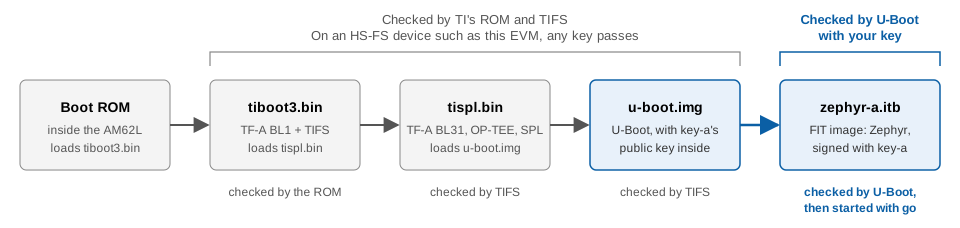 The same chain on the AM62L, with TI's file names
What a FIT image is
A FIT is a container format for U-Boot boot images. It’s a device tree blob (DTB) whose nodes hold images instead of hardware descriptions.
The signed FIT that you’ll build contains the following:
- The image itself, which is the Zephyr binary
zephyr.bin - A hash of that image, so that U-Boot can tell if a byte changed
- A configuration that names the image to use (
kernel = "kernel-1") and carries a signature
mkimage, a U-Boot host tool, builds the FIT from a text source .its file and signs it with your private key. On the target, the U-Boot bootm command parses the FIT, verifies the signature and the hash, and copies the image to its load address.
You’ll sign the FIT configuration with sha256,rsa2048, which combines SHA-256 hashing with a 2048-bit RSA key.
The public key lives under a /signature node in the U-Boot control device tree. That key node carries required = "conf". Every configuration in every FIT must carry a valid signature by this key, or U-Boot refuses to load it. Without required, a FIT with no signature still boots.
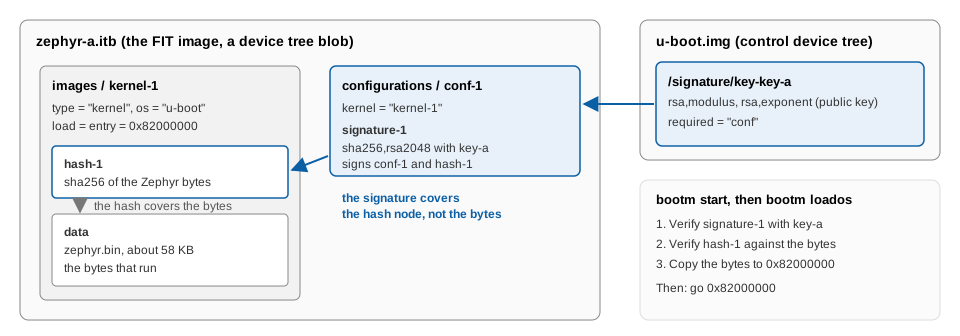 What the signature and the hash each cover in a FIT image
The signature doesn’t cover the image bytes. It covers the configuration node plus the hash node, and the hash covers the bytes.
Verify Zephyr before starting it
Configure U-Boot to verify the Zephyr FIT before starting Zephyr with go, a U-Boot command for jumping to an address.
If you choose QEMU as your target, there’s no key to fuse and nothing checks U-Boot at all.
If you choose AM62L EVM as your target, leave it in its development state without fusing your key into the chip. In that state, the ROM and vendor firmware accept boot files signed with any key. U-Boot verifies Zephyr either way.
After booting the image, you’ll review the Zephyr FIT verification boundary and production needs .
What you’ve learned and what’s next
You’ve learned that Zephyr is the last stage of a Cortex-A boot chain, so U-Boot can verify it. You also learned that required = "conf" makes U-Boot refuse any FIT it can’t verify.
Next, you’ll set up the host tools for your target.