Deploy ExecuTorch firmware on NXP FRDM i.MX 93 for Ethos-U65 acceleration
Introduction
Understand ExecuTorch deployment on NXP with Ethos-U
Boot the NXP FRDM i.MX 93 board
Set up the ExecuTorch build environment
Build and install ExecuTorch
Build ExecuTorch models for Ethos-U65
Build Cortex-M33 firmware for ExecuTorch
Deploy and test on FRDM-IMX93
Next Steps
Deploy ExecuTorch firmware on NXP FRDM i.MX 93 for Ethos-U65 acceleration
ExecuTorch deployment components
In this section, you build the Cortex-M33 executor_runner firmware. You then deploy it to the FRDM i.MX 93 board.
This is a key milestone. You’re proving you can control the real-time ML runtime for Ethos-U65 workloads.
On i.MX 93, Linux runs on the application cores, but the real-time ML runtime that talks to Ethos-U65 runs as firmware on Cortex-M33.
When you can build and boot your own executor_runner, you’ve proven that the microcontroller side of the system is under your control and ready to host ML workloads.
The project includes prebuilt ExecuTorch static libraries in the repository, so this section focuses on pulling the runner project, applying the required SDK patches, wiring it up to your toolchain, and building it.
In architectural terms:
- The application core (Linux) loads the firmware image and manages its lifecycle
- The Cortex-M33 firmware owns model execution and the delegate path into Ethos-U65
- The
.ptemodel remains a separate artifact that you update independently
Set up MCUXpresso for VS Code
Install the MCUXpresso extension for VS Code .
In VS Code, open Extensions, search for “MCUXpresso”, and install the extension published by NXP.
Install MCUXpresso SDK and Arm toolchain
Use the MCUXpresso Installer to install the SDK and toolchain components.
In VS Code, open the Command Palette and run MCUXpresso for VS Code: Open MCUXpresso Installer. Select the following items, then select Install:
- MCUXpresso SDK Developer (under Software Kits)
- Arm GNU Toolchain (Latest) (under Arm components)
- Standalone Toolchain Add-ons (Latest) (under Arm components)
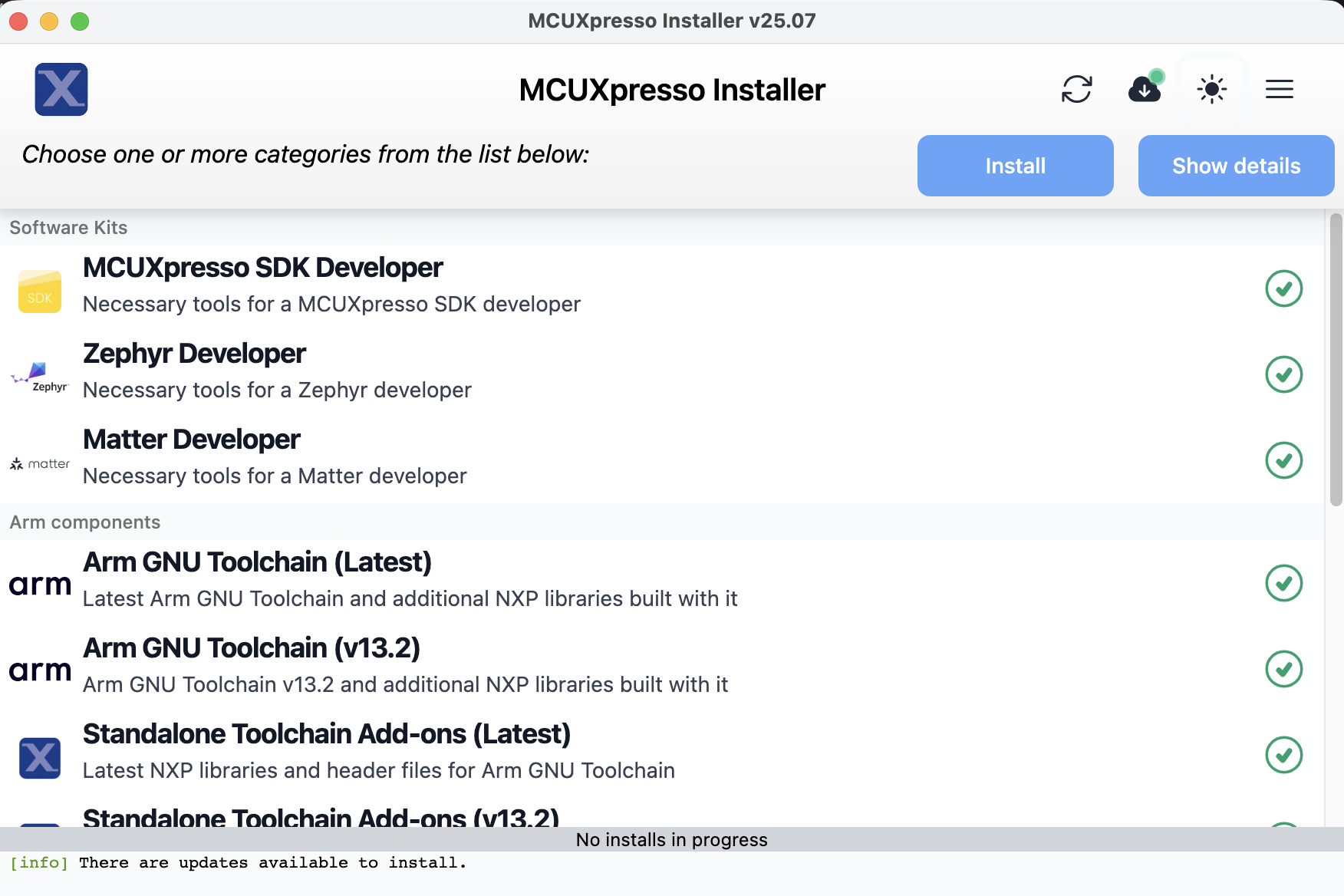 MCUXpresso Installer
Clone the executor_runner repository
Clone the ready-to-build executor_runner project:
git clone https://github.com/fidel-makatia/Executorch_runner_cm33.git
cd Executorch_runner_cm33
The repository contains the complete runtime source code, pre-built ExecuTorch libraries, and build configuration for Cortex-M33 with Ethos-U65 NPU support.
Configure the project for FRDM-MIMX93
Open the project in VS Code:
code .
If the MCUXpresso extension doesn’t automatically pick up the project, import it:
- Open the Command Palette
- Run MCUXpresso for VS Code: Import Project
- Select the
Executorch_runner_cm33folder - When prompted, choose Arm GNU Toolchain
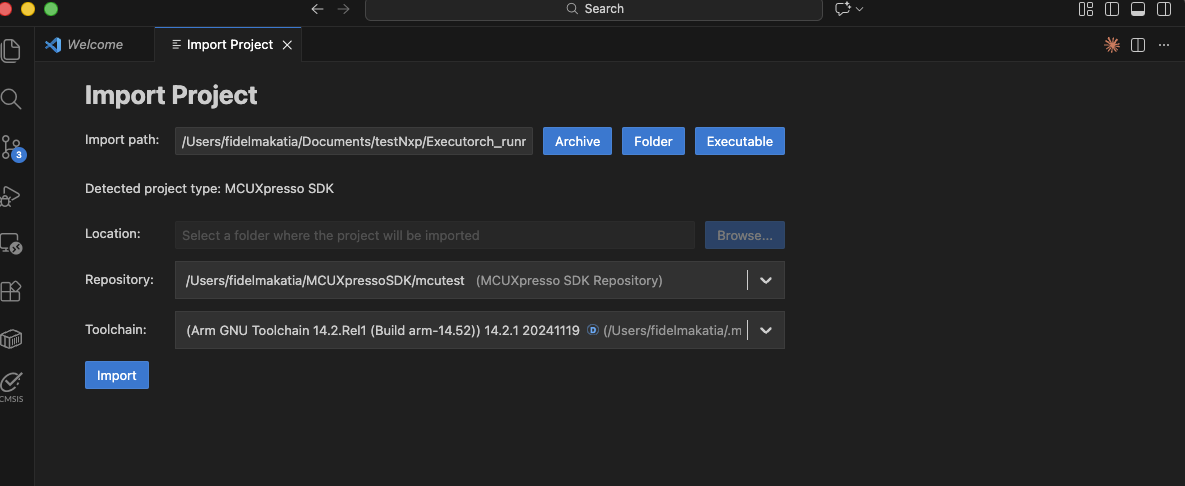 Import Cloned Project folder
Set environment variables
Set three environment variables so the build can find your toolchain, your SDK, and the MCUXpresso Python environment. These must be set before building or running the SDK patch script.
Do this once for your user account, then restart VS Code so the changes take effect.
Required variables
| Variable | Description |
|---|---|
ARMGCC_DIR | Path to the Arm GCC toolchain root, i.e. a directory starting with arm-gnu-toolchain-14.2.rel1* |
SdkRootDirPath | Path to the folder that contains the mcuxsdk/ subdirectory |
MCUX_VENV_PATH | Path to the MCUXpresso Python venv executables |
Find the installed toolchain directory name:
ls ~/.mcuxpressotools/arm-gnu-toolchain-*
dir $env:USERPROFILE\.mcuxpressotools\arm-gnu-toolchain-*
Use the directory name from the output for the ARMGCC_DIR variable below. The name looks like arm-gnu-toolchain-14.2.rel1-darwin-arm64-arm-none-eabi (the version number may differ).
export ARMGCC_DIR="$HOME/.mcuxpressotools/<toolchain-dir>"
export SdkRootDirPath="$HOME/mcuxsdk_root"
export MCUX_VENV_PATH="$HOME/.mcuxpressotools/.venv/bin"
[Environment]::SetEnvironmentVariable("ARMGCC_DIR", "$env:USERPROFILE\.mcuxpressotools\<toolchain-dir>", "User")
[Environment]::SetEnvironmentVariable("SdkRootDirPath", "$env:USERPROFILE\mcuxsdk_root", "User")
[Environment]::SetEnvironmentVariable("MCUX_VENV_PATH", "$env:USERPROFILE\.mcuxpressotools\.venv\Scripts", "User")
These quick checks catch most path mistakes before you start debugging build errors:
test -x "$ARMGCC_DIR/bin/arm-none-eabi-gcc" && echo "OK: toolchain" || echo "FAIL: ARMGCC_DIR"
test -d "$SdkRootDirPath/mcuxsdk" && echo "OK: SDK" || echo "FAIL: SdkRootDirPath"
if (Test-Path "$env:ARMGCC_DIR\bin\arm-none-eabi-gcc.exe") { "OK: toolchain" } else { "FAIL: ARMGCC_DIR" }
if (Test-Path "$env:SdkRootDirPath\mcuxsdk") { "OK: SDK" } else { "FAIL: SdkRootDirPath" }
Apply required SDK patches
The MCUXpresso SDK ships with a linker script and an Ethos-U driver log header that need two fixes before the firmware can run correctly. The patch script in the repository reads SdkRootDirPath to locate your SDK and applies both fixes automatically.
Using a bash shell, navigate to the Executorch_runner_cm33 directory and run:
./patches/apply_patches.sh
You should see output confirming each patch:
        === ExecuTorch Runner SDK Patches ===

[1/2] Linker script GOT fix: .../MIMX9352xxxxM_ram.ld
  APPLIED: Added *(.got) and *(.got.plt) inside .data section.

[2/2] Ethos-U driver log redirect: .../ethosu_log.h
  APPLIED: LOG_ERR/LOG_WARN/LOG_INFO/LOG_DEBUG now write to remoteproc trace buffer.

=== All patches applied successfully ===
The two patches and what they fix:
| Patch | What it changes | What happens without it |
|---|---|---|
| GOT initialization | Adds *(.got) and *(.got.plt) inside the .data section of the SDK linker script so the startup code copies the Global Offset Table from flash to RAM | The GOT stays zeroed out after boot. Every C++ virtual call resolves to address zero, causing a BUS FAULT the first time the firmware calls load_method |
| NPU log redirect | Replaces the Ethos-U driver’s LOG_ERR/LOG_INFO macros so they write to the remoteproc trace buffer instead of the UART | NPU error messages go to UART only. When you read trace0 from Linux, driver errors are invisible, making NPU failures difficult to diagnose |
Run the patch script once after installing the SDK. If you run it again, the script detects that the patches are already in place and skips them. If you reinstall or update the SDK, run the script again.
Pre-built ExecuTorch libraries
The repository includes pre-built static libraries in executorch/lib/, cross-compiled for Cortex-M33 with size optimization (-Os, MinSizeRel):
| Library | Size | Purpose |
|---|---|---|
libexecutorch.a | 52KB | ExecuTorch runtime |
libexecutorch_core.a | 217KB | Core runtime (gc-sections removes unused code) |
libexecutorch_delegate_ethos_u.a | 19KB | Ethos-U NPU delegate backend |
libquantized_ops_lib_selective.a | 7KB | Registers only quantize_per_tensor.out and dequantize_per_tensor.out |
libquantized_kernels.a | 242KB | Kernel implementations (gc-sections removes unused code) |
libkernels_util_all_deps.a | 308KB | Kernel utilities (gc-sections removes unused code) |
The selective quantized ops library registers only the two CPU operators needed at the NPU delegation boundary. The full libquantized_ops_lib.a registers all quantized operators and pulls in approximately 92KB of kernel code, which overflows the 128KB ITCM. If you rebuild the libraries from source, you must build this selective library separately.
Understand the memory configuration
The Cortex-M33 has 128KB of ITCM (code) and 108KB of DTCM (data). The firmware also uses reserved DDR regions for the model and NPU working memory. The key settings are defined in CMakeLists.txt:
target_compile_definitions(${MCUX_SDK_PROJECT_NAME} PRIVATE
  ET_ARM_BAREMETAL_METHOD_ALLOCATOR_POOL_SIZE=0x6000      # 24KB method allocator
  ET_ARM_BAREMETAL_SCRATCH_TEMP_ALLOCATOR_POOL_SIZE=0x200000  # 2MB scratch allocator
  ET_MODEL_PTE_ADDR=0xC0000000  # DDR address where U-Boot loads the .pte model
)
| Setting | Value | Description |
|---|---|---|
| Method allocator | 24KB (0x6000) | Method metadata and small model activations |
| Scratch allocator | 2MB (0x200000) | NPU scratch buffer (MobileNet V2 needs approximately 1.5MB) |
| Model address | 0xC0000000 | Start of the 4MB reserved DDR region |
The i.MX93 device tree reserves two DDR regions: model@c0000000 (4MB for the .pte model) and ethosu_region@A8000000 (128MB for NPU working memory). The NPU scratch buffer is placed at 0xA8000000 and planned buffers for large models at 0xA8200000, both inside the 128MB ethosu_region. The Ethos-U65 accesses memory via the AXI bus and cannot reach the CM33’s tightly-coupled DTCM, so all NPU buffers must be in DDR.
Build the firmware
Build the project from VS Code. In the left sidebar, open Explorer, then in the MCUXpresso Projects view select the build icon next to executorch_runner_cm33.
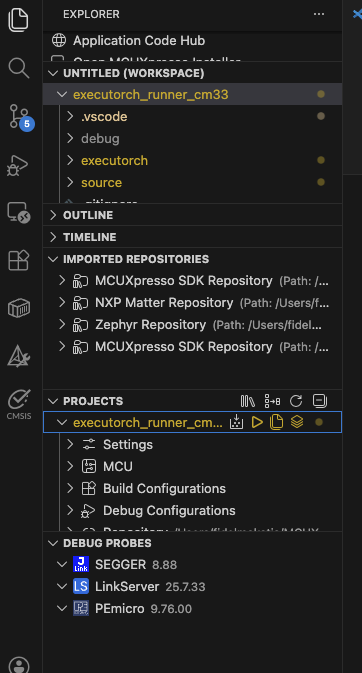 VS Code Projects panel with build icon
The build output shows the progress:
        [build] Scanning dependencies of target executorch_runner_cm33.elf
[build] [ 25%] Building CXX object source/arm_executor_runner.cpp.obj
[build] [ 50%] Building CXX object source/arm_memory_allocator.cpp.obj
[build] [ 75%] Linking CXX executable executorch_runner_cm33.elf
[build] [100%] Built target executorch_runner_cm33.elf
[build] Build finished with exit code 0
Verify the memory usage to ensure the firmware fits in the Cortex-M33:
        Memory region         Used Size  Region Size  %age Used
    m_interrupts:        1140 B       1144 B     99.65%
          m_text:      103476 B     129928 B     79.64%
          m_data:       61984 B       108 KB     56.05%
The text section uses approximately 80% of the 128KB ITCM, and data uses approximately 56% of the 108KB DTCM.
You now have everything you need to deploy the .elf binary on your NXP board.
SDK patches not applied:
If you see a BUS FAULT during load_method or vtable corruption errors, the GOT linker script patch has not been applied. Run:
./patches/apply_patches.sh
Then rebuild the project.
Region m_text overflowed:
The 128KB ITCM is nearly full. Verify that CMakeLists.txt links libquantized_ops_lib_selective.a (not the full libquantized_ops_lib.a). The selective library registers only the two operators needed for NPU delegation.
resolve_operator error for quantized_decomposed::*:
The quantized operator kernels are not linked. Verify that CMakeLists.txt links libquantized_ops_lib_selective.a with --whole-archive and that libquantized_kernels.a and libkernels_util_all_deps.a are also listed.
What you’ve learned and what’s next
In this section you’ve:
- Set up MCUXpresso for VS Code with the SDK and Arm toolchain
- Cloned the executor_runner project with prebuilt ExecuTorch libraries
- Applied critical SDK patches for GOT initialization and NPU logging
- Built the Cortex-M33 firmware and verified it fits within memory constraints
With the firmware binary built and its memory usage verified, you’re ready to deploy it to the FRDM i.MX 93 and run your first inference.