Generate human faces with a diffusion model on an Alif Ensemble E8
Introduction
Understand the pico-faces workflow
Set up the development tools and DevKit
Export the pico-faces model for Ethos-U85
Prepare the DevKit for debugging
Generate and validate faces on the DevKit
Next Steps
Generate human faces with a diffusion model on an Alif Ensemble E8
What pico-faces is
pico-faces is a compact generative model that produces 128 x 128 RGB face images. It combines a 2.5-million-parameter latent rectified-flow diffusion transformer (DiT) with a small convolutional decoder.
The model provides four conditioned face classes and one unconditional class. The conditioned classes combine the female or male label of the model with a neutral or smiling expression.
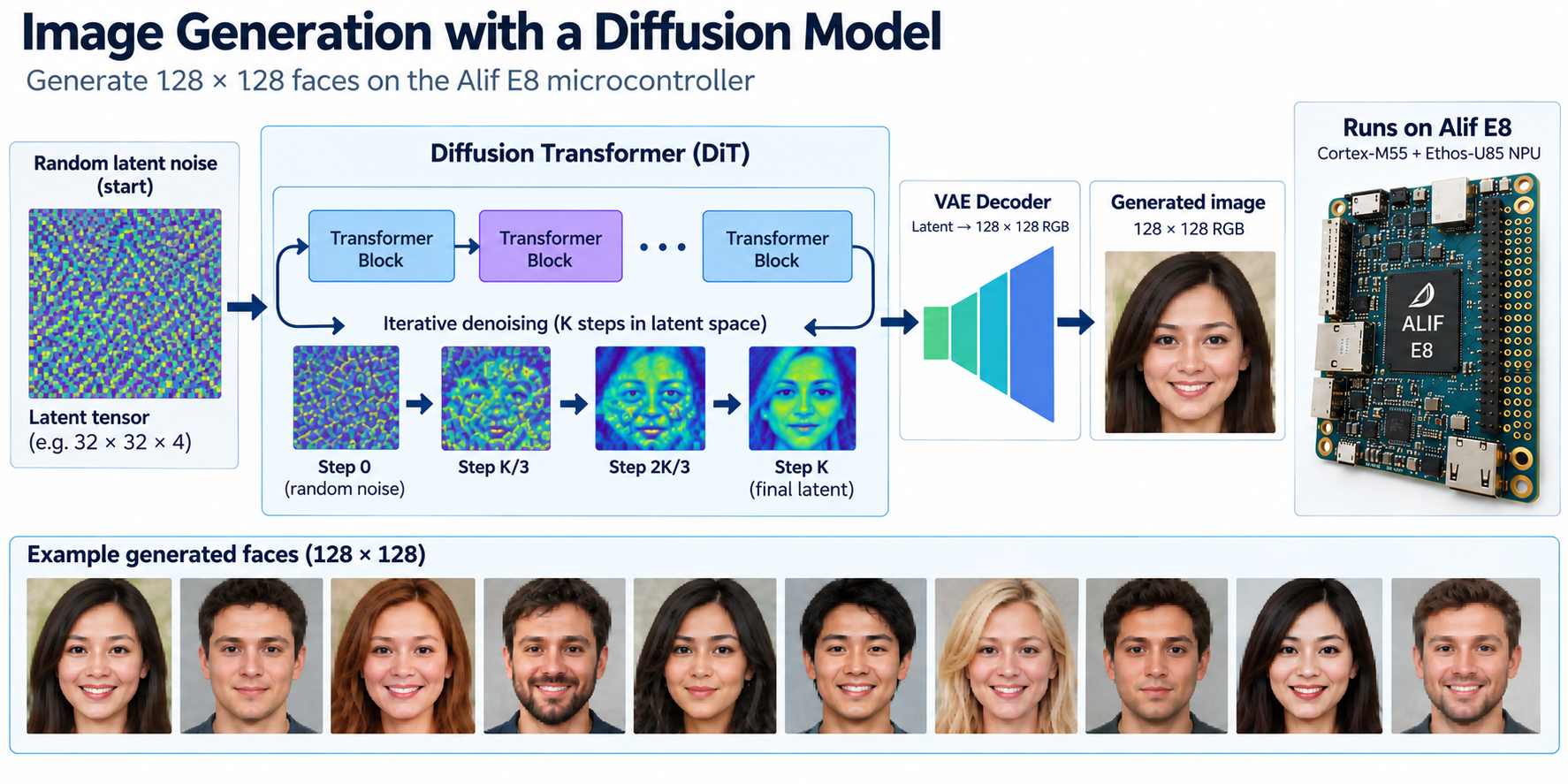 pico-faces diffusion workflow on the Alif Ensemble E8
The CMSIS-ExecuTorch example that you’ll build re-expresses the model as two ExecuTorch methods:
| Method | Purpose | Execution target |
|---|---|---|
dit_step(z, c) | Predict the velocity used to update the latent image | Ethos-U85 |
decode(z) | Convert the final latent image into an RGB face | Ethos-U85 |
| Sampling loop | Generate noise, apply guidance, and update the latent image | Cortex-M55 |
The dit_step method uses 16-bit activations and 8-bit weights. The extra activation precision preserves the residual stream of the transformer. The decoder uses 8-bit activations and weights, which reduces its execution time without the same visible quality loss.
Follow the deployment flow
The example uses a CMSIS solution to keep the hardware definition separate from the Python exporter. The workflow has three stages:
- CMSIS-Toolbox resolves the
DevKit-E8target and records its Cortex-M55, Ethos-U85, and Vela settings incmsis-executorch.cbuild-mlops.yml. create_ai_layer.pyquantizes and exports both methods, delegates them to Ethos-U85, and writes the AI layer.- CMSIS-Toolbox builds the application and embeds the ExecuTorch program in the firmware image.
The generated application uses the high-performance Cortex-M55 core at 400 MHz to control sampling. The Ethos-U85 configuration provides 256 multiply-accumulate operations per cycle. The firmware displays each generated face on the DevKit LCD and reports timings through UART4.
A successful workflow run is indicated in three ways:
- The DevKit LCD displays the generated face.
- UART output ends with
Test_result: PASS. - The Ethos-U performance monitoring unit reports cycles and activity for both model methods.
The first image uses a fixed seed and configuration. This makes the boot test repeatable even though the exact Cyclic Redundancy Check (CRC) can change when the model is exported on a different host.
What you’ve learned and what’s next
You’ve learned how the Cortex-M55 sampling loop calls two ExecuTorch methods that run on the Ethos-U85 NPU.
Next, you’ll install the host tools and connect the DevKit.