Deploy PaddlePaddle on Arm Cortex-M with Arm Virtual Hardware
Introduction
Overview of OCR
Deploy the PaddleOCR model
Next Steps
Deploy PaddlePaddle on Arm Cortex-M with Arm Virtual Hardware
Try the end-to-end workflow
This section provides hands-on instructions for you to deploy pre-trained PaddlePaddle models on the Corstone-300 Fixed Virtual Platform (FVP) included with Arm Virtual Hardware.
The steps involved in the model deployment are shown in the figure below:
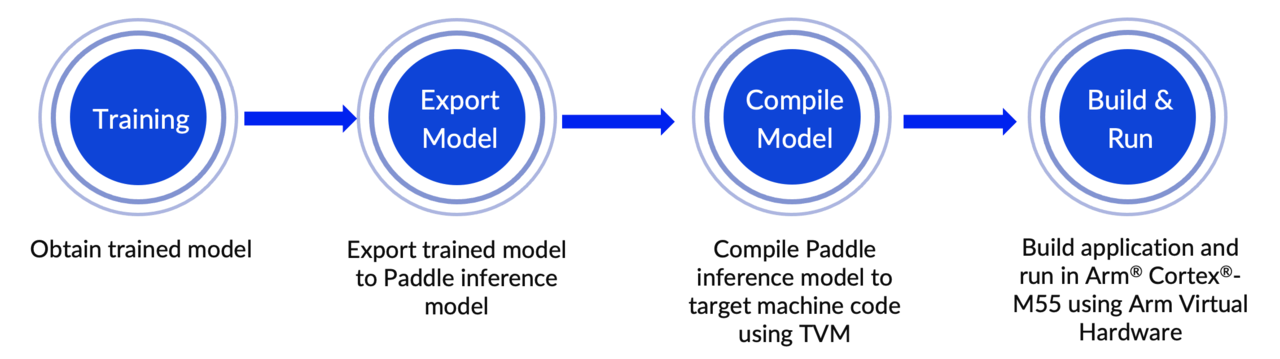 End-to-end workflow
Deploy PaddleOCR text recognition model on the Corstone-300 FVP included with Arm Virtual Hardware
Start by launching the Arm Virtual Hardware AMI .
Alternatively, you can also download the Corstone-300 FVP from the Arm Ecosystem FVP page. For installation instructions see Arm Ecosystem FVPs .
The code for this project is available to download from the ArmDeveloperEcosystem GitHub repository as well as PaddleOCR ’s GitHub repository.
Start by cloning the code repository on your running AVH AMI instance:
git clone https://github.com/ArmDeveloperEcosystem/Paddle-examples-for-AVH.git
cd Paddle-examples-for-AVH
Run the setup scripts.
sudo bash scripts/config_cmsis_toolbox.sh
sudo bash scripts/config_tvm.sh
Now you can navigate to the text recognition example directory.
cd ./OCR-example/Text-recognition-example-m85/
In this directory, there is a script named run_demo.sh that automates the entire process described in the End-to-end workflow diagram.
Update the FVP executable name in the run_demo.sh script. The VHT_Platform should match what’s installed in the system. The executable starts with either VHT_Corstone_SSE or FVP_Corstone_SSE. Check which one is available in the $PATH by typing it out and using the Tab key to autocomplete. Then, using a code editor of your choice or vim, you can assign the correct executable:
vim run_demo.sh
The final result should look something like this, with the right option uncommented:
if [ "$DEVICE" == "cortex-m55" ]; then
   RUN_DEVICE_NAME="M55"
#   VHT_Platform="FVP_Corstone_SSE-300"
   VHT_Platform="VHT_Corstone_SSE-300_Ethos-U55"
   TVM_TARGET="cortex-m55"
elif [ "$DEVICE" == "cortex-m85" ]; then
   RUN_DEVICE_NAME="M85"
#    VHT_Platform="FVP_Corstone_SSE-310"
   VHT_Platform="VHT_Corstone_SSE-310"
   TVM_TARGET="cortex-m85"
else
  echo 'ERROR: --device only support cortex-m55/cortex-m85' >&2
  exit 1
fi
The run_demo.sh script automatically builds and executes the English text recognition application on the Corstone-300 platform included with Arm Virtual Hardware. Here is a list of steps performed by this script:
- Step 1. Set up build environment
- Step 2. Download a trained PaddleOCR text recognition model
- Step 3. Use TVMC to compile the model and generate code for the Arm Cortex-M processor
- Step 4. Process resources for building the application image
- Step 5. Build the target application using Makefiles
- Step 6. Run application binary on Corstone-300 FVP included in AVH
Training the model usually takes a lot of time. In step 2, an already trained English text recognition model named ocr_en.tar is used.
By default, the script uses the image shown below (QBHOUSE) as an example to verify the inference results on the Corstone-300 FVP with Arm Cortex-M55.
 QBHOUSE test image
Make the script executable with chmod.
chmod 777 run_demo.sh
You can now run the trained PaddleOCR text recognition model on the Corstone-300 FVP included on the AVH AMI with the following command:
./run_demo.sh --device cortex-m55 --model EN_PPOCRV3_REC
The output from running the application on the Corstone-300 FVP is shown below:
        Ethos-U rev 136b7d75 --- Feb 16 2022 15:47:15
    (C) COPYRIGHT 2019-2022 Arm Limited
    ALL RIGHTS RESERVED

Starting ocr rec inference
text: QBHOUSE, score: 0.986746
EXITTHESIM
Info: /OSCI/SystemC: Simulation stopped by user.
The text recognition results are consistent with the input image text content QBHOUSE and have a high confidence score of 0.986746.
You’ve successfully deployed a PP-OCRv3 English recognition model directly on the Corstone-300 FVP with the Arm Cortex-M55.