Export and quantize SmolVLA for ONNX Runtime on Arm
Introduction
Set up the SmolVLA environment
Export and validate the SmolVLA ONNX model
Quantize SmolVLA to INT4 and compare it with FP32
Next Steps
Export and quantize SmolVLA for ONNX Runtime on Arm
Understand SmolVLA
SmolVLA is a compact vision-language-action model. It combines camera images, a task instruction, and the robot state to generate a sequence of robot actions.
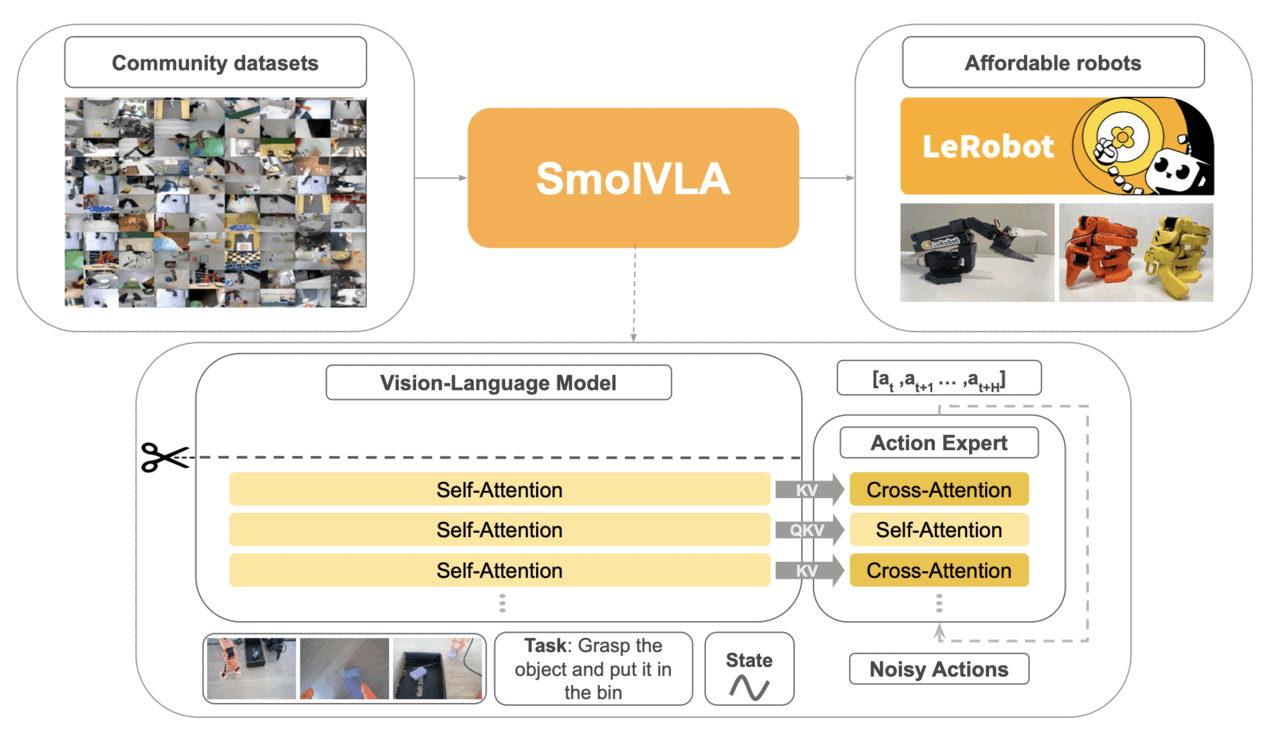 SmolVLA architecture
Image source: SmolVLA paper .
Export SmolVLA to ONNX
The checkpoint includes the SmolVLA policy and the LeRobot processors used before and after inference. The exporter writes the policy to an ONNX graph, and the processors remain outside it.
Run the exporter:
python scripts/export_onnx.py \
  --checkpoint work/artifacts/smolvla_libero \
  --output work/onnx/fp32/model.onnx \
  --reference-dir work/onnx/fp32/reference
The export might take several minutes while it loads the checkpoint, traces the model graph, and validates the output with ONNX Runtime.
The exporter creates a fixed-shape model and a deterministic reference batch. The batch includes an explicit flow-matching noise tensor, so the PyTorch and ONNX Runtime paths receive the same inputs.
The expected output ends with:
PASS: ONNX Runtime matches PyTorch within atol=0.001 and rtol=0.001
The FP32 graph contains the exported policy computation. Large weights can be
stored in external data files beside model.onnx, so keep the complete
work/onnx/fp32 directory together.
Review the model interface
The graph accepts six preprocessed inputs:
| Input | Type | Shape | Description |
|---|---|---|---|
camera1 | float32 | [1, 3, 512, 512] | Primary RGB image scaled to [0, 1] |
camera2 | float32 | [1, 3, 512, 512] | Wrist RGB image scaled to [0, 1] |
lang_tokens | int64 | [1, 48] | Tokenized task instruction |
lang_attention_mask | int64 | [1, 48] | Valid language-token mask |
state | float32 | [1, 8] | Normalized robot state |
noise | float32 | [1, 50, 32] | Flow-matching noise |
The model returns an action chunk with shape [1, 50, 7]: 50 steps with seven
control values each.
The ONNX boundary deliberately starts after preprocessing and ends before postprocessing:
observation -> LeRobot preprocessor -> ONNX model -> LeRobot postprocessor -> robot action
Use the processors from the same checkpoint. They preserve the tokenization, normalization, and action conversion expected by the policy.
Inspect the validation report
View the report written by the exporter:
python -m json.tool work/onnx/fp32/validation.json
Confirm that the report lists CPUExecutionProvider, reports an output shape
of [1, 50, 7], and passes validation.
What you’ve accomplished and what’s next
You’ve exported SmolVLA to FP32 ONNX and validated its action output with ONNX Runtime on an Arm CPU.
Next, you’ll quantize the eligible linear weights to packed INT4 and run the resulting model through the same interface.