Build a ROS 2 and Zenoh simulation environment on an Arm server
Introduction
Start the ROS 2 development containers
Configure Zenoh for ROS 2
Observe Zenoh router discovery behavior
Start the robot simulation and Navigation2
Visualize and navigate the robot with RViz
Control the Neobotix ROX robot with ROS 2
Observe ROS 2 simulation resource usage on an Arm server
Enable Zenoh shared-memory transport
Next Steps
Build a ROS 2 and Zenoh simulation environment on an Arm server
Introduction
Start the ROS 2 development containers
Configure Zenoh for ROS 2
Observe Zenoh router discovery behavior
Start the robot simulation and Navigation2
Visualize and navigate the robot with RViz
Control the Neobotix ROX robot with ROS 2
Observe ROS 2 simulation resource usage on an Arm server
Enable Zenoh shared-memory transport
Next Steps
Understand the velocity interface
After visualizing and navigating the robot with RViz, control the robot directly using the velocity interface.
The ROX base subscribes to the /cmd_vel topic using the geometry_msgs/Twist message type. The message carries linear and angular velocity commands.
Any process that publishes to /cmd_vel can control the base. Navigation2 uses this same interface, so it’s one publisher to the robot rather than a privileged control path.
Open a sourced bash shell in the robot container:
source ~/workshop_env.bash
Control the robot with the keyboard
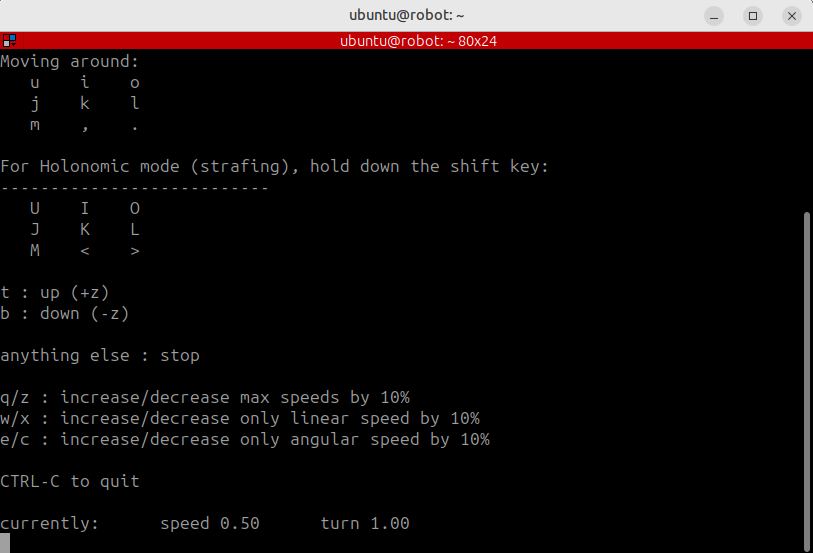
Start keyboard teleoperation:
just teleop
Use the key bindings displayed in the terminal to drive the robot while you observe its movement in RViz.
Publish a velocity command
You can also publish forward velocity at 0.2 m/s and a fixed rate of 10 Hz:
ros2 topic pub --rate 10 /cmd_vel geometry_msgs/msg/Twist "{linear: {x: 0.2}}"
Let the command run for approximately three seconds, then press Ctrl+C to stop the publisher. Stop the robot by publishing a zero-velocity command:
ros2 topic pub --once /cmd_vel geometry_msgs/msg/Twist "{}"
These commands use the same /cmd_vel interface as teleoperation and Navigation2.
Verify movement with odometry
Read one odometry message and display the robot position:
ros2 topic echo /odom --once | grep -A2 position
The x position should advance when the robot moves. The output is similar to:
x: 0.3899999883542309
On the supplied reference system, a 3-second command at 0.2 m/s moved the robot from approximately x = 0 to x = 0.39 m. This value is an example rather than an exact target. Acceleration behavior and the robot’s starting position affect the result.
The UR10 arm on the ROX uses a JointTrajectory action rather than Twist. Publishing Twist to the base and JointTrajectory to the arm follows the standard ROS interface for each mechanism.
What you’ve learned and what’s next
You’ve controlled the robot through the same velocity interface used by Navigation2 and confirmed its movement through /odom.
Next, you’ll inspect the CPU cost, simulation speed, and internal traffic of the running system.