Build a multimodal retail restocking assistant on Armv9 with MNN
Introduction
Run multimodal inference with MNN on Armv9
Build MNN and prepare an Omni model on Armv9
Validate text-only inference with an Omni model on Armv9
Run a vision retail shelf audit with MNN Omni
Convert spoken restock notes into structured tickets with MNN Omni
Build a single-shot multimodal restock ticket with MNN Omni
Next Steps
Build a multimodal retail restocking assistant on Armv9 with MNN
Introduction
Run multimodal inference with MNN on Armv9
Build MNN and prepare an Omni model on Armv9
Validate text-only inference with an Omni model on Armv9
Run a vision retail shelf audit with MNN Omni
Convert spoken restock notes into structured tickets with MNN Omni
Build a single-shot multimodal restock ticket with MNN Omni
Next Steps
Analyze retail shelf images with vision inference
This section shows how Armv9 can run lightweight operational vision reasoning locally without requiring cloud round trips, making it a practical fit for store-side restocking workflows.
The goal is not to produce SKU-level counting. Instead, you generate an operational signal that is useful for store staff:
- estimate shelf coverage for the top, middle, and bottom levels
- identify the priority zone that appears most sparse
- provide a short reason based on visible evidence
- return
NOT_SUREwhen the image is unclear
This keeps the task practical for on-device multimodal inference. In many retail workflows, deciding where to restock first is more useful than attempting perfect item counting from a single photo.
By the end of this section, you will produce a structured shelf audit signal from a local image and verify that it can guide a restocking decision.
Prepare the image asset
Create a local directory for assets:
mkdir -p ~/mnn/assets
Download the tutorial image and verify that it’s a valid JPEG file:
wget -P ~/mnn/assets https://upload.wikimedia.org/wikipedia/commons/e/e6/Pet_Food_Aisle.jpg
file ~/mnn/assets/Pet_Food_Aisle.jpg
The output is similar to:
JPEG image data, JFIF standard 1.02, resolution (DPI), density 72x72, segment length 16, Exif Standard: [TIFF image data, little-endian, direntries=12, description= , manufacturer=SONY, model=DSC-W50, orientation=upper-left, xresolution=203, yresolution=211, resolutionunit=2, software=Adobe Photoshop CS Macintosh, datetime=2007:04:10 17:45:47], progressive, precision 8, 2816x2112, components 3
The key detail is that the output starts with JPEG image data, confirming the file is a valid JPEG. The remaining EXIF metadata can be ignored.
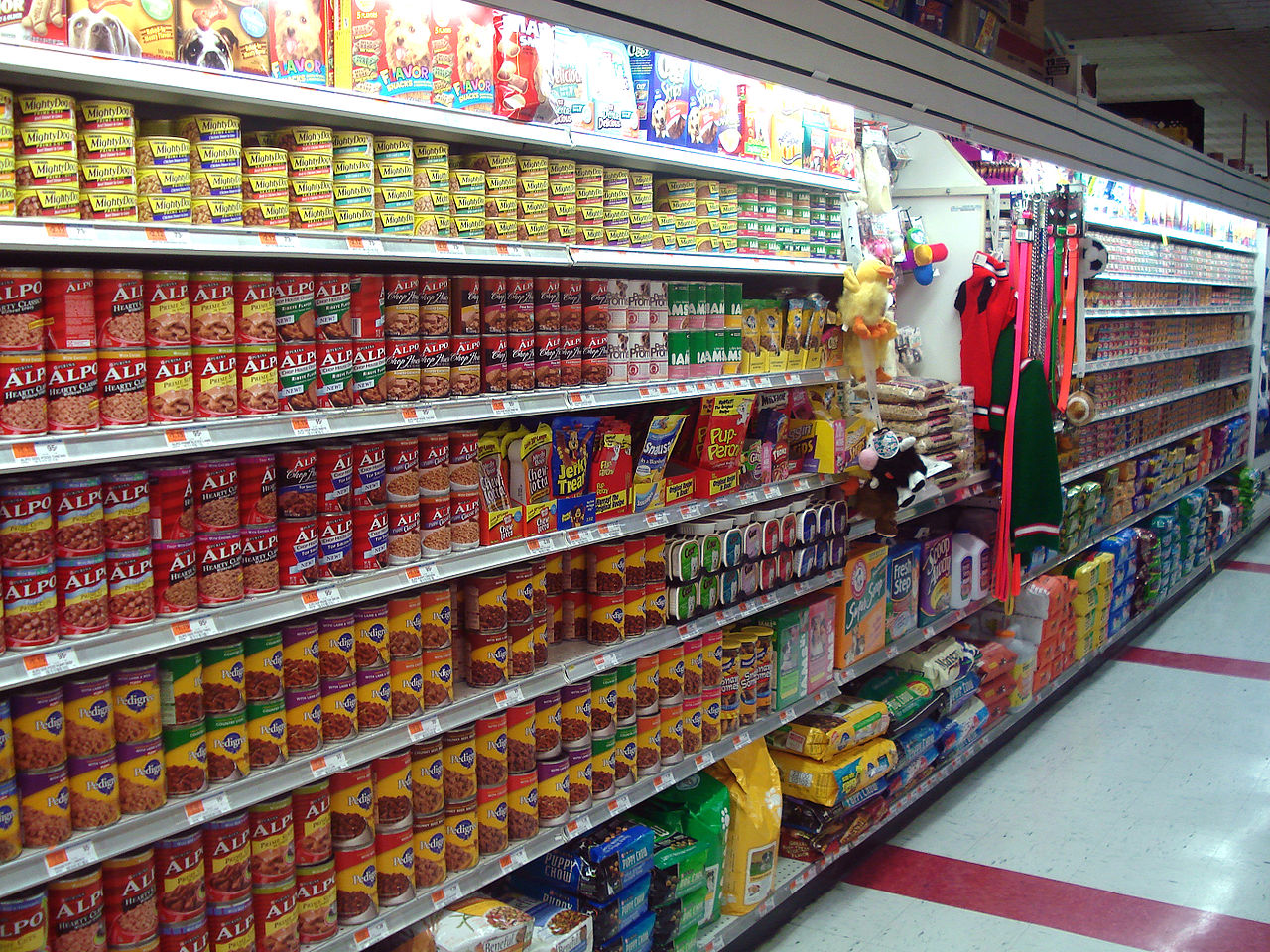 Pet food shelf for vision audit
Create the vision prompt
Next, create a prompt that instructs the model to audit only the main shelf on the left side of the image.
The prompt does four things:
- attaches the local image with
<img>...</img> - limits the analysis to the main left shelf
- asks for coverage estimates using
high,medium, orlow - constrains the response to a single structured line
Create the prompt file:
cat > ~/mnn/prompt_picture_coverage.txt <<EOF
<img>$HOME/mnn/assets/Pet_Food_Aisle.jpg</img> You are an on-device retail shelf auditing assistant. Audit ONLY the main left shelf (ignore the aisle on the right, hanging toys, and floor items). Do NOT count every item. Estimate facing coverage for top/middle/bottom as high|medium|low and identify the sparsest zone. Output ONE line only using bullet-style segments separated by semicolons: Shelf audit; - Coverage: top=<high|medium|low>, middle=<high|medium|low>, bottom=<high|medium|low>; - Priority zone: <top|middle|bottom>-<left|center|right>; - Reason: <one short sentence>; - Notes: <NOT_SURE if unclear>.
EOF
Run the vision demo
Run llm_demo with the model config.json file and the vision prompt:
Vision inference takes longer than text-only inference because the model encodes the image into tokens before generation begins. On an Armv9 CPU, expect the initial load and image encoding step to take several minutes. The terminal will appear idle during this time — this is expected.
cd ~/mnn/MNN/build
./llm_demo ~/mnn/Qwen2.5-Omni-7B-MNN/config.json ~/mnn/prompt_picture_coverage.txt
The output is similar to:
config path is /home/radxa/mnn/Qwen2.5-Omni-7B-MNN/config.json
CPU Group: [ 1  2  3  4 ], 799999 - 1800968
CPU Group: [ 7  8 ], 799897 - 2199795
CPU Group: [ 5  6 ], 799897 - 2299896
CPU Group: [ 9  10 ], 799897 - 2399998
CPU Group: [ 0  11 ], 799897 - 2500100
The device supports: i8sdot:1, fp16:1, i8mm: 1, sve2: 1, sme2: 0
main, 274, cost time: 6046.771973 ms
Prepare for tuning opt Begin
Prepare for tuning opt End
main, 282, cost time: 766.086975 ms
prompt file is /home/radxa/mnn/prompt_picture_coverage.txt
Shelf audit; - Coverage: top=high, middle=high, bottom=medium; - Priority zone: top-left; - Reason: top and middle have more variety than bottom, and left is where most items are; - Notes: NOT_SURE if unclear.
The exact wording can vary, but the structured fields should be present. If the model appends extra conversational text after the ticket line, tighten the prompt by repeating Output ONE line only.
Why a coarse coverage estimate is enough for edge workflows
In many edge retail workflows, you don’t need a perfectly precise inventory measurement to make a useful decision. A coarse estimate such as High, Medium, or Low coverage is often enough to identify which shelf area needs attention first and to generate a practical restocking signal.
Keeping the prompt and output simple reduces post-processing requirements and makes the result easier to validate during early on-device prototyping. For this Learning Path, the goal isn’t to build a full inventory counting system, but to show how local vision reasoning on Armv9 can produce an operationally useful input for a restocking workflow.
Verify the result
Check that the output meets these conditions:
- includes coverage estimates for top, middle, and bottom
- identifies one priority zone, such as
middle-center - provides a short reason tied to visible shelf sparsity
- uses
NOT_SUREonly when the image is genuinely ambiguous
If the model returns extra conversational text, tighten the prompt further by repeating Output ONE line only.
What you’ve learned and what’s next
In this section, you:
- Ran vision-based inference using a shelf image as input
- Generated a structured shelf audit with coverage estimates and priority zones
- Validated that MNN Omni can process local images on Armv9 CPU for operational retail workflows
You’ve confirmed that image-based multimodal inference works correctly and produces actionable output.
In the next section, you’ll extend this workflow by running an audio-based restock instruction demo using an <audio>...</audio> prompt.