Build a CI/CD pipeline using GitLab-hosted Arm runners
Introduction
Build and use GitLab-hosted Arm runners for CI/CD
Create a GitLab project
Build and configure your Arm64 CI/CD pipeline
Run pipeline and verify results
Next Steps
Build a CI/CD pipeline using GitLab-hosted Arm runners
Overview
This section guides you through building an Arm64 container image and creating a pipeline configuration for GitLab-hosted runners.
GitLab-hosted runners are available for any project without additional setup. To use Arm64 runners, create a .gitlab-ci.yml file in your project root and specify the Arm64 runner tag.
Build an Arm64 container image
You will create a simple C application, containerize it for Arm64 architecture, and push it to GitLab Container Registry.
Create main.c with a simple test program:
//main.c
#include <stdio.h>

int main(void) {
  printf("Hello from an Arm64 Docker image built on GitLab hosted Arm runners!\n");
  return 0;
}
This example provides a minimal starting point to verify your pipeline works correctly.
Create a Dockerfile with build instructions:
# DockerFile
# syntax=docker/dockerfile:1

FROM alpine:3.20 AS build
RUN apk add --no-cache build-base
WORKDIR /src
COPY main.c .
RUN gcc -O2 -static -s -o hello main.c

FROM scratch
COPY --from=build /src/hello /hello
ENTRYPOINT ["/hello"]
This multi-stage build compiles your C program with GCC on Alpine Linux, then copies only the statically-linked Arm64 binary to a minimal scratch image.
Optionally, create .dockerignore to exclude files from the build context:
.git
.gitlab-ci.yml
To create these files in GitLab, use the + button in your project and select New File. Name each file appropriately (main.c, Dockerfile, .dockerignore).
Create these three files before adding the pipeline configuration. Once you commit the .gitlab-ci.yml file, the pipeline runs automatically. If the application files don’t exist, the pipeline will fail.
Create pipeline configuration
From your project page, select Set up CI/CD or use the + button to create a new file:
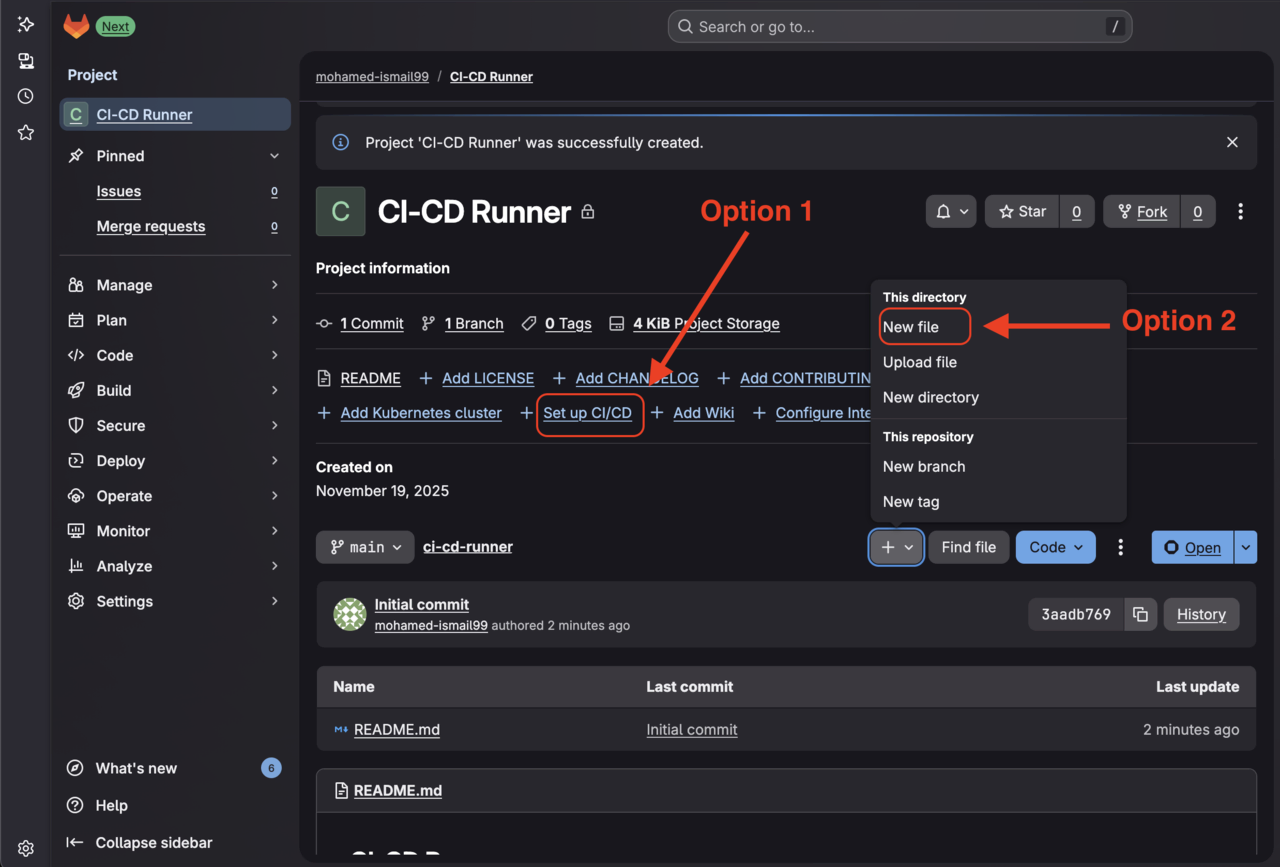 GitLab Set up CI/CD button
Name the file .gitlab-ci.yml:
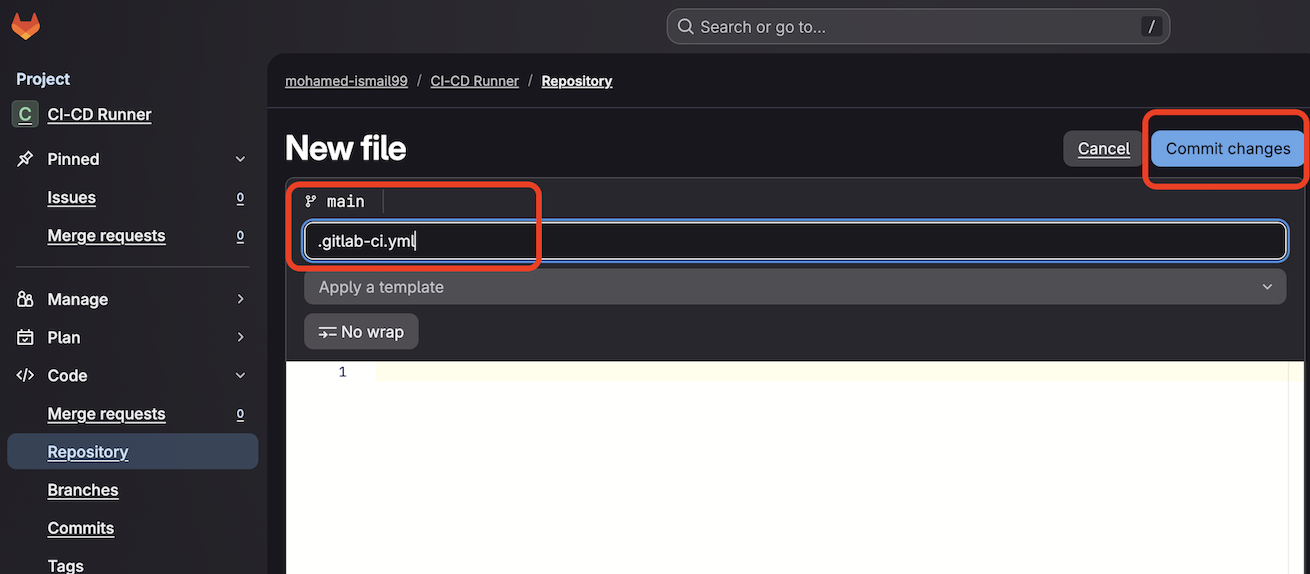 GitLab new YAML file creation screen
Select Edit > Edit in pipeline editor:
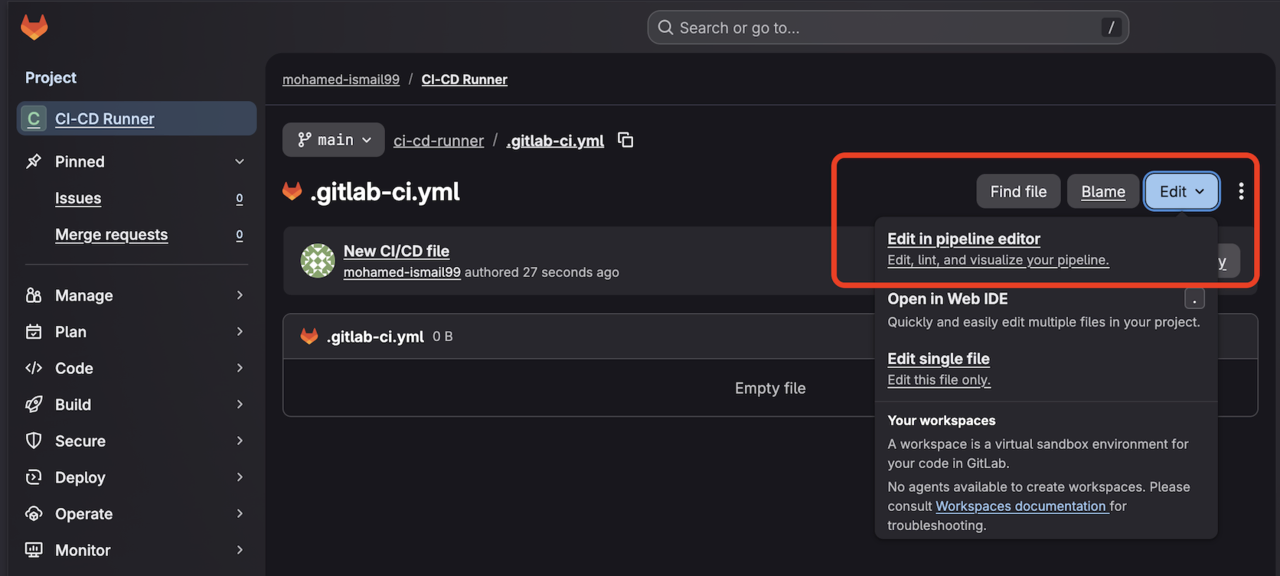 GitLab pipeline editor screen
Add the following pipeline configuration. This defines three stages that build, test, and publish your Arm64 container image:
stages: [build, test, push]

variables:
  IMAGE_TAG: "$CI_REGISTRY_IMAGE:$CI_COMMIT_SHORT_SHA"
  IMAGE_LATEST: "$CI_REGISTRY_IMAGE:latest"
  DOCKER_HOST: "tcp://docker:2376"
  DOCKER_TLS_CERTDIR: "/certs"
  DOCKER_CERT_PATH: "/certs/client"
  DOCKER_TLS_VERIFY: "1"

build_test_push:
  stage: build
  tags:
    - saas-linux-small-arm64
  image: docker:27
  services:
    - name: docker:27-dind
  before_script:
    - uname -m
    - apk add --no-cache util-linux
    - lscpu
    - docker version
    - echo "$CI_REGISTRY_PASSWORD" | docker login -u "$CI_REGISTRY_USER" --password-stdin "$CI_REGISTRY"
  script:
    - docker build --pull -t "$IMAGE_TAG" .
    - docker run --rm "$IMAGE_TAG"
    - docker push "$IMAGE_TAG"

push_latest:
  stage: push
  tags:
    - saas-linux-small-arm64
  image: docker:27
  services:
    - name: docker:27-dind
  before_script:
    - apk add --no-cache util-linux
    - lscpu
    - echo "$CI_REGISTRY_PASSWORD" | docker login -u "$CI_REGISTRY_USER" --password-stdin "$CI_REGISTRY"
  script:
    - docker pull "$IMAGE_TAG"
    - docker tag "$IMAGE_TAG" "$IMAGE_LATEST"
    - docker push "$IMAGE_LATEST"
  rules:
    - if: $CI_COMMIT_BRANCH == $CI_DEFAULT_BRANCH
Understanding the pipeline configuration
Runner selection:
The tags: saas-linux-small-arm64 directive selects GitLab’s Arm64 runner. This ensures your build runs on Arm architecture, producing native Arm64 binaries.
Build stage:
The build_test_push job compiles your C program on the Arm64 runner. The uname -m and lscpu commands verify you’re running on aarch64 architecture. The Docker build produces an Arm64 container image because the compilation happens on Arm64 hardware.
Push stage:
The push_latest job runs only on the default branch (typically main). It tags the successfully built image as latest and pushes it to GitLab Container Registry.
Authentication:
GitLab automatically provides $CI_REGISTRY_PASSWORD and $CI_REGISTRY_USER variables for authenticating to the container registry.
Commit the configuration. GitLab validates the syntax and starts the pipeline automatically.
What you’ve accomplished and what’s next
In this section, you:
- Built a simple C application for Arm64
- Created a Dockerfile and containerized your application
- Configured a GitLab pipeline to build and push Arm64 images
Next, you’ll run your pipeline, verify the results, and test your container image on Arm64 infrastructure. Continue to the next section to validate your CI/CD workflow and ensure your application is ready for deployment on Arm platforms.