Automate MCP server testing using Pytest and Testcontainers
Introduction
Introduction to MCP server testing
Set up your testing environment
Run a basic Testcontainers example
Write integration tests for MCP servers
Configure GitHub Actions for CI/CD
Next Steps
Automate MCP server testing using Pytest and Testcontainers
MCP integration testing overview
In this section, you’ll build an integration test suite for the Arm MCP server step by step. You’ll create the test files yourself and understand each component as you go.
The Arm MCP repository already includes a complete test implementation in mcp-local/tests/ . You can reference those files at any point, but this tutorial guides you through building a simplified version to understand the key concepts.
Understand MCP communication
Before writing tests, you need to understand how MCP servers communicate. MCP uses JSON-RPC 2.0 over standard input/output (stdio transport). The following diagram shows the communication flow between your test code, Testcontainers, and the MCP server:
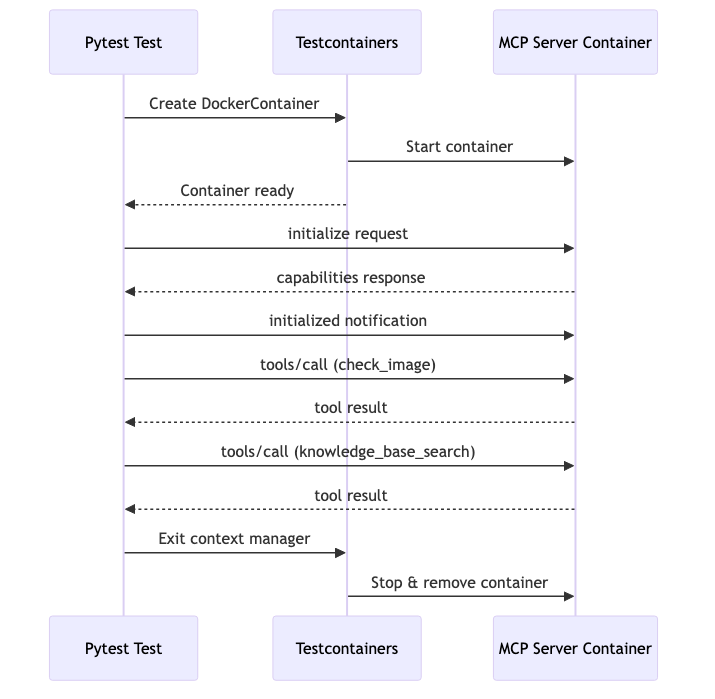 MCP JSON-RPC Communication Flow
The communication follows this sequence:
MCP JSON-RPC Communication Flow
The communication follows this sequence:
| Step | Direction | Message Type |
|---|---|---|
| 1 | Client → Server | initialize request with protocol version |
| 2 | Server → Client | Response with server capabilities |
| 3 | Client → Server | initialized notification |
| 4 | Client → Server | tools/call requests to invoke tools |
Each message is a JSON object followed by a newline character.
Step 1: create the test directory
Create a directory for your test files:
mkdir -p my-mcp-tests
cd my-mcp-tests
Step 2: define test constants
Create a file called constants.py to hold the MCP request payloads and expected responses.
Open your editor and create constants.py with the following content:
First, define the Docker image name:
MCP_DOCKER_IMAGE = "arm-mcp:latest"
Add the initialization request. This follows the MCP protocol specification:
INIT_REQUEST = {
    "jsonrpc": "2.0",
    "id": 1,
    "method": "initialize",
    "params": {
        "protocolVersion": "2024-11-05",
        "capabilities": {},
        "clientInfo": {"name": "pytest", "version": "0.1"},
    },
}
Add a test request for the check_image tool. This tool verifies if a Docker image supports Arm architecture:
CHECK_IMAGE_REQUEST = {
    "jsonrpc": "2.0",
    "id": 2,
    "method": "tools/call",
    "params": {
        "name": "check_image",
        "arguments": {
            "image": "ubuntu:24.04",
            "invocation_reason": (
                "Checking ARM architecture compatibility for ubuntu:24.04 "
                "container image as requested by the user"
            ),
        },
    },
}
Define what response you expect from the tool:
EXPECTED_CHECK_IMAGE_RESPONSE = {
    "status": "success",
    "message": "Image ubuntu:24.04 supports all required architectures",
    "architectures": [
        "amd64", "unknown", "arm", "unknown", "arm64", "unknown",
        "ppc64le", "unknown", "riscv64", "unknown", "s390x", "unknown",
    ],
}
Save the file. This gives you a complete constants.py with one test case.
Try it yourself by following the same format to add another test request for a different MCP tool. Look at the
Arm MCP documentation
to find other available tools such as knowledge_base_search.
Step 3: create helper functions for JSON-RPC communication
The MCP server runs inside a Docker container that communicates over an attached socket. You need helper functions to encode and decode messages.
Create a new file called helpers.py:
Start with the imports and the message encoding function:
import json
import time


def encode_mcp_message(payload: dict) -> bytes:
    """Encode an MCP message for stdio transport."""
    return (json.dumps(payload) + "\n").encode("utf-8")
This function converts a Python dictionary to a JSON string, adds a newline, and encodes it as bytes.
Add a function to read Docker’s multiplexed stream format:
def read_docker_frame(sock, timeout: float) -> bytes:
    """Read a Docker multiplexed frame from the socket."""
    deadline = time.time() + timeout
    header = b""

    # Read the 8-byte header
    while len(header) < 8:
        if time.time() > deadline:
            raise TimeoutError("Timed out waiting for docker frame header.")
        chunk = sock.recv(8 - len(header))
        if not chunk:
            time.sleep(0.01)
            continue
        header += chunk

    # Docker frame format:
    # byte 0: stream type (0x01 = stdout, 0x02 = stderr)
    # bytes 1-3: Reserved (\x00\x00\x00)
    # bytes 4-7: Payload size (big-endian uint32)
    if header[1:4] != b"\x00\x00\x00":
        return header  # Raw/unframed output

    size = int.from_bytes(header[4:8], "big")
    payload = b""
    while len(payload) < size:
        if time.time() > deadline:
            raise TimeoutError("Timed out waiting for docker frame payload.")
        chunk = sock.recv(size - len(payload))
        if not chunk:
            time.sleep(0.01)
            continue
        payload += chunk
    return payload
Add a function to parse MCP JSON-RPC messages:
def read_mcp_message(sock, timeout: float = 10.0) -> dict:
    """Read and parse an MCP JSON-RPC message."""
    deadline = time.time() + timeout
    buffer = b""

    while True:
        if time.time() > deadline:
            raise TimeoutError("Timed out waiting for MCP response line.")

        frame = read_docker_frame(sock, timeout)
        buffer += frame

        while b"\n" in buffer:
            line, buffer = buffer.split(b"\n", 1)
            if not line:
                continue
            try:
                return json.loads(line.decode("utf-8"))
            except json.JSONDecodeError:
                # Try to find JSON object in the line
                idx = line.find(b"{")
                if idx != -1:
                    try:
                        return json.loads(line[idx:].decode("utf-8"))
                    except json.JSONDecodeError:
                        continue
Save helpers.py. You now have the communication utilities needed for testing.
Understanding the code: The Docker socket uses a multiplexed format where each frame has an 8-byte header. When you attach to a container’s stdin/stdout, Docker wraps the data in frames that need to be parsed. The helper functions handle this low-level detail so your tests can focus on MCP logic.
Step 4: write the test function
Create the main test file test_mcp.py:
Start with imports:
import os
from pathlib import Path
import pytest
from testcontainers.core.container import DockerContainer
from testcontainers.core.waiting_utils import wait_for_logs

import constants
from helpers import encode_mcp_message, read_mcp_message
Create the test function that starts the container:
def test_mcp_server_initializes():
    """Test that the MCP server starts and responds to initialization."""
    image = os.getenv("MCP_IMAGE", constants.MCP_DOCKER_IMAGE)

    with (
        DockerContainer(image)
        .with_kwargs(stdin_open=True, tty=False)
    ) as container:
        # Wait for MCP server to start
        wait_for_logs(container, "Starting MCP server", timeout=60)
        print("MCP server started successfully")
Attach to the container’s stdio streams to communicate with the MCP server. The MCP protocol uses JSON-RPC 2.0 messages over stdin/stdout:
        # Attach to container stdin/stdout
        socket_wrapper = container.get_wrapped_container().attach_socket(
            params={"stdin": 1, "stdout": 1, "stderr": 1, "stream": 1}
        )
        raw_socket = socket_wrapper._sock
        raw_socket.settimeout(10)

        # Send initialize request
        raw_socket.sendall(encode_mcp_message(constants.INIT_REQUEST))
        response = read_mcp_message(raw_socket, timeout=20)

        # Verify the response
        assert response.get("id") == 1, "Response ID should match request ID"
        assert "result" in response, "Response should contain result"
        assert "serverInfo" in response["result"], "Result should contain serverInfo"

        print(f"Server info: {response['result']['serverInfo']}")
Complete the initialization handshake:
        # Send initialized notification
        raw_socket.sendall(
            encode_mcp_message({
                "jsonrpc": "2.0",
                "method": "initialized",
                "params": {}
            })
        )
        print("MCP session initialized successfully")
Save the file. You now have a basic test that verifies the MCP server starts and initializes correctly.
Step 5: run your test
Execute the test to verify your implementation:
python -m pytest -v test_mcp.py
If successful, you see output similar to:
        ============================= test session starts ==============================
platform linux -- Python 3.11.0, pytest-8.0.0
collected 1 item

test_mcp.py::test_mcp_server_initializes PASSED                          [100%]

============================== 1 passed in 45.32s ==============================
Use the -s flag to see print statements:
python -m pytest -s test_mcp.py
Step 6: add a tool test (challenge)
Now extend your test to verify an MCP tool. This is a hands-on challenge.
Your task: Add code to your test function that:
- Sends the
CHECK_IMAGE_REQUESTfrom your constants file - Reads the response
- Verifies the response matches
EXPECTED_CHECK_IMAGE_RESPONSE
Hints:
- Use
raw_socket.sendall(encode_mcp_message(...))to send requests - Use
read_mcp_message(raw_socket, timeout=60)to read responses (tool calls take longer than initialization) - The response structure is
response["result"]["structuredContent"]
After attempting this yourself, you can compare your solution with the implementation in mcp-local/tests/test_mcp.py
Troubleshooting
Container fails to start: Verify the Docker image exists by running docker images arm-mcp.
Timeout errors: Increase the timeout values. The MCP server can take 30-60 seconds to initialize on first run.
Socket connection errors: Ensure stdin_open=True is set in with_kwargs().
What you’ve learned and what’s next
In this section:
- You built a test suite from scratch, understanding each component
- You learned how MCP servers communicate using JSON-RPC over stdio
- You created helper functions to handle Docker socket communication
- You wrote and ran integration tests using pytest
In the next section, you’ll configure GitHub Actions to run these tests automatically in your CI/CD pipeline.