Automate MCP server testing using Pytest and Testcontainers
Introduction
Introduction to MCP server testing
Set up your testing environment
Run a basic Testcontainers example
Write integration tests for MCP servers
Configure GitHub Actions for CI/CD
Next Steps
Automate MCP server testing using Pytest and Testcontainers
Understand Testcontainers for Python testing
Before writing full integration tests, see how Testcontainers manages containers programmatically. This section walks you through basic examples that demonstrate the core concepts.
Run a simple container
Create a Python script called basic_example.py to see how Testcontainers works:
from testcontainers.core.container import DockerContainer

# Start a container with a long-running process to keep it alive
with DockerContainer("alpine:latest").with_command("sleep infinity") as container:
    # Execute a command inside the running container
    exit_code, output = container.exec("echo 'Hello from Testcontainers on Arm!'")
    print(output.decode("utf-8"))
The .with_command("sleep infinity") keeps the container running so you can execute commands inside it. Without this, the container would exit immediately.
Run the script:
python basic_example.py
The output shows the message from inside the container:
Hello from Testcontainers on Arm!
When the with block exits, Testcontainers automatically stops and removes the container.
Verify Arm container architecture
Since you’re running on an Arm machine, verify the container uses the correct architecture.
Create a file verify_arch.py with the code below:
from testcontainers.core.container import DockerContainer

with DockerContainer("python:3.11-slim").with_command("sleep infinity") as container:
    exit_code, output = container.exec("uname -m")
    arch = output.decode("utf-8").strip()
    print(f"Container architecture: {arch}")
    assert arch in ("aarch64", "arm64"), f"Expected Arm architecture, got {arch}"
Run this script:
python verify_arch.py
The output confirms the container runs on Arm:
Container architecture: aarch64
Start the MCP server container
Now apply these concepts to the Arm MCP server. Create a script called mcp_container_example.py:
from testcontainers.core.container import DockerContainer
from testcontainers.core.waiting_utils import wait_for_logs

MCP_IMAGE = "arm-mcp:latest"

print("Starting MCP server container...")

with (
    DockerContainer(MCP_IMAGE)
    .with_kwargs(stdin_open=True, tty=False)
) as container:
    # Wait for the MCP server to initialize
    wait_for_logs(container, "Starting MCP server", timeout=60)
    print("MCP server is ready!")

    # Get container details
    container_id = container.get_wrapped_container().id[:12]
    print(f"Container ID: {container_id}")

    # The container is now ready for MCP communication
    print("Container started successfully. Exiting...")

print("Container automatically stopped and removed.")
Run the example:
python mcp_container_example.py
The output shows the container lifecycle:
        Starting MCP server container...
MCP server is ready!
Container ID: a1b2c3d4e5f6
Container started successfully. Exiting...
Container automatically stopped and removed.
Understand the container lifecycle
The following diagram illustrates how Testcontainers manages the complete container lifecycle:
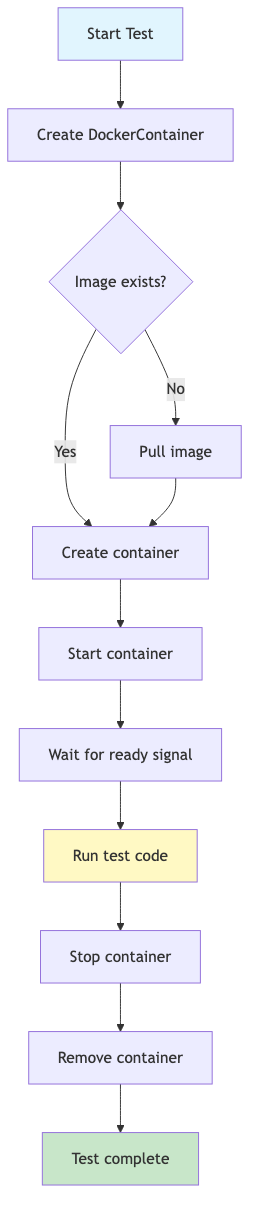 Testcontainers container lifecycle
The DockerContainer context manager handles four phases automatically:
| Phase | What happens |
|---|---|
| Create | Pulls the image if needed, creates the container |
| Start | Starts the container with specified configuration |
| Wait | Blocks until the container is ready (log message appears) |
| Cleanup | Stops and removes the container when exiting the with block |
This ensures tests always start with a clean environment and never leave orphaned containers.
Configure Testcontainers options
Testcontainers provides methods to configure container settings:
from testcontainers.core.container import DockerContainer

with (
    DockerContainer("arm-mcp:latest")
    .with_env("LOG_LEVEL", "debug")           # Set environment variables
    .with_volume_mapping("/local/path", "/container/path")  # Mount volumes
    .with_kwargs(stdin_open=True, tty=False)  # Additional Docker options
) as container:
    # Container is configured and running
    pass
Common configuration options include:
- with_env(): sets environment variables inside the container
- with_volume_mapping(): mounts host directories into the container
- with_kwargs(): passes additional arguments to the Docker SDK
For MCP testing, stdin_open=True enables communication over the stdio transport.
Handle container startup failures
If the MCP server image doesn’t exist, Testcontainers raises an error. Add error handling to provide helpful messages:
from testcontainers.core.container import DockerContainer
from testcontainers.core.waiting_utils import wait_for_logs
from docker.errors import ImageNotFound

MCP_IMAGE = "arm-mcp:latest"

try:
    with (
        DockerContainer(MCP_IMAGE)
        .with_kwargs(stdin_open=True)
    ) as container:
        wait_for_logs(container, "Starting MCP server", timeout=60)
        print("MCP server started successfully")
except ImageNotFound:
    print(f"Error: Image '{MCP_IMAGE}' not found.")
    print("Run 'docker buildx build -f mcp-local/Dockerfile -t arm-mcp .' to build it.")
except TimeoutError:
    print("Error: MCP server failed to start within 60 seconds.")
    print("Check the Docker logs for more details.")
What you’ve learned and what’s next
In this section:
- You ran basic Testcontainers examples to understand the container lifecycle
- You verified container architecture matches your Arm system
- You started the MCP server container and waited for it to initialize
- You learned how to configure containers and handle errors
In the next section, you’ll write full integration tests that communicate with the MCP server using the JSON-RPC protocol.