Arm System Characterization Tool
About this Install Guide
| Reading time: | 15 min |
| Last updated: | 24 Mar 2026 |
| Reading time: |
| 15 min |
| Last updated: |
| 24 Mar 2026 |
This guide shows you how to install and use the tool with the most common configuration. For advanced options and complete reference information, see the official documentation. Some install guides also include optional next steps to help you explore related workflows or integrations.
The Arm System Characterization Tool (ASCT) is a command-line utility for running low-level benchmarks, diagnostic scripts, and system tests to analyze and debug performance on Arm-based platforms. ASCT provides a standardized environment for evaluating key hardware characteristics and is especially suited for platform bring-up, system tuning, and architectural comparison tasks.
ASCT provides capabilities for:
- Memory latency and bandwidth benchmarking across NUMA nodes
- Storage I/O performance testing
- System hardware and software configuration reporting
- Core-to-core latency measurements
- Cache hierarchy mapping through sweep operations
ASCT is available for Linux on Arm (AArch64) systems and requires Python 3.10 or later.
What should I do before installing ASCT?
ASCT requires a Linux system running on Arm hardware. Confirm you are using an Arm computer with 64-bit Linux by running:
uname -m
The output should be:
aarch64
If you see a different result, you are not using an Arm computer running 64-bit Linux.
Install prerequisites
Before installing ASCT, ensure you have the required system packages:
sudo apt update
sudo apt install python3 python3-pip python-is-python3 gcc make numactl fio linux-tools-generic linux-tools-$(uname -r) -y
These packages are required for:
python3- Python 3.10 or later for running ASCTgccandmake- For compiling benchmark componentsnumactl- For NUMA-aware memory benchmarksfio- Version 3.36 or later for storage benchmarkslinux-tools-genericandlinux-tools-$(uname -r)- Linux Perf for performance analysis
For more information about installing Perf on different Linux distributions, see the Perf install guide .
How do I download and install ASCT?
ASCT is distributed as a Python package and requires Python 3.10 or later.
Download ASCT
Download the latest ASCT release from the artifacts.tools.arm.com page.
For example, to download version 0.5.1:
wget https://artifacts.tools.arm.com/asct/dist/0.5.1/asct-0.5.1+11d418d-release.tar.gz
How do I install ASCT using uv?
The recommended method uses
uv
, a fast Python package installer. Install uv:
curl -LsSf https://astral.sh/uv/install.sh | sh
Extract the release archive
tar xzf asct-0.5.1+11d418d-release.tar.gz
Create the required directories
sudo mkdir -p /opt/uv/tools /usr/local/bin
Install ASCT system-wide using:
cd asct-0.5.1+11d418d
sudo UV_TOOL_DIR=/opt/uv/tools UV_TOOL_BIN_DIR=/usr/local/bin $(which uv) tool install ./asct-0.5.1+11d418d.tar.gz
This installs ASCT to /usr/local/bin making it available system-wide. Installing to /usr/local/bin instead of the default ~/.local/bin allows you to run ASCT with sudo, which is required for some benchmarks to access system resources and configure huge pages.
How do I verify that ASCT is installed?
Verify the installation by checking the version:
asct version
The output is similar to:
ASCT 0.5.1+11d418d
Display the help information:
asct --help
This displays available commands and benchmarks.
How do I use ASCT?
ASCT provides several commands for benchmarking and system analysis, including run, system-info, list, diff, and sysreg.
Some benchmarks require sudo or root privileges to configure huge pages and access certain system information. You can run ASCT without sudo, but some benchmarks can be unavailable or limited in functionality.
Get system information
To generate a system information report:
sudo asct system-info
To save the system information in JSON format:
sudo asct system-info --format json --output-dir my_output
List available benchmarks
To see all available benchmarks and their associated keywords:
asct list
Run benchmarks
To run the default set of benchmarks:
sudo asct run
To run all available benchmarks (including optional ones):
sudo asct run all
To run specific benchmarks by name:
sudo asct run latency-sweep idle-latency
Each benchmark has associated keywords that describe its characteristics. You can use these keywords to run groups of related benchmarks without specifying each one individually.
To run all benchmarks tagged with the memory keyword:
sudo asct run memory
To run all benchmarks tagged with both latency and bandwidth keywords:
sudo asct run latency bandwidth
Common keywords include memory, storage, latency, bandwidth, sweep, and long-runtime. Use asct list to see which keywords are associated with each benchmark.
To exclude benchmarks by keyword, prepend the keyword with the ^ character:
sudo asct run all ^bandwidth
This runs all benchmarks except those tagged with the bandwidth keyword.
To save benchmark results in CSV format:
sudo asct run --format csv --output-dir results
By default, ASCT saves output in a directory named data.<YYYYMMDD_HHMMSS_microseconds> in the current working directory. Use --output-dir to specify a custom location.
Compare results
To compare results from multiple ASCT runs:
asct diff --output-dir results1 --output-dir results2
What are the available benchmarks?
ASCT includes several categories of benchmarks:
Memory benchmarks:
latency-sweep(ls) - Measures memory latency across data sizes from 128 bytes to 1 GiB, revealing cache hierarchy transitions. Uses 1 GiB huge pages to reduce TLB impact. Calculates optimal data sizes for L1, L2, LLC, and DRAM.idle-latency(il) - Reports a matrix of idle memory latency across NUMA nodespeak-bandwidth(pb) - Measures peak memory bandwidthcross-numa-bandwidth(cnb) - Measures cross-NUMA node memory bandwidthbandwidth-sweep(bs) - Sweeps bandwidth by data size to map cache hierarchyloaded-latency(ll) - Measures memory latency under load conditions (not run by default)c2c-latency(ccl) - Measures core-to-core communication latency
Storage benchmarks:
storage-request-size-sweep(srss) - Sweeps I/O request sizes to measure performancestorage-io-depth-sweep(sids) - Sweeps I/O queue depths to find optimal settingsstorage-process-count-sweep(spcs) - Sweeps process counts to measure scalingstorage-access-pattern-sweep(saps) - Evaluates different workload profiles including sequential and random access (not run by default)
You can filter benchmarks using keywords like latency, bandwidth, memory, storage, sweep, or long-runtime.
What output formats are supported?
ASCT supports three output formats:
stdout- Human-readable console output (default)csv- Individual CSV files for each benchmark (for example,benchmark-name.csv)json- Single combined JSON file (report.json) containing all results
Specify the format using the --format or -f option:
sudo asct run --format json
What other options are available?
ASCT provides several additional options:
--log-levelor-L- Set logging verbosity (debug, info, warning, error, critical)--log-file- Save logs to a specific file--force- Overwrite existing output directory--quietor-q- Disable all output to stdout and stderr--no-progress-bar- Use single-line updates instead of animated progress bar--dry-run- Show which benchmarks would run without executing them--no-cache- Disable cached benchmark data--clear-cache- Clear cached benchmark data
Setting --log-level to debug is useful if the tests are not running due to permission settings or a missing software dependency.
Some of the tests also generate graphs.
An example of a bandwidth graph is shown below:
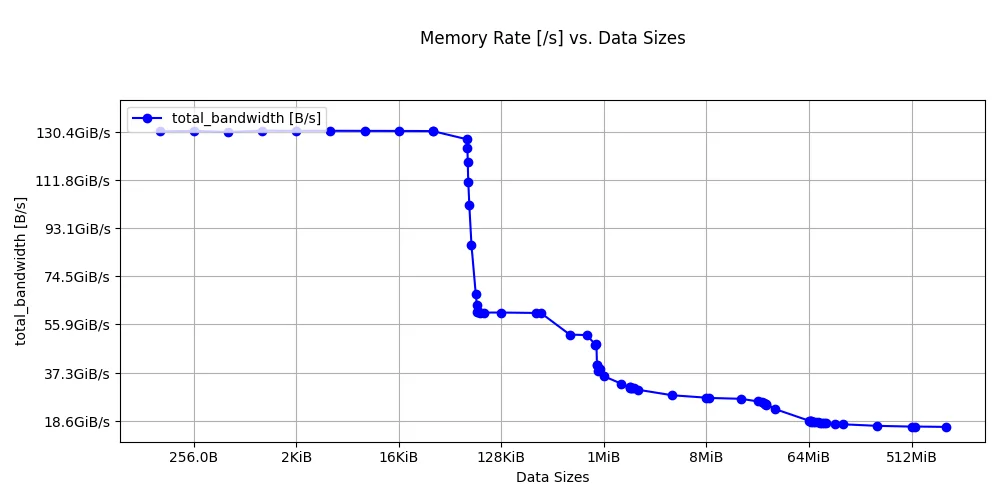 Bandwidth sweep benchmark results
How do I uninstall ASCT?
If you installed ASCT using uv, remove it with:
sudo -E $(which uv) tool uninstall asct
Where can I find more information?
Use the built-in help command to get detailed information about any ASCT command:
asct help <command>
For example:
asct help run
Give Feedback
How would you rate this tool quick-install guide?
What is the primary reason for your feedback ?
Thank you! We're grateful for your feedback.
- Have more feedback? Log an issue on GitHub.
- Want to collaborate? Join our Discord server.